Answer first
The smallest useful customer portal closes one self-service loop inside an enforced organization boundary.
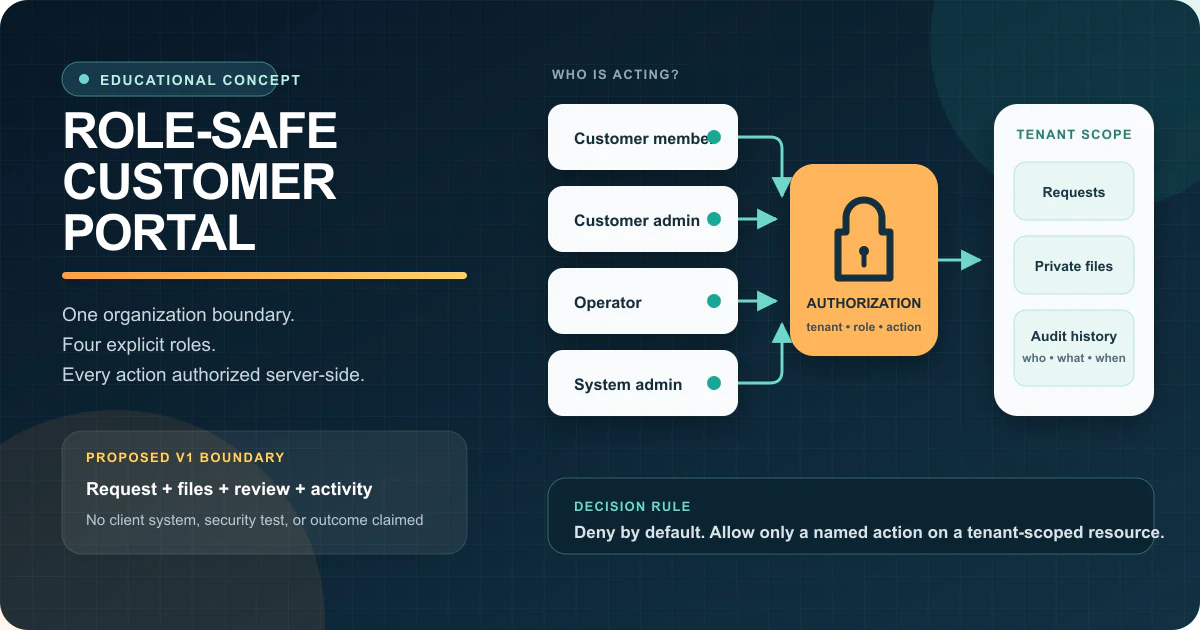
Start with one request type that customers currently initiate by email. Give each customer organization explicit membership, separate member and administrator privileges, and let internal operators review the request through named states. Enforce every record and file decision on the server using the authenticated user, organization, role, action, and resource—not a page URL or a hidden control.
Add private file handling, append-only activity history, safe invitations, session revocation, and a support path for access exceptions. Delay broad dashboards, billing, white-labelling, and flexible workflow builders until one real flow proves that the access model and operating process are understandable.
Illustrative discovery conversation — not a client quotation
“Give customers a portal” becomes buildable only after identity, organization, role, and action are separated.
Operations lead
“Customers email files, ask for status, and copy different people every time. Can we give them a portal?”
Leeonex
“Which customer organizations share records, who can invite colleagues, and which actions must remain internal?”
Operations lead
“Each company should see only its own requests. Their admin manages members; our operators review files; only our system admin changes access rules.”
Leeonex
“Then v1 is one tenant-scoped request workflow with four explicit roles, server-side authorization, private files, and audit history—not a library of dashboard screens.”
This is Leeonex-authored teaching material. It represents no real customer, quotation, engagement, portal, user account, security review, or customer record.
Starting situation and buyer
This concept is for teams whose customers need visibility but not unrestricted access.
The intended buyer is a B2B service owner, operations leader, or web product team coordinating requests, documents, approvals, or status updates across multiple customer companies. Email threads, shared drives, and manually assembled status reports make it hard to tell which version is current, who may see it, or which action is waiting on whom.
The hard constraints are not visual. A person can belong to more than one organization; customer administrators can invite the wrong address; a removed user can keep a live session; a copied object identifier can expose another account; files can leak through public links; and internal support access can become permanent. The portal must make these boundary decisions explicit before convenience features multiply.
Customer member
Creates and updates permitted requests for one organization, uploads files, responds to questions, and sees only records their membership allows.
Customer admin
Manages membership inside one organization and can see the broader customer account without receiving internal operator privileges.
Operator
Reviews assigned requests, asks for missing input, records decisions, and uses support views without changing customer membership rules.
System admin
Owns organization setup, elevated access, policy changes, audit review, support escalation, and the runbook for suspected access mistakes.
Smallest useful scope
Choose one request, one organization model, and one accountable review path.
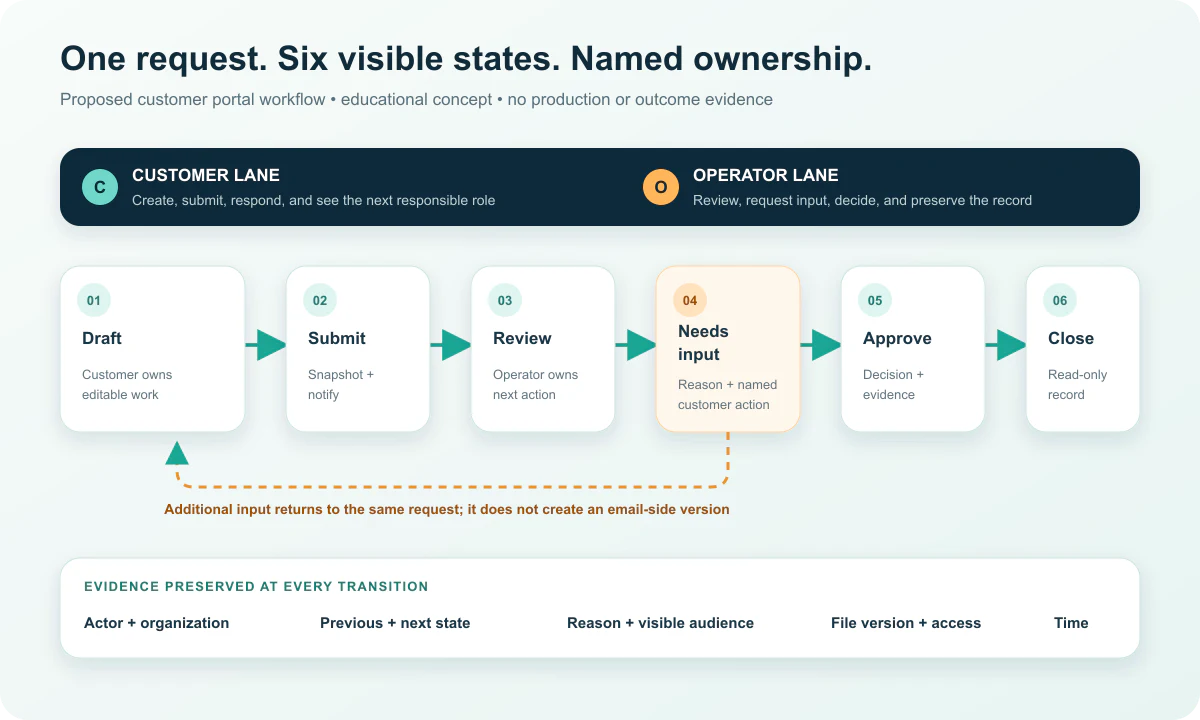
V1 begins when a customer member drafts one request, attaches the allowed evidence, and submits it. An operator either starts review, asks for specific input, approves it, or closes it with a reason. The customer can see the current state, the next responsible role, and a safe activity history without seeing internal-only notes.
The scope includes organization creation, membership, invitations, four roles, request states, private files, comments separated by audience, notifications, audit events, basic search, and an admin route for access support. It deliberately avoids pretending that every process, customer type, and exception belongs in the first release.
Architecture decisions
Put authorization beside the data operation, not only in the interface.
The data model needs stable users, organizations, memberships, roles, requests, state transitions, files, comments, invitations, and audit events. Every query should derive an allowed tenant scope before loading or mutating a resource. High-risk operations such as membership changes, exports, support access, and file retrieval deserve their own authorization policy and test cases.
Authentication can use a managed identity provider, but product authorization remains application work. Private object storage should issue short-lived access only after policy evaluation. Notifications should follow committed state changes through an outbox or equivalent reliable handoff so a failed email does not roll back the request. Audit records should be append-only and useful to support without exposing production database access.
Risks and guardrails
Cross-tenant reads, unsafe invitations, and invisible support access are core product risks—not edge cases for later.
- Resolve organization membership and authorization on the server for every read, write, file, export, and administrative action.
- Use deny-by-default policies and separate customer administration from system administration; a UI-hidden button is not access control.
- Keep files private, scan uploads where required, use time-limited download access, and record which user requested each file.
- Write append-only activity events for membership, state, file, and elevated-access changes with actor, organization, time, and reason.
- Test cross-tenant object identifiers, invitations, removed users, stale sessions, bulk actions, exports, and support access before release.
Build now, validate later
Access safety belongs in v1; portal breadth does not.
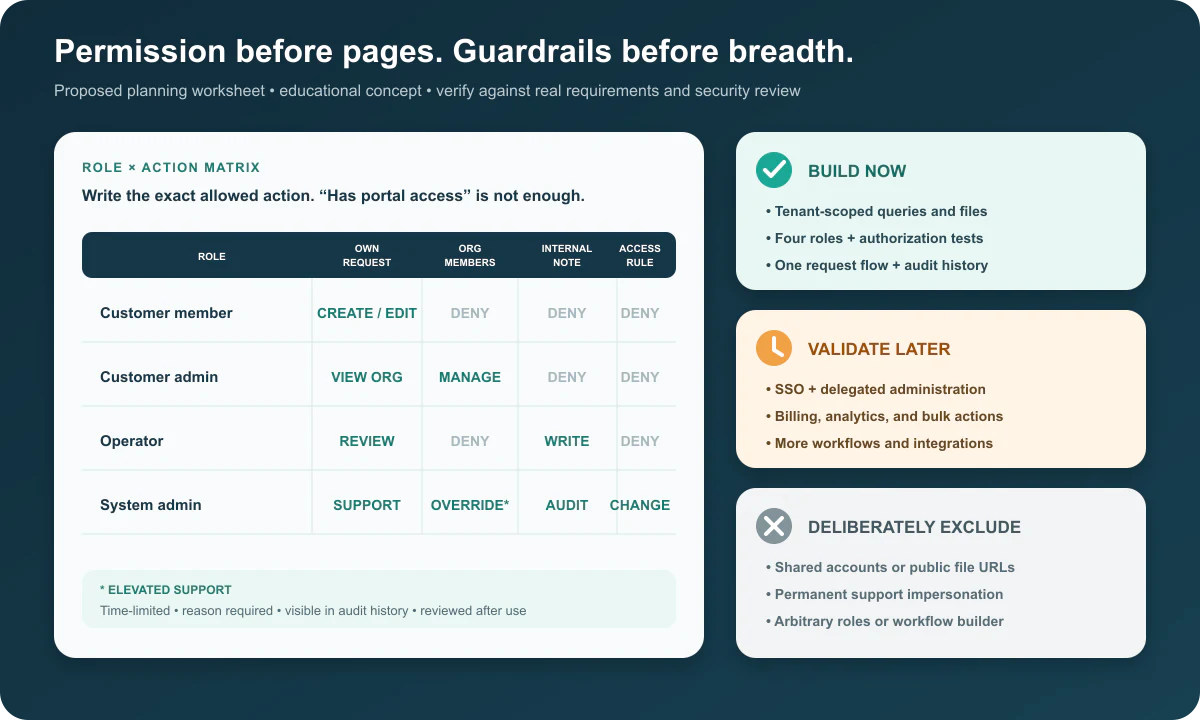
Build the organization boundary, explicit membership, four roles, one request lifecycle, private file access, activity history, invitation expiry, session revocation, authorization tests, monitoring, backup expectations, and an access-incident runbook now. Validate SSO, delegated enterprise administration, billing, richer reporting, bulk operations, more request types, and deeper integrations against actual adoption and support evidence.
Deliberately exclude shared accounts, public file URLs, client-supplied role names with arbitrary privileges, permanent support impersonation, customer-visible internal notes, silent membership changes, and a generic workflow builder. If customers only need occasional status messages, a secure link or structured notification flow may be lighter than a maintained portal.
Limitations and evidence boundary
This concept proves no portal security, adoption, support reduction, or business outcome.
No portal was implemented, deployed, penetration-tested, or used for this study. No client, security result, access-error rate, support-ticket reduction, completion time, file safety, user adoption, revenue, conversion, retention, or operational improvement is claimed. The roles, states, technology labels, architecture, and guardrails are proposed scope decisions only.
Stronger claims would require approved requirements, an implemented system, representative organizations and roles, threat modelling, code review, automated authorization and isolation tests, file and session tests, accessibility and usability review, penetration testing, remediations, production logs, a defined measurement window, metric sources and exclusions, a verifier, approved visuals, and publication permission.
Lessons and first consultation
Bring one real request and the access mistakes you cannot accept.
The main lesson is that portal scope lives in organizations, actions, states, and evidence—not a list of dashboards. These inputs make a first consultation concrete:
- One complete customer request with normal, incomplete, rejected, reopened, and cancelled examples
- A list of user types, customer organizations, internal teams, invite owners, and actions that must never cross those boundaries
- Representative files and sensitive fields, retention expectations, export needs, identity provider requirements, and legal or security review owners
- The current source systems, available APIs, notification channels, expected record volume, support process, and evidence required before rollout
Explore Leeonex portal and admin panel development for the closest service path. Use the spreadsheet-to-internal-tool decision guide when the workflow still needs a build-versus-process decision. You can also return to the case-study hub to compare other evidence types and product decisions.
Have one customer workflow trapped in email?