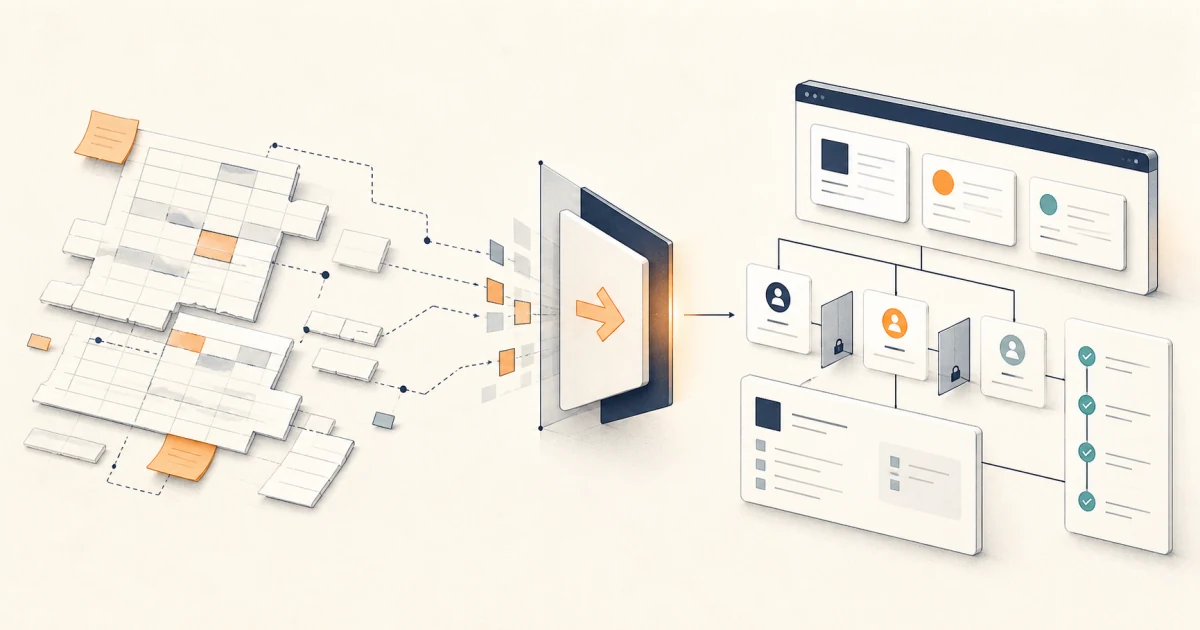
The short answer: replace the workflow, not the grid
Replace a spreadsheet when it has become the operating system for an important, repeatable process and the team repeatedly needs controls the workbook cannot provide cleanly: distinct roles, cross-record validation, controlled workflow states, durable event history, reliable integrations, or safe exception handling. Do not replace it simply because it is large or looks untidy.
A spreadsheet can remain the right tool for analysis, planning, a low-risk list, or a process that is still being discovered. When the work is standard, packaged software may be better than either a sheet or a custom build. When the workflow is specific but fits a low-code platform, low-code may be the lightest useful answer. Custom software earns its place only when the operating fit, integrations, ownership, or constraints justify ongoing product maintenance.
Decision rule
Keep the sheet
The work is exploratory, low-risk, lightly shared, and simple enough for a named owner to govern.
Assess a replacement
The process is stable and important, while workarounds for rules, roles, history, or integration recur.
A sheet can be shared without being an application
Modern spreadsheet products support collaboration, protected ranges, version history, and sharing controls. Those features solve real problems. They do not turn cell protection into action-level authorization. Microsoft states that Excel worksheet protection is not intended as a security feature, and Google gives the same warning for protected Sheets ranges. See the official guidance for Excel worksheet protection and Google Sheets protection.
That distinction matters when one role may view a record but not approve it, when an operator may change a status but not its amount, or when a sensitive action needs a reason and an event trail. The question is no longer “can a cell be locked?” It is “can every important action be permitted, validated, observed, and recovered in the way the operation requires?”
Score the workflow pressure before discussing screens
Pick one process, such as purchase approval, partner onboarding, inventory allocation, job scheduling, or service delivery. Score each requirement from 0 to 2 using examples from recent work. Do not score an imagined future organisation or every workbook at once.
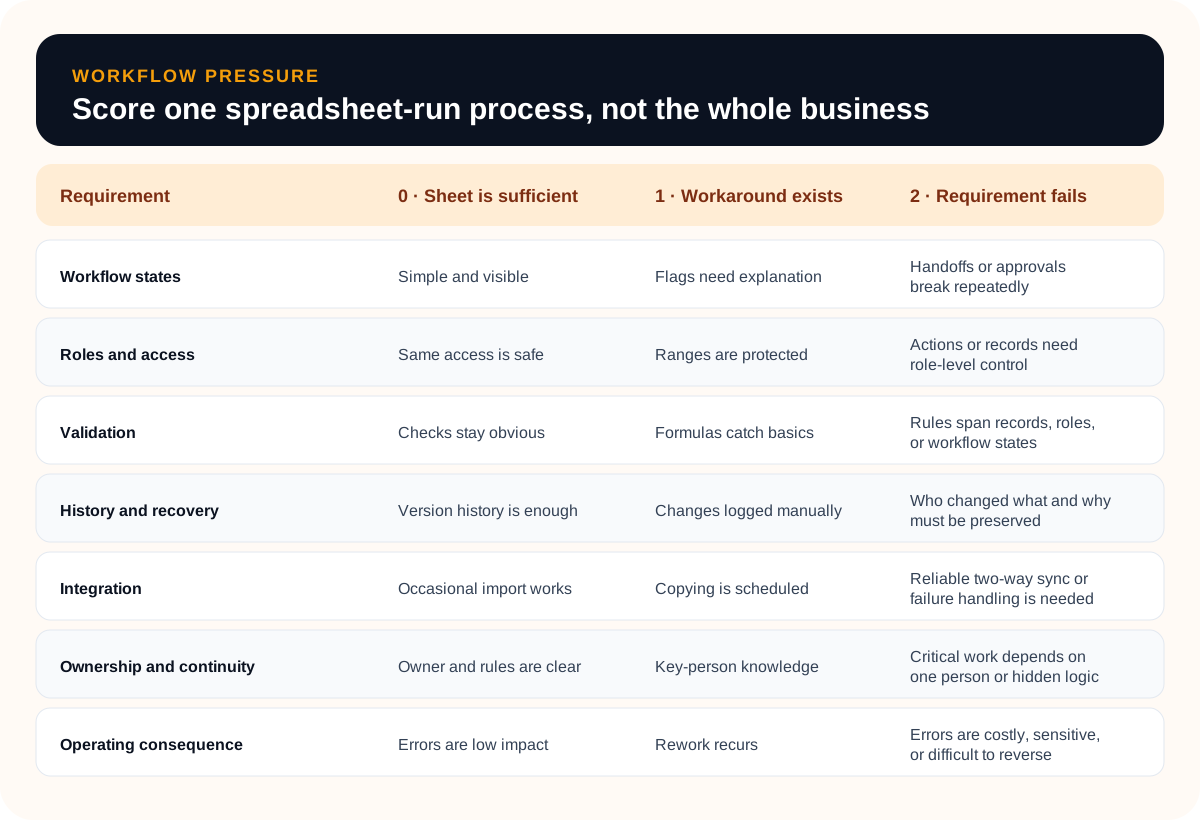
Interpret the total as a routing signal
- 0–4: keep and govern the spreadsheet. Name the owner, document key formulas, restrict sharing, and remove unnecessary copies.
- 5–9: run an options assessment. A form, packaged product, database-backed low-code app, or focused integration may remove the main pressure without a custom system.
- 10–14: prepare a replacement brief. The score is not approval to build; it is evidence that the current operating model deserves structured discovery.
A single score of 2 can outweigh the total when the consequence is severe. For example, a workflow with sensitive records and incompatible access requirements should not wait for several unrelated frustrations to accumulate. Conversely, a high score caused by an unstable process may call for process repair before software.
If customer and relationship management is the likely category, use the custom CRM versus off-the-shelf CRM guide to test configuration, a focused extension, and a custom system against one complete customer journey before choosing the ownership boundary.
If a configurable application platform is the likely middle path, the no-code versus custom software guide helps test workflow, data, permissions, integration, governance, and exit pressure before the business commits to a platform or a build.
Choose among four valid paths
| Path | Best fit | Watch for |
|---|---|---|
| Strengthen the sheet | Low-risk, changing work with a small trusted group | Hidden dependencies and uncontrolled copies |
| Buy SaaS | A standard workflow such as CRM, accounting, or project tracking | Configuration becoming a permanent workaround |
| Use low-code | Forms, roles, rules, and integrations that fit platform boundaries | Licensing, scale, portability, and specialist extensions |
| Build custom | A specific, durable workflow with deep fit or integration needs | Owning security, hosting, support, releases, and change |
Buy when the process should become more standard
If the spreadsheet is a home-made substitute for a common business category, test suitable products before commissioning custom software. The cost of changing some internal habits may be lower than maintaining a unique system. Ask vendors to demonstrate your difficult cases with realistic sample records, not a generic feature tour.
Use low-code when its constraints are acceptable
Low-code is not merely a prototype tier. A database-backed platform can provide structured records, server-side rules, roles, forms, and process flows. Microsoft’s Dataverse documentation is one example of the capabilities that distinguish an app data layer from a workbook. Evaluate the exact platform against data volume, permissions, integrations, audit needs, licensing, environments, testing, and exit options.
Build when the workflow is a durable operating advantage
A focused custom web app is most defensible when the process is specific, changes slowly enough to model, matters enough to support, and cannot fit an existing product without damaging workarounds. Leeonex’s custom web application development is aligned with this kind of workflow, data, permission, and integration problem. If operators or customers need distinct role-aware views, also review portal and admin panel development. The secure multi-role customer portal concept study shows how one role-aware self-service workflow can be scoped without treating a shared login as a permission model.
When the new surface is customer-facing, use the customer portal requirements checklist to define the shared customer job, account boundary, source records, internal exception path, and launch acceptance cases.
Turn the workbook into requirements without copying it
A spreadsheet is evidence about the process, not a screen specification. Tabs may mix records, calculations, instructions, access workarounds, reports, and temporary staging. Recreating every tab in a browser preserves the accidental design while adding software cost.
Start with one complete operating loop
- Name the user and job. “Operations coordinator approves a valid supplier request” is clearer than “admin dashboard.”
- Model the records. Define stable identifiers, relationships, required fields, and the authoritative source.
- Define states and transitions. Draft, submitted, returned, approved, and cancelled should have allowed actions and owners.
- Specify rules with examples. Include accepted, rejected, boundary, and exception cases from real records.
- Map permissions to actions. View, create, edit, approve, export, delete, and administer are different capabilities.
- Design failure paths. Explain what the operator sees when an integration fails or required data is missing.
If reporting is the main pain, pause before combining it with a workflow replacement. Use the dashboard data readiness checklist to define metrics and sources separately. If the candidate workflow contains language interpretation or judgment, apply the AI workflow automation readiness checklist before treating AI as part of the replacement.
If the workbook tracks physical stock, use the inventory management software requirements checklist to define item and location identity, controlled movements, availability, exceptions, integrations, and reconciliation before copying tabs into a custom interface.
Plan migration as a controlled product release
Data import is only one part of migration. The team must agree on definitions, resolve duplicates, prove permissions and rules, train each role, handle work already in progress, and decide exactly when the spreadsheet stops accepting updates.
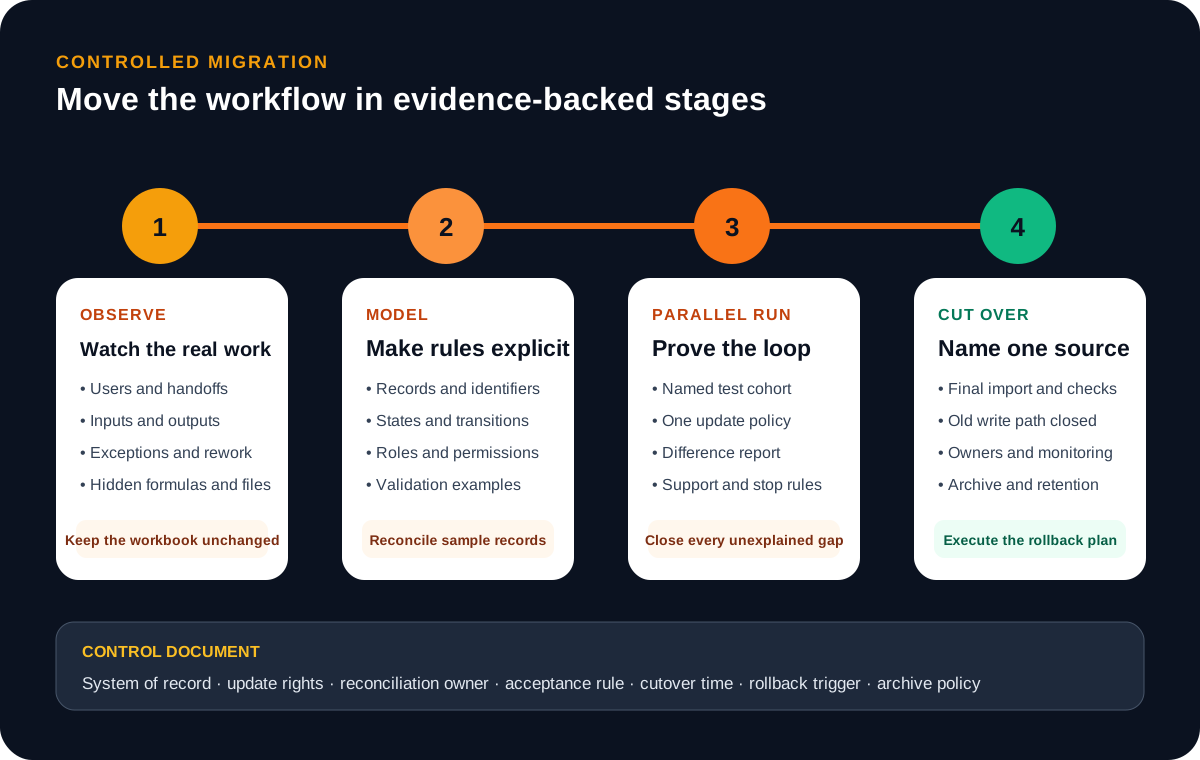
Do not create two editable sources of truth
During a parallel run, state which system receives new records and edits. If both must accept writes temporarily, define the synchronization direction, reconciliation schedule, conflict rule, and end time. Archive the original workbook according to the organisation’s retention needs, and remove unnecessary access rather than leaving an informal fallback forever.
If both systems must remain writable after cutover, use the two-way CRM and operations sync concept study to define stable identity, field ownership, safe retries, reconciliation, and the human conflict path before estimating the connector.
For a broader platform decision, compare managed connectors, custom recovery logic, and hybrid ownership with the iPaaS versus custom API integration guide. It treats duplicate safety, replay, reconciliation, and the operator path as part of the integration—not optional polish.
Before cutover, test real roles with realistic records: normal cases, denied actions, missing data, duplicate identifiers, failed integrations, reversals, and in-progress work. The rollback trigger should be observable—such as unreconciled record differences or a critical action failing—not “if users dislike it.”
Build the business case without invented ROI
Do not begin with a generic claim that spreadsheets cause a certain error rate or that custom software will save a fixed percentage. Measure the workflow you actually operate. Use a consistent observation period and document assumptions.
Current annual process cost
routine labour + re-entry + correction work + error impact + delay impact + current tool overhead
Record each term in a worksheet with source, unit, frequency, range, and owner. Separate cash cost from time and risk. Then compare options over the same planning horizon: subscription or build, implementation, migration, training, hosting, security, support, future changes, and exit cost. A custom application may improve fit while increasing ownership obligations; both belong in the decision.
Choose success measures before development
- Median time from valid input to completed outcome.
- Records re-entered across tools per completed case.
- Exceptions left unresolved beyond the agreed service window.
- Correction work caused by invalid or stale data.
- Reconciliation differences between the system and its source.
- Successful completion by each role without administrator intervention.
These are measurement options, not promised outcomes. Choose the few that reflect the real reason for change and preserve the baseline method so the before-and-after comparison remains fair.
Seven mistakes that make replacement harder
- Starting from screens. A polished table cannot fix undefined ownership, rules, or states.
- Copying every tab. Separate source records, working views, calculations, reports, and obsolete scaffolding.
- Automating an unstable process. Agree on the normal path and exceptions before encoding them.
- Using hidden UI as permission. Enforce access at the action and data boundary, then test every role.
- Importing dirty ambiguity. Resolve identifiers, duplicates, definitions, and authoritative fields before cutover.
- Shipping without support ownership. Name who monitors, helps users, changes rules, and handles failed integrations.
- Keeping the old write path indefinitely. A fallback without a closure rule becomes a second system of record.
Use this 60-minute first-release worksheet
Invite the workflow owner, one frequent operator, one downstream user, and the person responsible for the connected data or system. Bring the live workbook and two or three recent cases, including an exception. Complete each prompt in plain language.
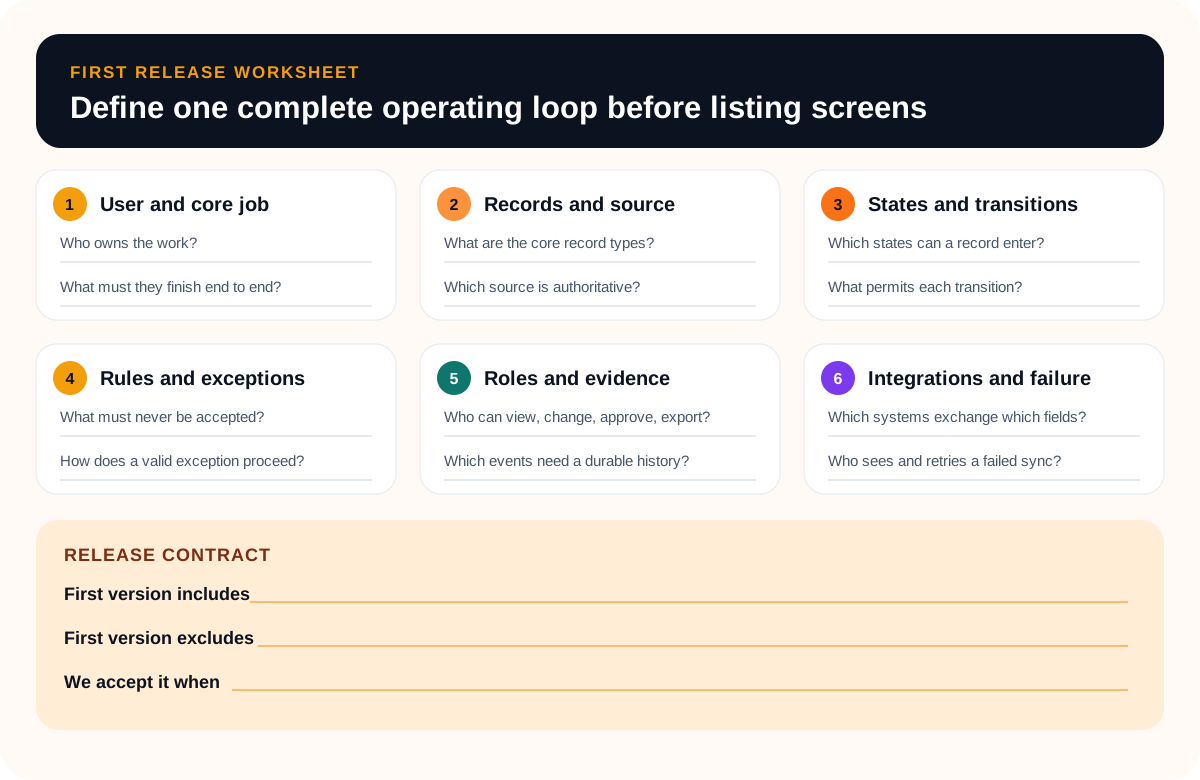
End the session with three lists: what the first release must include, what it explicitly excludes, and what evidence will make it acceptable. If the group cannot agree on the core job, record states, or authoritative source, the next step is process and data clarification—not estimation.
Frequently asked questions
When should a business replace a spreadsheet?
Assess replacement when a spreadsheet is running a repeatable, important workflow and repeatedly fails requirements for roles, validation, controlled states, event history, integration, or reliable ownership. Keep it when the work is low-risk, exploratory, lightly shared, and still changing too quickly to model well.
Should we use SaaS, low-code, or a custom internal tool?
Buy SaaS when the workflow is standard and the product fits without harmful workarounds. Use low-code when the process needs forms, rules, permissions, and integrations that fit the platform's limits. Build custom when the workflow is genuinely specific, central to operations, deeply integrated, or constrained in ways packaged tools cannot support cleanly.
Is a database enough to replace a spreadsheet?
Usually not. A database can improve record structure and consistency, but operators also need an interface, permissions, workflow states, validation, exception handling, integrations, and support procedures. Treat the database as one layer of the internal tool, not the complete replacement.
Should the spreadsheet stay live during migration?
It can stay available during a defined validation or parallel-run period, but name which system accepts new updates, how records are reconciled, who resolves differences, and when the old write path closes. Two editable sources of truth without a cutover rule create a new version problem.
How do we measure whether the internal tool worked?
Record a baseline before development using measures tied to the workflow: completion time, re-entry steps, unresolved exceptions, correction work, reconciliation differences, or successful completion by each role. Compare the same definitions after adoption; deployment alone is not an outcome.