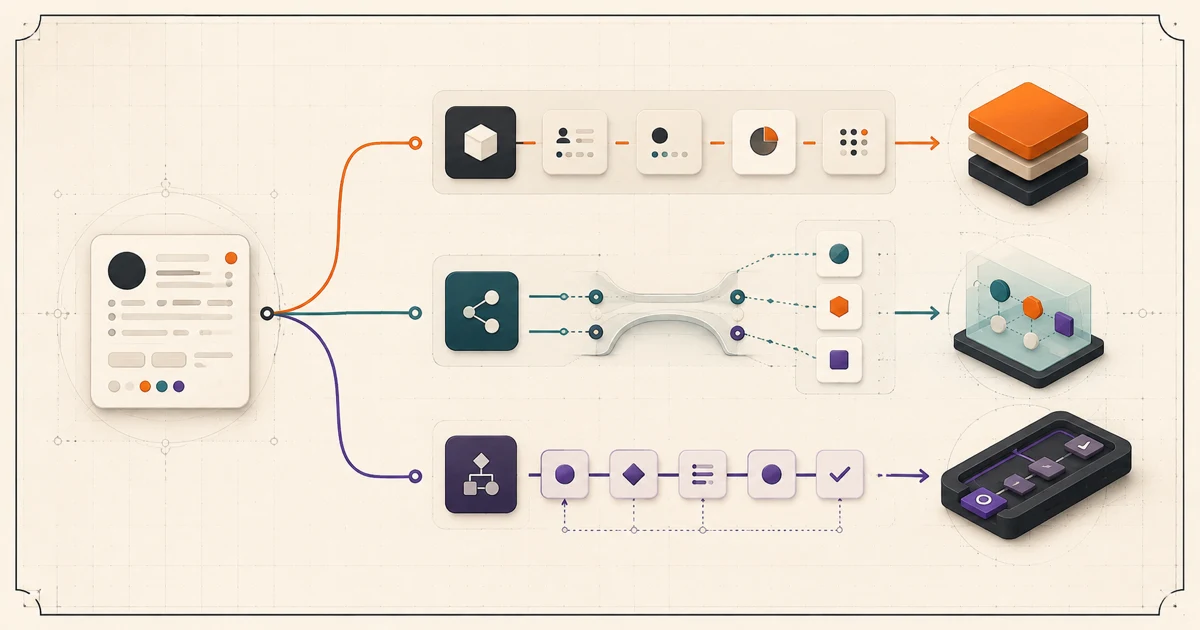
The short answer: configure first, extend a proven boundary, and build only what must be owned
Choose an off-the-shelf CRM when a supported configuration can run the real customer journey acceptably. Extend it when the packaged core is useful but one differentiating workflow, interface, or integration needs custom behavior. Build a custom CRM only when an important operating constraint cannot be met cleanly and your organization is ready to own the resulting product for years.
The decision is not won by the longest feature checklist. Most CRMs already store contacts, activities, deals, tasks, and reports. The useful question is whether the system can preserve your required process, data authority, permissions, exception handling, and change cadence without creating a permanent layer of fragile workarounds.
Configure
Standard process, supported platform controls.
Extend
Useful CRM core, focused custom boundary.
Build
Distinct workflow, deliberate software ownership.
Compare three realistic paths, not a false buy-or-build pair
A configured CRM uses vendor-supported tables or objects, fields, stages, views, roles, rules, and automations. An extended CRM keeps that platform as a useful core while adding integrations, a focused custom interface, or a service for specialized logic. A custom system owns the application, workflow, and operating surface directly, while still relying on commodity infrastructure and external services where that is sensible.
Configuration can be deeper than many buyers expect. Microsoft, for example, documents that Dataverse supports standard and custom tables, server-side rules, workflows, integrations, and role-, row-, and column-level security. Its Dataverse overview is one platform-specific illustration, not a recommendation for every buyer. Verify the equivalent capabilities, limits, and license terms for the actual products on your shortlist.
| Path | Best starting condition | You still own |
|---|---|---|
| Configure | The workflow can adopt supported platform conventions. | Process design, data quality, administration, training. |
| Extend | The core fits, but a high-value boundary does not. | The extension, integration, monitoring, and recovery. |
| Build | The operating model itself is distinct and important. | Product decisions, application, security, support, evolution. |
Run a fit-gap test against one complete customer journey
Select a journey that crosses the work your team actually struggles with: inquiry to qualified opportunity, quote to signed order, onboarding to renewal, or service request to resolution. Use realistic records and exceptions. For every step, classify the fit as adopt the platform process, configure a supported capability, extend a defined boundary, or blocker because the requirement remains unsafe or unusable.
When quote-to-order is the decisive journey, use the CPQ software requirements checklist to test configuration, pricing, approvals, active revisions, customer acceptance, and downstream reconciliation as one commercial contract.
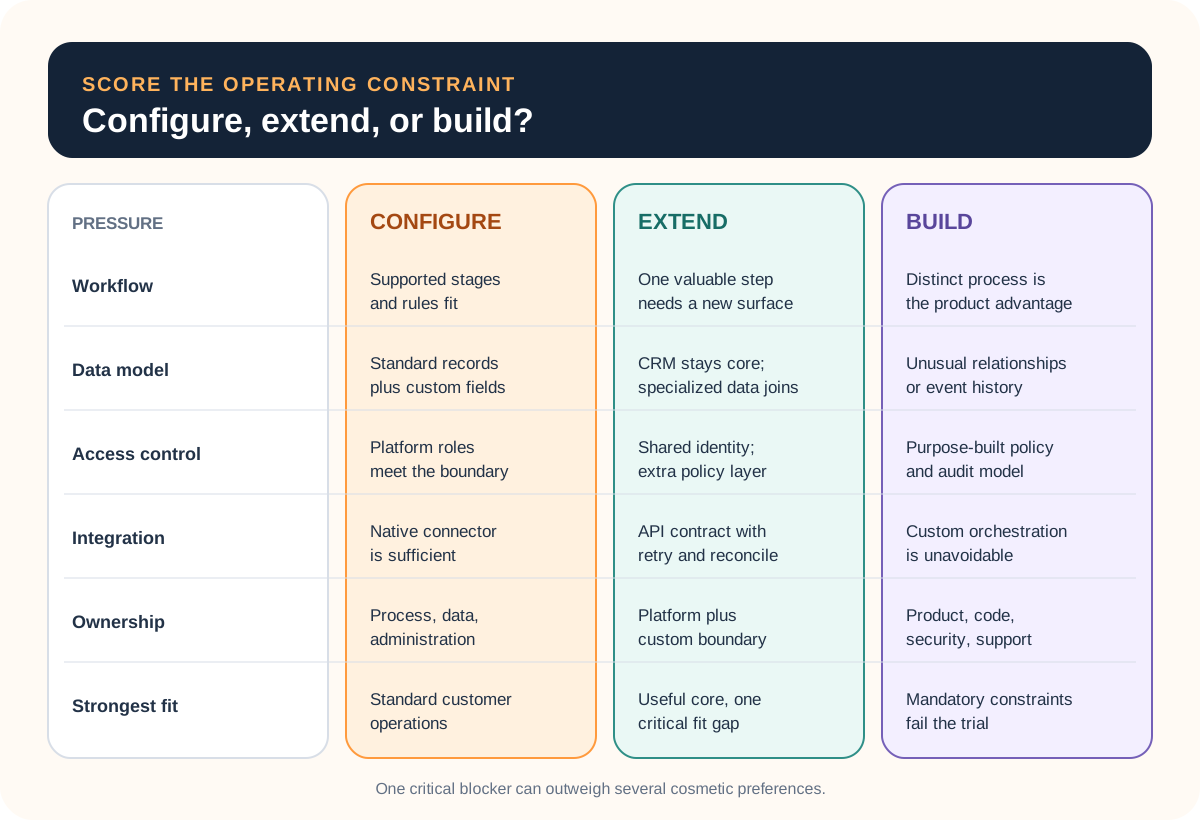
Judge five pressures. Workflow: stages, approvals, handoffs, service levels, and exception routes. Data: records, relationships, history, deduplication, and source-of-truth rules. Access: role, team, customer, record, field, audit, and separation requirements. Integration: triggers, limits, retries, reconciliation, and partial failure. Ownership: who can administer, support, change, export, and eventually replace the system.
Keep cosmetic preferences separate from critical constraints. A busy layout can be inconvenient; a permission model that exposes the wrong customer record is a blocker. A manual label may be tolerable in version one; an untraceable handoff that loses paid work may not be.
Draw the system boundary before approving custom code
If a packaged CRM passes most of the journey, do not rebuild its commodity capabilities merely because one screen is awkward. Keep contact history, activity capture, or basic pipeline work in the CRM and let a custom surface own only the specialized operational step. That surface could be an estimator, intake queue, scheduling workspace, approval console, or customer portal.
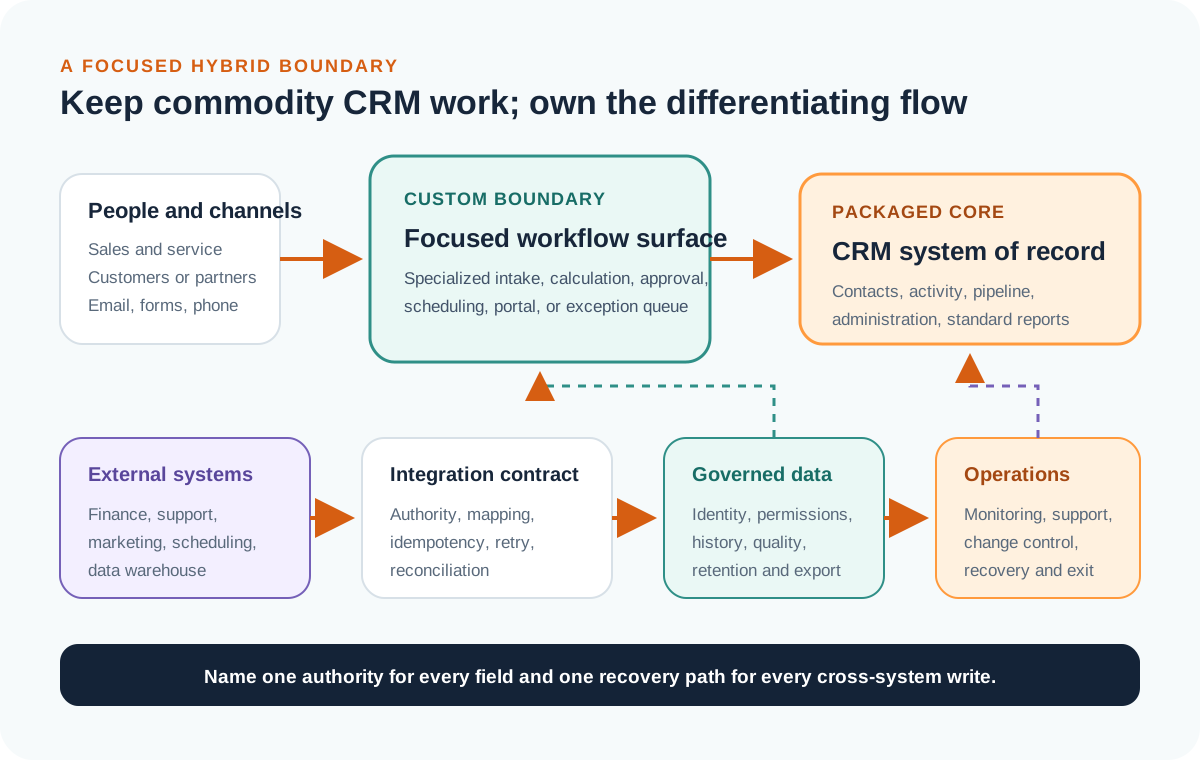
Name the authoritative system for every important field and event. Define what happens when a write fails after the other system has already changed, when a record is edited on both sides, when an API limit is reached, or when an administrator changes a field. The API integration requirements checklist provides a deeper contract for these failure and recovery paths.
If the desired custom surface is customer-facing, also map identity, tenancy, files, notifications, and support boundaries. The customer portal requirements guide helps turn that experience into a testable first release.
Compare total operating cost over the same horizon
Do not compare one year of license fees with only the initial custom build estimate. Choose a planning horizon and list costs under the same headings: discovery, implementation, configuration or engineering, data cleanup and migration, integrations, add-ons, training, administration, monitoring, support, security review, incident response, routine changes, and exit.
For packaged software, model seats, usage limits, required editions, storage, premium connectors, implementation help, and the work needed when pricing or platform behavior changes. For custom software, include product ownership, hosting, backups, dependency upgrades, testing, observability, on-call response, documentation, and future feature delivery. For a hybrid, include both platform cost and the full life of the connecting boundary.
The cheapest credible path is the one that meets the mandatory constraints with acceptable adoption and an operating model you can sustain. If the current problem is still a spreadsheet-run process rather than a CRM decision, start with the spreadsheet-to-internal-tool guide to decide whether the workflow needs better rules, bought software, low-code, or a focused build.
Once the destination is chosen, use the CRM data migration checklist to preserve identifiers and relationships, rehearse representative records, define cutover evidence, and keep a recovery path.
Use the trial to produce evidence, not a polished demo
Prepare representative records before the trial starts. Ask the people who perform and manage the work to complete the chosen journey, including an exception, a correction, a permission boundary, a report, and an export. Record configuration effort, missing behavior, administrator dependency, integration assumptions, and the steps users move outside the tool to finish.
Microsoft's guidance on business process flows is a useful reminder that supported workflows can span records, guide users through stages, and vary by security role—but also have explicit platform limits. Every shortlisted CRM has its own boundary. Confirm it through current documentation and a real scenario rather than a sales presentation alone.
End with a decision record: proceed with configuration, test a focused extension, approve a custom build, or pause because the process and data are not ready. Include the evidence that would cause the team to revisit that choice.
Complete this CRM decision brief
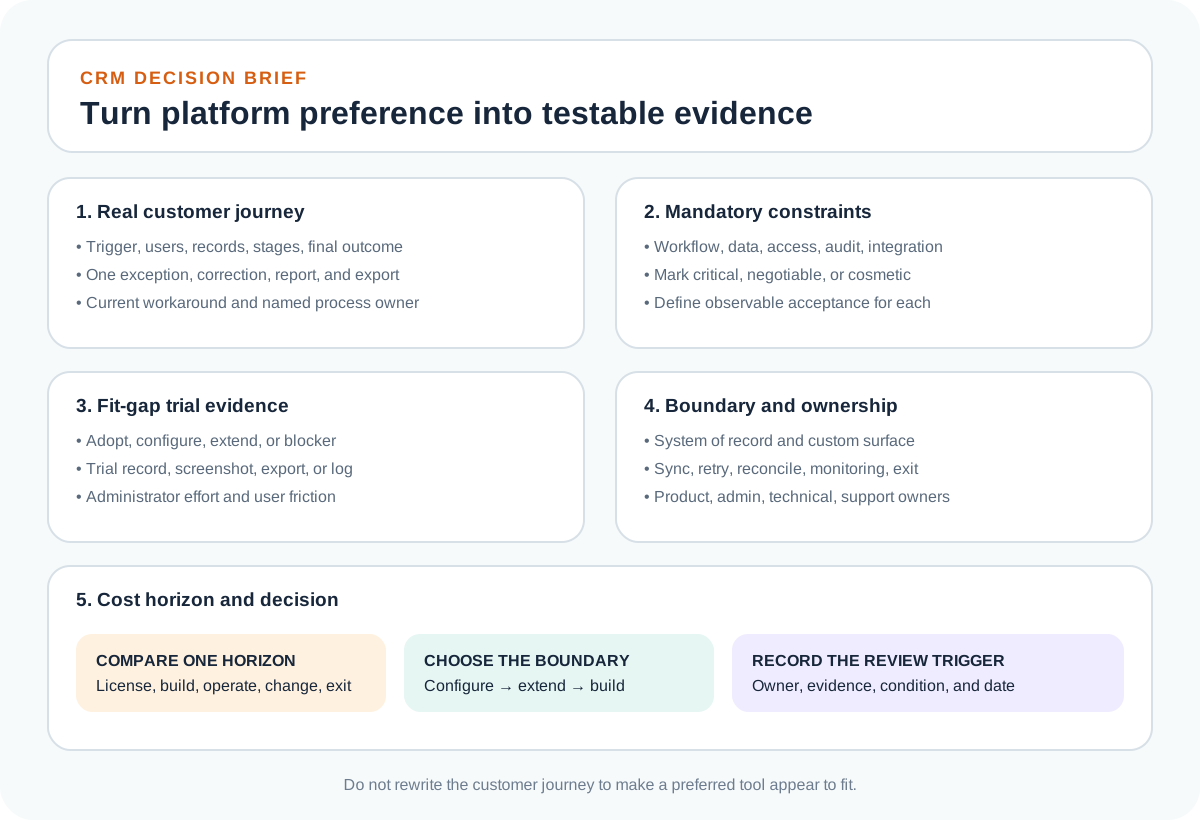
- Name the owner, users, triggering event, final outcome, and one representative customer journey.
- List mandatory workflow, data, permission, integration, reporting, and audit constraints.
- Classify each step as adopt, configure, extend, or blocker and attach trial evidence.
- Draw the system of record, custom boundary, synchronization, failure handling, and export path.
- Compare costs on one horizon and name the product, administrative, technical, security, and support owners.
- Approve the smallest path that passes the critical constraints and record the trigger for reconsideration.
If a focused custom workflow is the justified boundary, Leeonex's custom web application development service can help turn the journey, data rules, roles, and integration contract into a maintainable first version. A useful first conversation can still conclude that configuration is enough.
Frequently asked questions
Should a small business build a custom CRM?
Usually not as a first move. A small business should first test whether a configurable CRM supports its real customer journey, permissions, reporting, and integrations. Build only when a business-critical workflow remains an unacceptable gap and the company can own the resulting product, data, security, support, and changes over time.
What is the difference between CRM configuration and customization?
Configuration uses supported platform capabilities such as fields, objects, stages, views, roles, rules, and automations. Customization adds code, extensions, or external services for behavior the platform does not provide cleanly. The practical boundary varies by vendor, so verify it in documentation and a realistic trial.
When is a custom CRM worth building?
A custom CRM may be justified when the customer workflow is strategically differentiating, standard tools cannot model a critical data or permission rule, workarounds create material operational risk, the integration boundary must behave in a specific recoverable way, and a named team can fund and own the system after launch.
Can you keep an off-the-shelf CRM and build a custom front end?
Yes, when the CRM remains a suitable system of record and its API, permissions, limits, and commercial terms support the design. A custom workflow surface or portal can handle a specialized experience while the CRM retains commodity contact and activity capabilities. The integration needs explicit ownership, retries, reconciliation, and failure handling.
How should a team compare CRM total cost?
Compare the same operating horizon and include licenses, implementation, migration, add-ons, integrations, training, administration, support, security review, change requests, monitoring, vendor price or limit changes, and exit work. For a custom system, also include product ownership, hosting, maintenance, incident response, and future platform upgrades.