
The short answer: migrate a working customer record
A CRM migration is complete when users can trust the new system to run customer work—not when an import job reports success. Inventory and clean the source, map stable identities and relationships, rehearse representative loads, reconcile the result, approve a controlled cutover, and keep a tested recovery path until the destination is stable.
Protect the original source snapshot and record every rule that changes data. A contact without its company, a deal without its activity history, or a customer without the correct owner can pass a row-count check while failing the business.
Preserve
Source truth and stable identifiers.
Rehearse
Representative data and hard cases.
Reconcile
Records, relationships, tasks, reports.
Control eight migration lanes
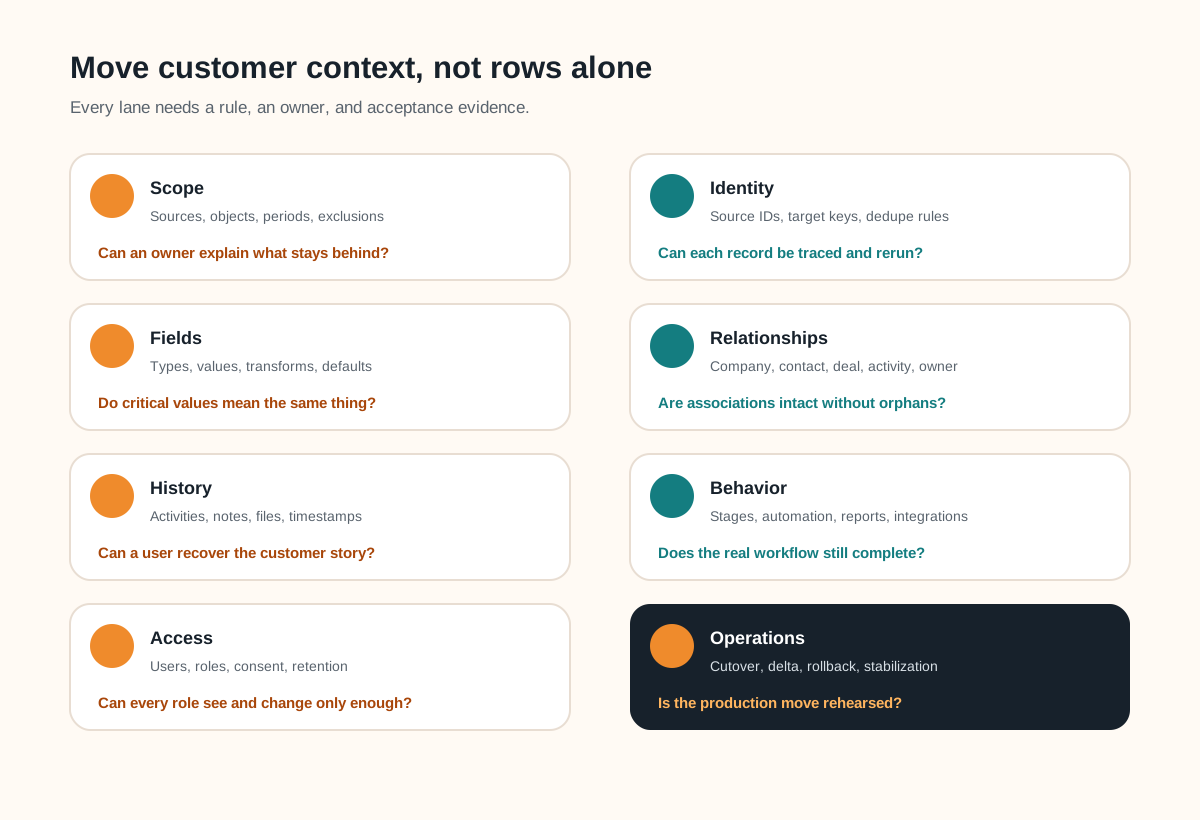
| Lane | Decisions | Acceptance evidence |
|---|---|---|
| Scope | Sources, objects, periods, exclusions | Approved inventory and archive |
| Identity | Source IDs, target keys, dedupe | No unexplained duplicates or collisions |
| Fields | Types, values, transforms, defaults | Critical-field comparison |
| Relationships | Parent, child, many-to-many, owner | Association and orphan checks |
| History | Activities, notes, files, timestamps | Representative customer timelines |
| Behavior | Stages, rules, automation, reports | End-to-end task tests |
| Access | Users, roles, consent, retention | Role tests and owner approval |
| Operations | Cutover, delta, rollback, support | Rehearsal log and signed gate |
Inventory the operating system around the data
List every source, object, field, relationship, owner, activity, file, report, automation, integration, and downstream export. Mark each item migrate, transform, archive, rebuild, replace, or retire. Name a business owner for customer identity, pipeline, service history, marketing status, finance-related data, and reporting where those domains exist.
Define a stable identifier for every object. Preserve the legacy identifier in the destination or a controlled crosswalk so a failed row, relationship, or later support question can be traced back. Never use a display name as an implicit unique key unless the business can prove it is unique and stable.
HubSpot's current import documentation explains why this matters: imports use unique identifiers to update records, avoid duplicates, and associate objects. Microsoft's Dataverse migration guidance likewise notes that dependent relationships may require parent records and alternate keys before child lookups can be populated. The exact mechanics vary by platform, but identity and load order must be designed before production.
Mapping rule
For each source value, record the target object and field, type, transform, default, validation rule, relationship key, exclusion reason, and approving owner.
Clean deliberately in a versioned staging step. Keep raw extracts unchanged, then apply reviewed rules for duplicates, invalid dates, empty required fields, obsolete stages, unused fields, and inconsistent categories. If personal data is in scope, have the appropriate owner or adviser confirm purpose, minimization, retention, access, and deletion obligations rather than treating “move everything” as the default.
Rehearse the hard records, not only a neat sample
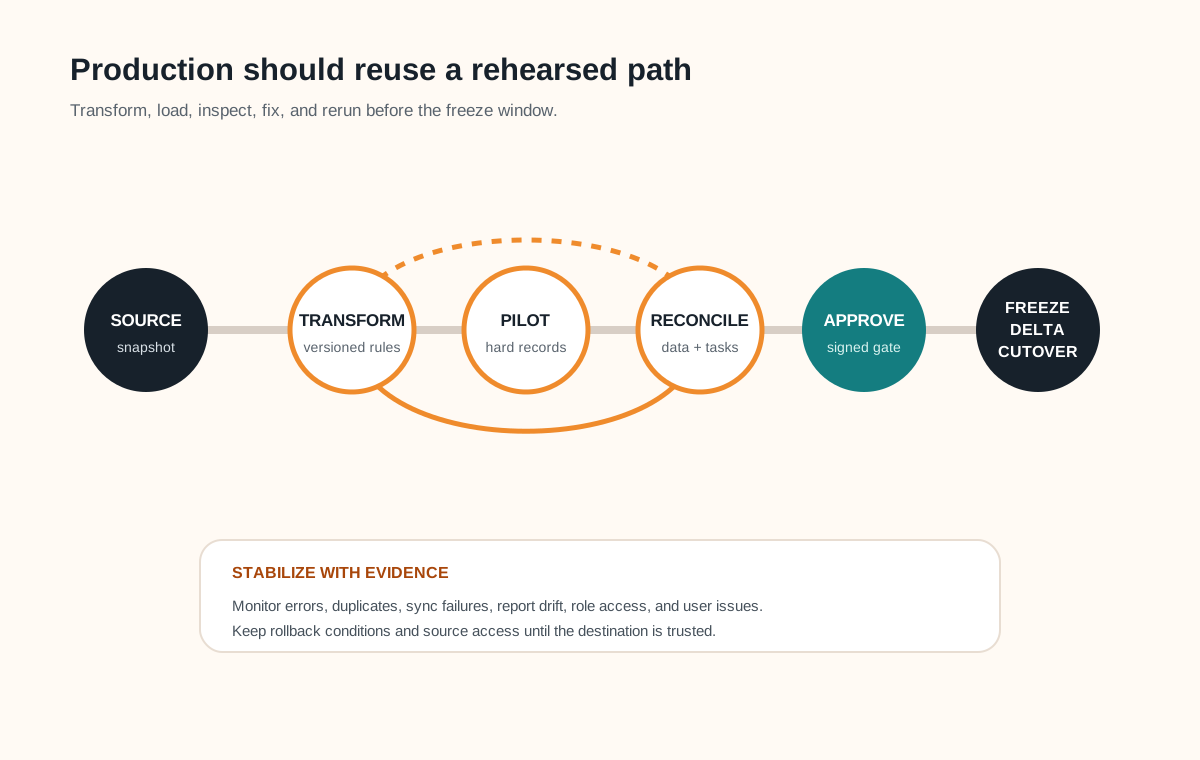
Build a pilot set with ordinary and difficult records: duplicate candidates, missing identifiers, several contacts per company, multiple deals, long activity histories, attachments, inactive owners, unusual characters, old stages, and records touched by integrations. Test in a safe destination environment whenever the platform supports it. Salesforce's Bulk API guidance, for example, explicitly recommends testing data loads in a sandbox because production behavior can differ.
Reconciliation needs layers. Compare counts and approved exclusions by object; compare critical fields and transformation results; verify associations and detect orphans; inspect complete customer timelines; test permissions, automations, reports, and integrations; then ask users to find the latest conversation, current opportunity, next action, and correct owner.
Keep a discrepancy log with source ID, destination ID, affected rule, severity, owner, decision, and rerun result. A repeatable pipeline should be safe to rerun without silently creating duplicates or applying transformations twice.
Useful platform references include HubSpot's import model, Microsoft's Dataverse migration approaches, and Salesforce data-load planning.
Make cutover a gated, reversible operating change
- Approve the rehearsal. Resolve critical discrepancies and record accepted lower-risk differences.
- Prepare the people. Train users on changed tasks and publish the freeze, support, and communication plan.
- Freeze and snapshot. Control writes, take final exports, and preserve access to the source.
- Run the delta. Move records changed since the rehearsal using the same tested mappings and sequence.
- Validate the business. Run the approved data checks, role tests, reports, automations, integrations, and user tasks.
- Decide go or rollback. Use written severity thresholds, owners, and time limits—not optimism at the end of a long day.
Keep the legacy CRM read-only for the approved retention window when feasible, restrict access, and document how audit or support questions will be answered. Monitor migration errors, sync failures, duplicate creation, report drift, and user issues during stabilization. Close the migration only when open issues have owners and the destination is the trusted operating system.
If the old and new systems must exchange changes during a staged move, treat that as an integration product with authority, retry, conflict, monitoring, and decommission rules. Use the API integration requirements checklist to define that boundary.
Complete this CRM migration acceptance brief
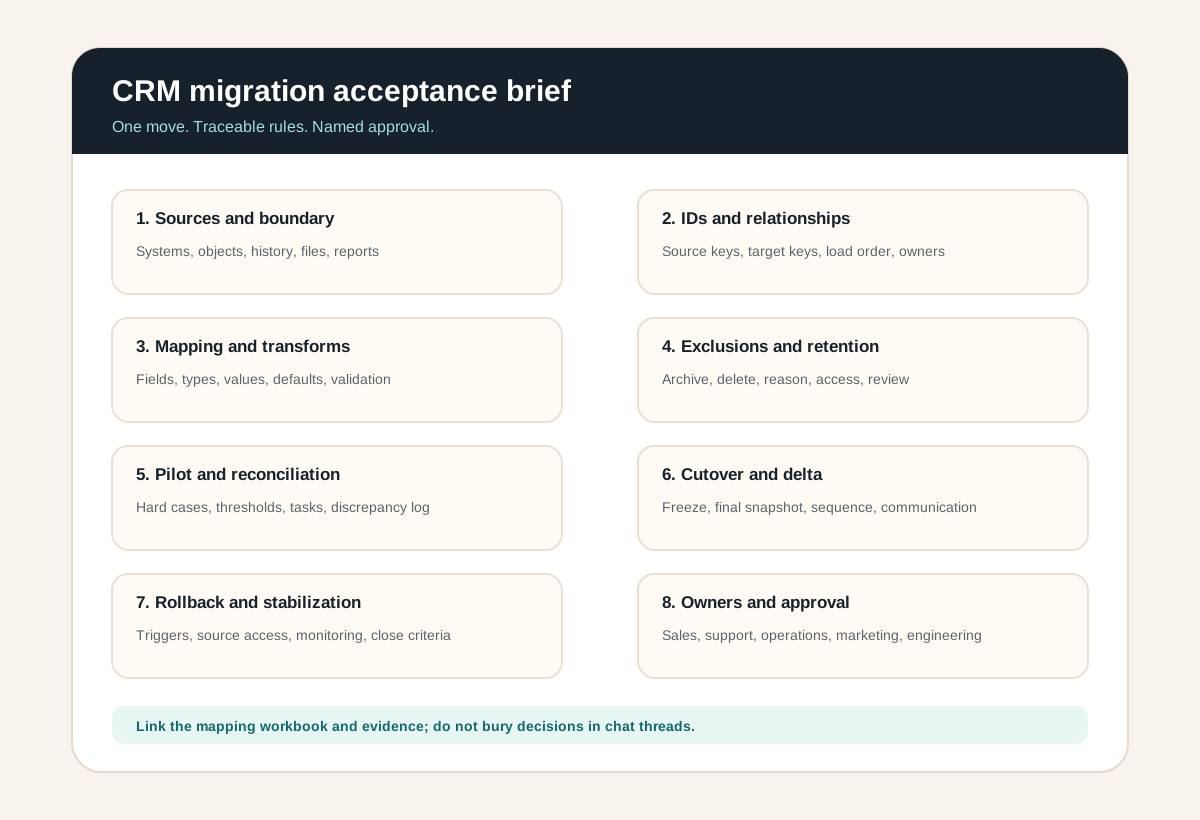
Record the business outcome, source and target, in-scope objects, required history, identifiers, relationship order, transformations, exclusions, integrations, users and roles, pilot cases, reconciliation thresholds, freeze and delta plan, rollback triggers, stabilization window, and every sign-off owner. Link the mapping workbook and test evidence rather than hiding them in chat threads.
If the destination product is not settled, first compare a configured, extended, or owned system with the custom CRM versus off-the-shelf CRM guide. Migration cost and feasibility belong inside that choice, not after the contract is signed.
CRM data migration FAQ
What should a CRM data migration checklist include?
It should include source and target systems, objects and fields, stable identifiers, relationships, activity history and files, data quality rules, transformations, exclusions and retention, user and ownership mapping, automations and integrations, pilot loads, reconciliation tests, freeze and delta strategy, rollback conditions, cutover communication, stabilization, and named sign-off owners.
Should CRM data be cleaned before or after migration?
Define and test cleaning rules before the production migration. Correct obvious duplicates, invalid values, unused fields, and inconsistent categories in a controlled source export or staging layer while preserving the original snapshot. Some destination-specific cleanup may follow, but undocumented changes during cutover make reconciliation and rollback harder.
How do you validate a CRM migration?
Reconcile record counts and exclusions by object, compare critical fields, verify stable identifiers and relationships, inspect representative customer histories, test permissions, reports, automations and integrations, and ask real users to complete important tasks. Record discrepancies, severity, owner, resolution, and the evidence required for approval.
How should CRM relationships be migrated?
Preserve source identifiers, define target unique keys, load parent or independent records before dependent records where the platform requires it, and build an explicit relationship crosswalk. Test one-to-many, many-to-many, parent-child, ownership, and activity associations with representative records before the full load.
When is a custom CRM migration integration needed?
A custom migration or integration may be needed when data spans several systems, relationships and history exceed import-tool capabilities, transformation rules are complex, volume or downtime constraints require an API pipeline, or the old and new CRMs must coexist temporarily. The custom path still needs checkpoints, idempotent reruns, logs, reconciliation, and an exit plan.