
The short answer: scope a shared job, not a feature catalogue
A customer portal needs one clearly defined exchange between a customer and your team, the correct records on both sides, and a trustworthy path from request to outcome. Start with the job—such as submitting evidence, approving work, checking fulfilment, or resolving an account issue—then specify identity, permissions, source data, files, notifications, internal exception handling, accessibility, audit evidence, and acceptance tests around it.
If the shared job is choosing, paying for, changing, or cancelling a time slot, use the appointment booking software requirements checklist to define availability, holds, constrained resources, and the booking lifecycle before adding it to a portal.
Do not begin with “dashboard, chat, documents, billing, reports.” That list hides which system owns each record and what happens when the happy path breaks. The first useful release can be narrow, but it must complete a real customer outcome and remain supportable by the internal team.
Customer
Can see the right state, act safely, and understand what happens next.
System
Reads and changes governed records without creating a shadow source of truth.
Operations
Can detect exceptions, support users, correct errors, and prove consequential actions.
Define six requirement layers around the shared workflow
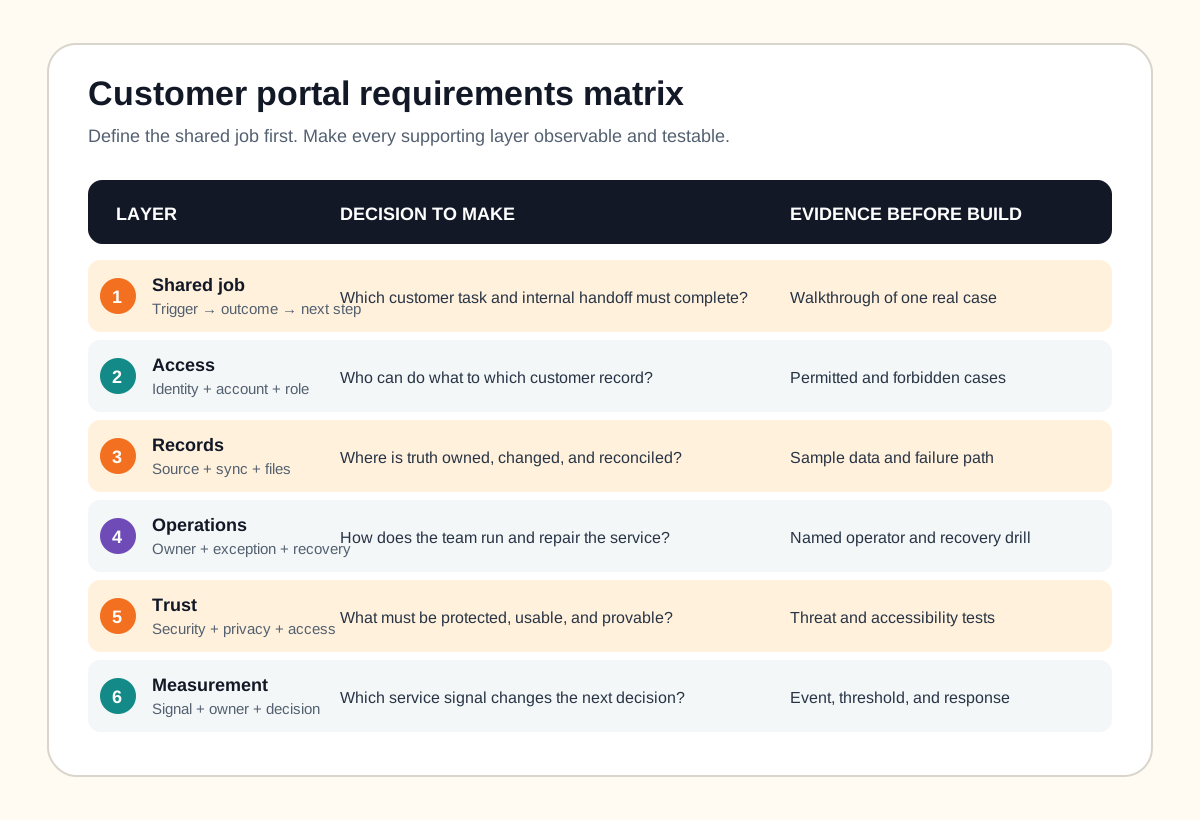
Walk through a representative case with the customer-facing and internal owners together. For every step, record the input, decision, system of record, permitted actor, notification, failure, and recovery. Then organize the result into six layers.
1. Customer job and visible state
Name the trigger, outcome, and next action in the customer’s language. Decide which statuses genuinely change their decision and which internal states would only create confusion. A useful home view should answer “what needs me now?” before it presents a complete history or a wall of metrics.
2. Identity, account, and role model
Separate a person, login identity, customer organization, account membership, and role. Specify invitations, duplicate accounts, password or authenticator recovery, multi-factor authentication where risk requires it, organization switching, role changes, offboarding, and dormant access. NIST’s current digital identity guidelines provide a risk-based model for identity proofing, authentication, and federation; use the level appropriate to the service rather than collecting identity evidence by habit.
3. Records, files, and integration
Identify the canonical owner for customers, orders, cases, invoices, messages, and documents. If the portal copies data, define freshness, conflict handling, retries, reconciliation, and who can repair a failed sync. For uploads, specify allowed formats, size, scanning, storage, retention, versioning, download authorization, deletion, and what the customer sees while processing fails.
4. Internal operations
Name who sends invitations, associates an account, reviews a submission, corrects an error, resends a notification, handles a disputed approval, exports data, and responds to a customer. The internal interface is part of the product boundary. A portal without an operator path simply moves hidden manual work into inboxes and database tickets.
When that internal operating surface has consequential actions, use the admin panel requirements checklist to define action-level permissions, safeguards, audit events, and recovery before the interface becomes a collection of privileged buttons.
5. Trust and accessibility
Record authorization rules, sensitive fields, retention, consent, audit needs, session behavior, rate limits, support safeguards, accessibility target, and failure messages. The W3C recommends WCAG 2.2 as the current conformance target. Include sign-in, recovery, uploads, errors, tables, confirmations, and help in the accessibility test—not only the marketing shell.
6. Service measurement
Measure the workflow, not vanity activity: eligible customers invited, successful first access, completion, stuck cases, failed syncs, repeated support needs, time awaiting each side, and safe recovery. State an owner and decision for each signal.
Keep the portal boundary and source records visible
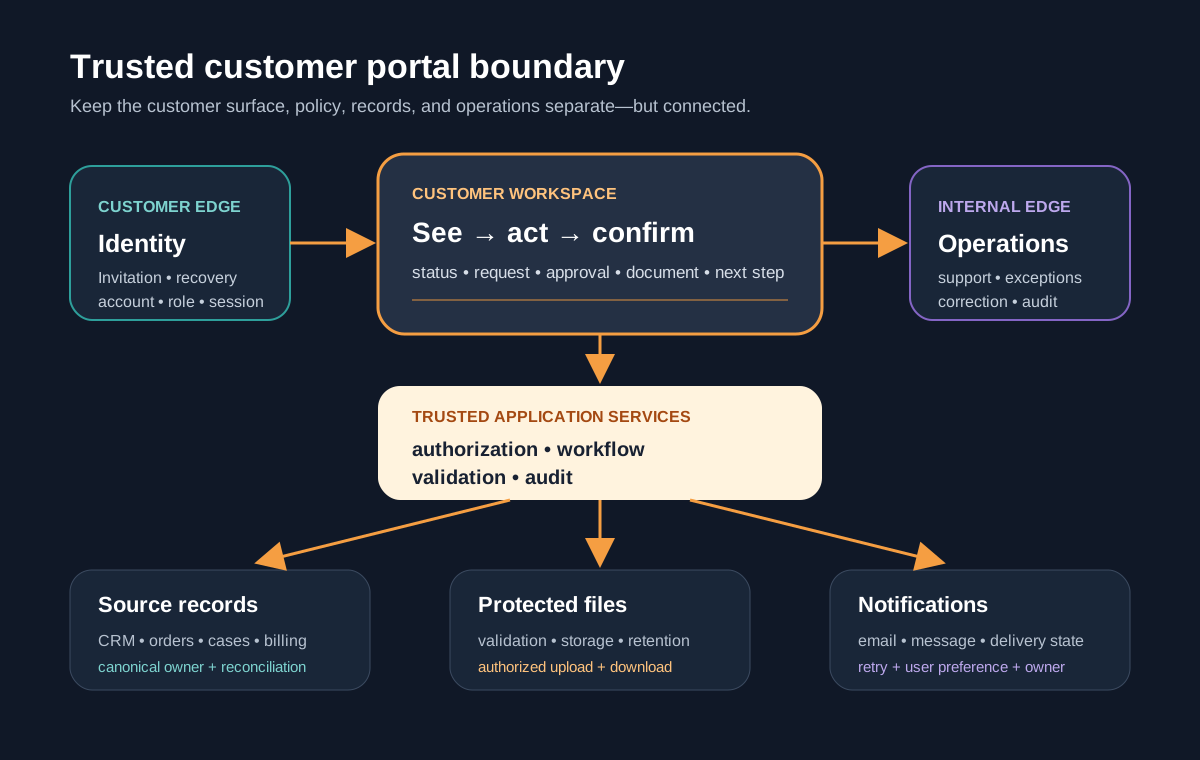
Draw the customer experience separately from identity, domain services, databases, file storage, notifications, third-party systems, and internal administration. This prevents a design mockup from becoming an accidental architecture. It also shows which failures need a visible fallback.
If customer data must move between a CRM, operations platform, billing tool, and portal, use the iPaaS versus custom integration guide to define ownership, retries, and reconciliation. If the internal team is also operating a spreadsheet-driven process, the spreadsheet replacement guide helps scope that operating side without making customers work around its limitations.
Turn “secure portal” into testable access cases
Authentication proves control of an identity; authorization decides whether that identity can perform this action on this record now. Build an access matrix with actor, customer account, resource, action, condition, and expected result. Include customer users, customer administrators, internal operators, support, automation identities, and revoked users.
OWASP’s authorization guidance recommends denying by default and validating permissions on every request. Test guessed and copied URLs, direct API calls, downloads, exports, cached pages, organization switching, role changes, and administrator actions. Hiding a menu item is not an authorization control.
If customers exchange documents, apply defense in depth. The OWASP file upload guidance covers allowed extensions, content validation, generated filenames, limits, authorized uploaders, isolated storage, and malware controls. For approvals, status changes, exports, and access failures, define what is recorded and protected; OWASP’s logging guidance distinguishes application, audit, and security needs rather than treating one undifferentiated log as proof.
Choose configure, custom, or hybrid after mapping the seam
| Path | Strong fit | Test before committing |
|---|---|---|
| Configure a product | Standard files, requests, status, billing, or support flows | Permissions, customer seats, exports, branding, integration, retention, exit |
| Custom portal | Distinct domain workflow, roles, customer experience, or in-context actions | Riskiest access rule, integration, exception, and customer task |
| Hybrid | Custom journey with managed identity, payments, files, or communication | Ownership, failure behavior, portability, and support across the seam |
Compare representative cases, not brochure checkmarks: invite a second contact, remove a user, submit a large or invalid file, change a source record, fail an integration, dispute an approval, export data, and close an account. Include licensing, configuration, integration, migration, support, change, and exit work in the ownership comparison.
If the external users are suppliers responding to orders, submitting delivery evidence, maintaining controlled profile data, or resolving invoice differences, use the supplier portal requirements checklist to define that transaction chain. Procurement authority and reciprocal business documents need a more specific contract than a general customer workspace.
Leeonex’s custom web application service fits portals whose workflow is product-specific. The admin panel offering is relevant when the internal operating surface is substantial, while API integration services address the system boundary behind the portal.
Complete a customer portal release brief
Name the first customer group, shared job, start and end states, canonical records, actors and permissions, internal owner, common exceptions, notification rules, trust constraints, service signals, acceptance cases, exclusions, and the evidence that would justify expansion. If the boundary keeps growing, use the MVP scope checklist to preserve one complete first-release loop.
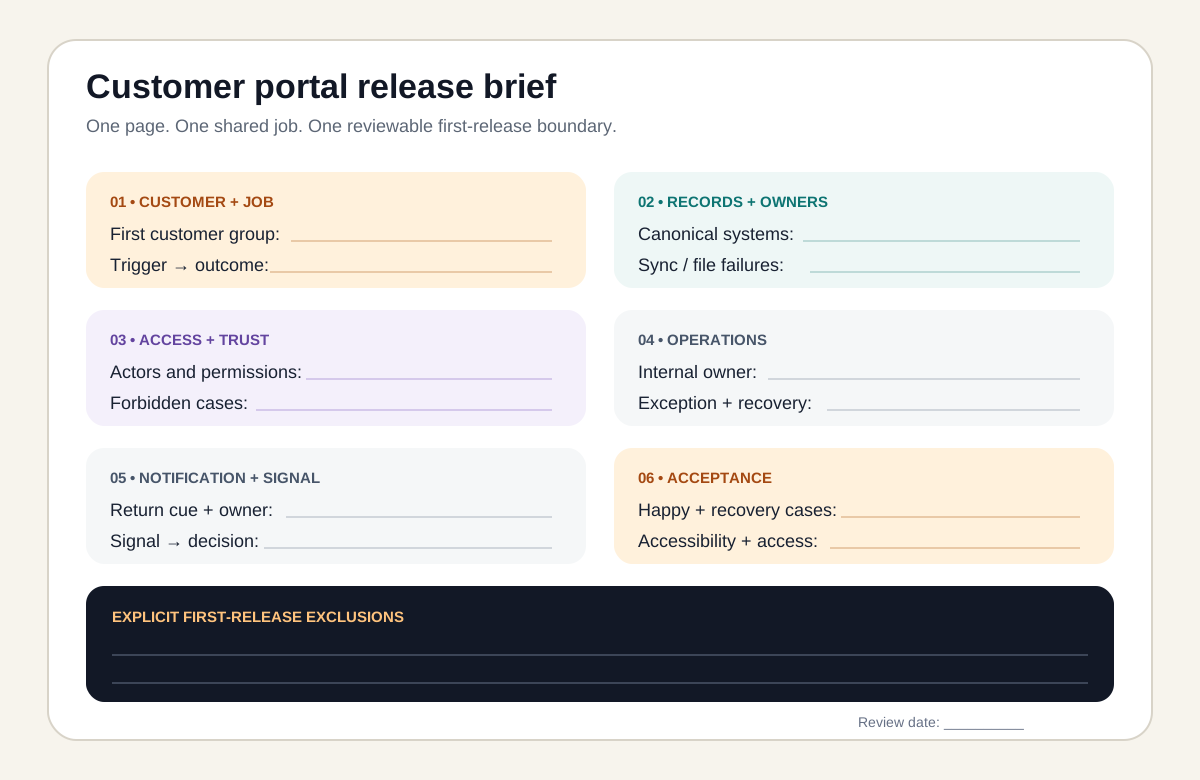
End the brief with live acceptance evidence: a permitted case, a forbidden cross-account case, a revoked user, an integration delay, an invalid upload, an operator recovery, keyboard-only completion, and a customer who knows the next step. That is a release boundary a team can estimate and test.
Frequently asked questions
What are the essential requirements for a customer portal?
Essential requirements are one clearly defined customer job, secure identity and account recovery, server-enforced access to the correct customer records, a reliable source of truth, usable status and next actions, controlled file exchange when needed, notifications with clear ownership, an internal exception path, accessibility, audit evidence for consequential actions, and acceptance tests across permitted and forbidden cases.
Should a customer portal be custom-built or bought?
Configure an existing product when its workflow, record model, permissions, integrations, and customer experience fit with limited compromise. Choose a custom portal when the customer journey, domain rules, system integrations, tenant boundaries, or in-context actions are central to the service and cannot be represented safely or maintainably in a packaged tool. A hybrid can place a custom experience over managed identity, payments, files, or communications.
What should be included in a minimum viable customer portal?
Include the smallest complete exchange that gives a defined customer a useful outcome: sign in or invitation, access to the correct account, the primary request or status flow, necessary documents, clear next steps, recovery from common failure, and an internal operator path. Defer broad reporting, deep customization, chat, billing, and automation unless the first workflow truly depends on them.
How should customer portal permissions be specified?
Use an access matrix that names each actor, resource, action, condition, and forbidden case. Separate authentication from authorization, deny access by default, validate permissions on every request, and test direct URLs, API calls, downloads, exports, cached responses, role changes, account switching, offboarding, and administrator actions with representative accounts.
Does a customer portal need an admin panel?
It needs an internal operating path, but that does not always require a large admin product. The first release may need invitation management, account association, exception review, content or status correction, resend controls, audit lookup, and support impersonation safeguards. Scope the smallest controlled interface that lets named operators run and recover the service.