
The short answer: specify privileged actions, not menu pages
Admin panel requirements should define who operates the product, which records they can see, which actions they can take, what each action changes, how risky actions are approved or confirmed, what gets audited, how failures are recovered, and what evidence proves the workflow is safe. A list of screens and CRUD verbs is not enough.
Scope the first release around one complete operating loop—find an exception, inspect its context, take an authorized action, confirm the result, and recover if it fails. Add overview charts only when they help an operator decide or act.
See
Right record, context, history, and visibility.
Act
Authorized change with safeguards and clear result.
Recover
Audit evidence, error path, and owned correction.
Start with the operator and the decision they must make
List real operator roles such as support agent, operations manager, finance reviewer, content moderator, customer administrator, and platform administrator. For each role, record the trigger, record they need, decision, allowed action, business consequence, expected frequency, time pressure, and escalation path.
Observe how the work happens today. Include inboxes, spreadsheets, support tools, payment providers, identity systems, and manual approvals. Capture exceptions: duplicate accounts, partial refunds, missing evidence, conflicting records, disputed moderation, failed integrations, and requests that require a second reviewer.
If the main need is a customer-facing self-service surface, start with the customer portal requirements checklist. A customer portal delegates bounded actions to customers; an admin panel gives trusted operators broader control over product or business state. They may share components, but not permission and audit assumptions.
Classify admin actions by consequence and reversibility
A read-only lookup and a permanent account deletion should not pass through the same interaction or control. Score each action by data sensitivity, financial or customer consequence, blast radius, reversibility, urgency, and how easy an error is to detect.
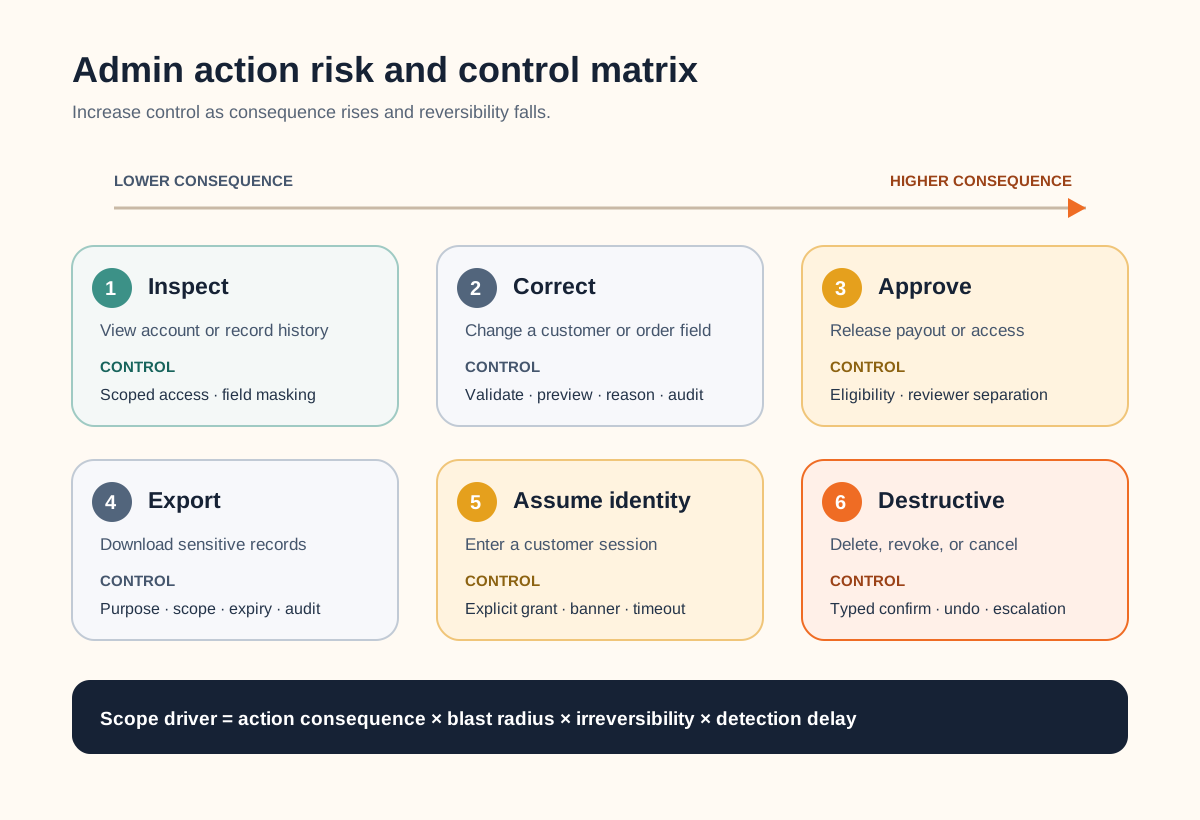
| Action class | Example | Typical safeguards |
|---|---|---|
| Inspect | View account history | Record-level access, sensitive-field masking |
| Correct | Fix a customer field | Validation, change preview, reason, audit |
| Approve | Release a payout | Eligibility evidence, separation of duties |
| Export | Download customer records | Purpose, scope preview, watermark or expiry |
| Assume identity | Enter a customer session | Explicit grant, banner, limited duration, full log |
| Destructive | Delete or revoke access | Typed confirmation, delay or undo, escalation |
Write a permission matrix at action and record level
Start with deny by default. For every role, define permissions as a combination of resource, action, scope, and conditions: “support may view accounts assigned to its region but may not export payment data” is more useful than “support has limited access.” Include create, view, edit, approve, export, impersonate, configure, and delete where relevant.
Enforce authorization on every protected server request. Hiding a button only changes the interface; it does not protect the action. The OWASP Authorization Cheat Sheet recommends least privilege, deny-by-default behaviour, validation on every request, and automated tests for authorization logic. It also notes that simple roles often become insufficient as real business rules grow.
Decide how access is granted, reviewed, changed, and removed. Separate privileged and everyday access where consequence warrants it. Record tenant, business unit, region, ownership, relationship, or record-state conditions now; bolting them onto a global “admin” flag later is a costly data and testing change.
Design every consequential mutation as a trusted path
Show the operator the target, current state, intended change, side effects, and whether the action can be reversed. Validate the request and current record state on the server immediately before the change. If two operators can act on the same record, define how stale views and conflicting updates behave.
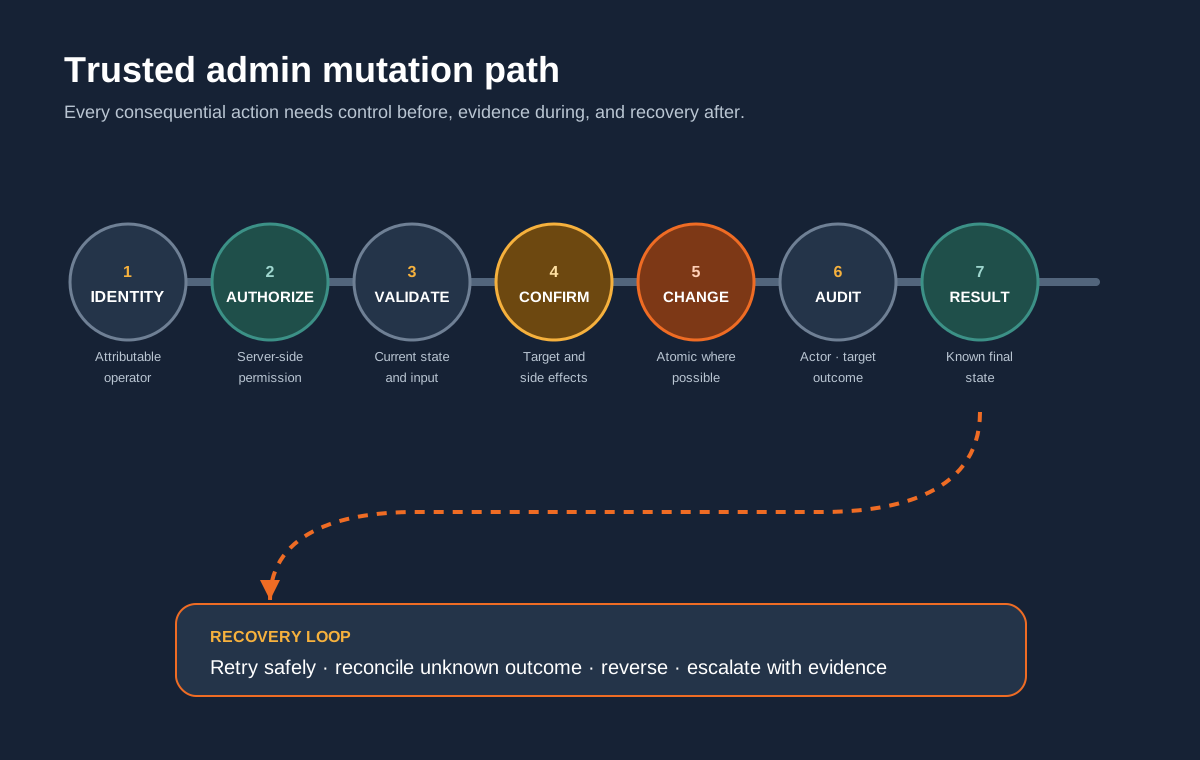
Treat approval, payment, access, and destructive actions as workflows rather than buttons. Define prerequisites, second-person approval where needed, idempotency or duplicate protection, external side effects, timeout behaviour, result evidence, and the allowed recovery. A confirmation dialog cannot compensate for an ambiguous target or missing rollback path.
Make important actions attributable, reviewable, and recoverable
Define the audit event alongside the action. Capture an attributable operator or process, timestamp, action, target, outcome, relevant change summary, reason or ticket where required, and a request or correlation identifier. Avoid secrets and unnecessary sensitive data. Decide who can view audit records, how long they remain, and how they are protected from unauthorized alteration or deletion.
OWASP's application logging guidance distinguishes audit and transaction trails from security-event logging and explicitly includes administrative privilege use and administrator actions among events worth recording. One noisy log stream is not automatically a useful operator history.
For failures, show whether nothing changed, part of the action completed, or the outcome is unknown. Give the operator a safe retry, reconciliation, escalation, or reversal path. Preserve the original evidence rather than replacing it with the corrected state. Support teams need to reconstruct what happened without reading application logs or querying production directly.
Design for high-volume, keyboard, and error-prone work
Requirements should cover search fields, stable identifiers, filters, saved views, sorting, pagination, empty and partial states, time zones, status definitions, bulk selection, export limits, and performance with representative data. Show why a record matched the search and keep the active scope visible before a bulk action.
Admin tools are workplace software and still need accessible interaction. Use semantic labels, logical headings, keyboard access, visible focus, meaningful error messages, sufficient contrast, and a predictable focus order. The W3C explanation of WCAG focus order specifically calls for an order that preserves meaning and operability, including logical movement through table content.
Test with operators using realistic records and interruptions. Acceptance should cover permission boundaries, stale data, concurrent work, slow dependencies, partial failure, accidental repetition, keyboard-only operation, and recovery—not only the scripted happy path.
Scope one complete admin-panel release
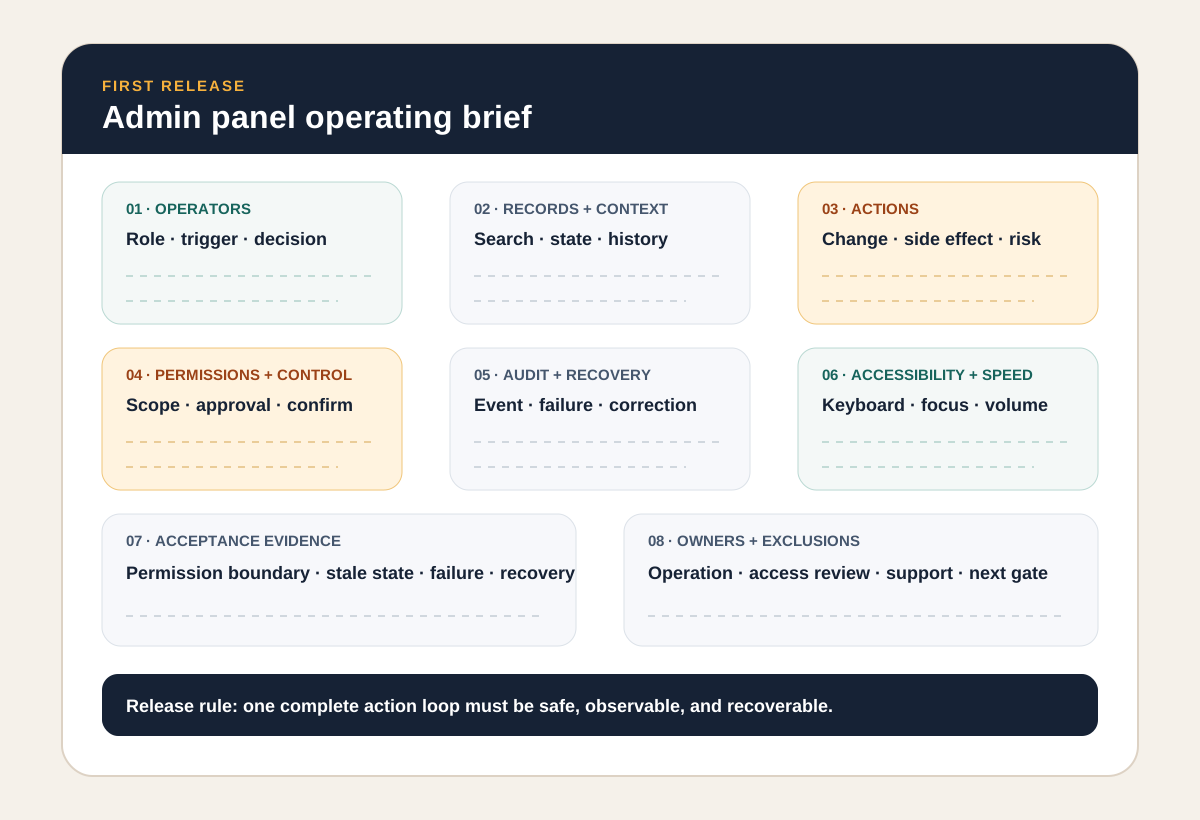
For the first release, name the operators, one workflow trigger, managed records, search and context, actions, permission matrix, safeguards, audit events, notifications, integrations, recovery, accessibility expectations, realistic test data, acceptance evidence, owners, and excluded work.
If the admin panel is replacing a spreadsheet-run operation, pair this brief with the internal-tool decision framework so the team preserves useful flexibility while moving authority, permissions, and workflow state into the system deliberately.
Keep the release small, but do not defer the control path. One safe, observable, recoverable workflow is a stronger foundation than ten attractive pages that share a global administrator account.
When the main risk is who may decide, at which threshold, and what proves the decision, use the approval workflow requirements checklist to define the routing, exception states, and acceptance pack before designing more admin screens.
For a concrete money-moving example, see the refund approval admin workflow concept study. It maps a single request from policy review to payment-provider reconciliation, including the uncertain-result path.
Admin panel requirements FAQ
What should be included in admin panel requirements?
Define the operators and their jobs, managed records, search and filters, permitted actions, field- and record-level visibility, approvals, destructive-action safeguards, audit events, notifications, exports, integrations, error and recovery paths, accessibility, performance expectations, acceptance tests, ownership, and post-launch support.
What is the difference between an admin panel and a dashboard?
A dashboard primarily helps someone observe status, trends, or exceptions. An admin panel lets authorized operators change product or business state: managing accounts, approvals, configuration, refunds, content, access, or other records. One interface can contain both, but mutation workflows create additional permission, audit, confirmation, and recovery requirements.
Does every admin panel need role-based access control?
Every admin panel needs explicit authorization, but the model should fit the product. A very small system may begin with a few roles; more complex products may require permission, attribute, relationship, tenant, region, or record-level rules. Do not rely on hiding buttons in the interface—enforce authorization on every protected server request.
What should an admin audit log record?
For important actions, record an attributable operator or process, timestamp, action, target, relevant before and after state or change summary, reason or reference where required, outcome, and request or correlation context. Protect audit information from unauthorized editing or deletion, avoid logging secrets, and define retention and access rules.
Should we build or buy an admin panel?
Configure or buy when the workflow is standard, data access is supported, and the product can meet your permission and audit needs. Build when the admin surface is a durable operational advantage or requires product-specific approvals, side effects, recovery, tenancy, or integration logic. A hybrid path can use a tool for low-risk inspection and custom flows for consequential actions.