
The short answer: choose the smallest boundary that fits and can be owned
Choose no-code when a supported platform can run the real workflow, enforce the required data and access rules, connect to the necessary systems, and remain governable as usage grows. Choose custom software when the differentiated behavior or critical constraint cannot be represented safely. Use a hybrid when configurable tools can own the commodity edges while custom code owns a narrow, valuable core.
Do not decide from prototype speed alone. Test a complete scenario, an exception, a permission boundary, an integration failure, an administrative change, and an export or recovery path. The result should be a system decision, not loyalty to a tool category.
No-code
Supported workflow, deliberate platform governance.
Hybrid
Configurable edges, focused custom boundary.
Custom
Distinct product behavior, full operating ownership.
Compare no-code, hybrid, and custom—not two extremes
“No-code” covers very different products: page builders, databases, workflow automation, internal-app platforms, and application builders. Some allow custom logic or code components, so “low-code” and “no-code” often blur in practice. Evaluate the actual platform, plan, extensions, deployment model, and contract rather than the label.
A no-code path configures the application primarily inside a vendor runtime. A hybrid keeps useful platform capabilities but connects them to owned services or interfaces. A custom path owns the application code and architecture directly while still buying commodity infrastructure, authentication, payments, messaging, and hosting when appropriate.
| Path | Strong starting condition | Ownership that remains |
|---|---|---|
| No-code | Workflow fits supported patterns and limits | Process, data, access, platform administration |
| Hybrid | Platform fits most work; one boundary does not | Platform plus code, contracts, integration, recovery |
| Custom | Core behavior or experience must be distinct | Product, code, infrastructure, security, support |
Run a boundary pressure test on the real workflow
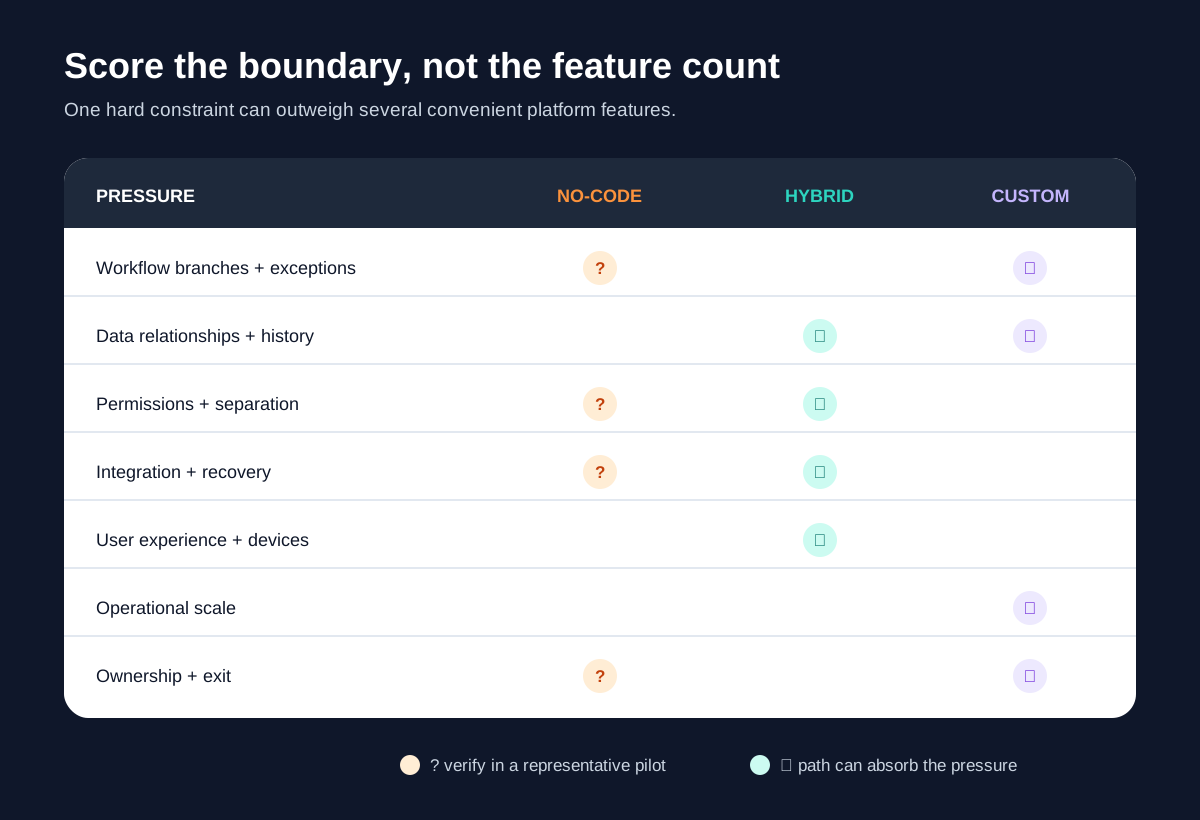
Choose one frequent, valuable journey from trigger to confirmed outcome. Use representative records and include a correction, cancellation, duplicate, partial failure, and user who should not see part of the data. Score seven pressures as low, moderate, or hard constraint.
- Workflow: branching, approvals, timing, exceptions, and audit history.
- Data: relationships, validation, history, portability, and source-of-truth rules.
- Permissions: roles, records, fields, teams, tenants, and administrative separation.
- Integration: APIs, limits, retries, reconciliation, and offline or delayed states.
- Experience: audience, devices, accessibility, responsiveness, and interaction needs.
- Scale: record, automation, concurrency, storage, and operational growth—not vanity traffic.
- Ownership: administration, releases, monitoring, support, change, and exit.
A long list of platform conveniences cannot cancel one unsafe permission model or unrecoverable integration. Conversely, a cosmetic limitation rarely justifies rebuilding standard accounts, forms, and records. If the current process still runs in spreadsheets, first use the spreadsheet-to-internal-tool guide to establish whether software is needed at all.
Draw a hybrid boundary before approving a full custom build
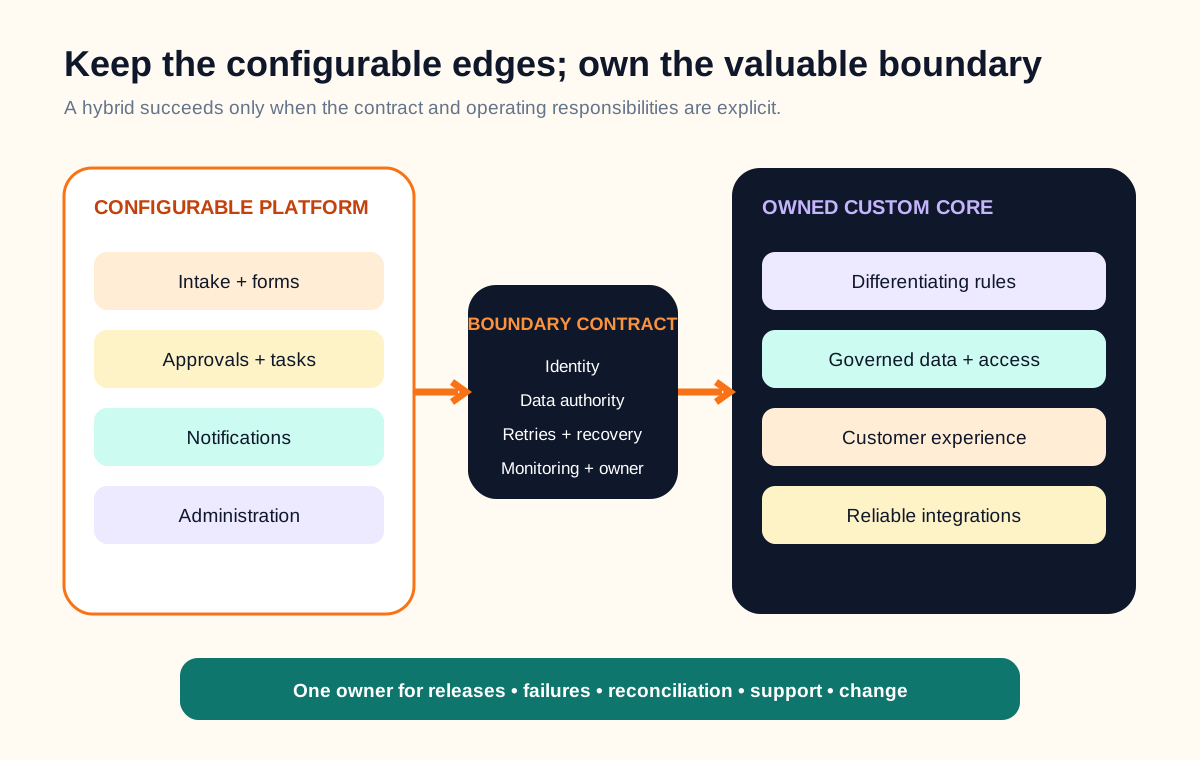
Keep commodity edges—intake forms, internal approvals, scheduled notices, or basic administration—inside a configurable tool when it handles them cleanly. Put custom code around the part that creates distinctive value or requires exact control: pricing logic, customer-facing experience, allocation, permissions, reconciliation, or a reliability-sensitive integration.
Name the authoritative system for every record and event. Define identity, data flow, retry behavior, reconciliation, monitoring, and who changes the contract on each side. The API integration requirements checklist provides a deeper failure-and-recovery model for this boundary.
A hybrid is not automatically simpler. It creates two operating surfaces and a contract between them. Use it only when the retained platform removes more commodity work than the integration adds.
The quote-to-delivery workflow web app concept study shows what happens after a focused custom boundary is justified: the CRM keeps customer and opportunity authority, the custom app owns versioned scope, approval, work states, and exceptions, and accounting keeps posted invoice authority. It is an educational implementation blueprint, not a client project or measured result.
Treat platform governance as part of the product
Fast creation does not remove ownership. Decide who may create environments, connect data sources, publish changes, install extensions, view production records, respond to incidents, and retire unused applications. Separate development and production where the platform supports it, document change review, and make backups and restoration testable.
Microsoft’s current Power Platform governance guidance calls for explicit policies, roles, connector management, environment management, security protocols, monitoring, and delivery models as adoption grows. The details are Microsoft-specific, but the governance questions apply to any platform holding operational data and logic.
Custom software shifts more responsibility to the product team: code review, dependency upgrades, environments, secrets, observability, incident response, backups, security fixes, and a supported release process. Choose custom because the boundary is worth owning, not because platform administration looked inconvenient during a demo.
Verify exit coverage and compare the same operating horizon
“Export available” is incomplete. Ask whether you can export data, files, schema, workflows, interface definitions, users, audit history, configuration, and executable application logic. Record the format, API limits, downtime, identity migration, and what must be rebuilt before another system can run the workflow.
Platform boundaries differ. Bubble’s application and data ownership documentation says customers retain application data and design ownership while the underlying Bubble code remains with the platform, so moving away requires rebuilding application logic. Webflow’s code export documentation says exported HTML, CSS, JavaScript, and assets exclude hosted CMS, user-account, ecommerce, search, and form functionality. These are examples of why teams must inspect the exact product and plan, not universal limitations of no-code.
Compare the same planning horizon. Include discovery, configuration or engineering, licenses and usage, premium features, integrations, data cleanup, testing, security review, administration, monitoring, support, training, changes, vendor-limit responses, migration, and exit. For custom software, include hosting, product ownership, maintenance, incident response, and future releases—not just the initial build.
Use a representative pilot to earn the architecture decision
Build the smallest vertical slice that reaches a real outcome. Include the hardest data relationship, one exception, a permission boundary, an integration failure, a correction, an administrative change, monitoring, and export. Do not spend the pilot polishing screens that avoid the risky constraint.
Record setup effort, custom workarounds, manual steps, performance under representative data, permissions evidence, failure recovery, editor or administrator dependence, and portability. End with one of four decisions: configure the platform, approve a defined hybrid, scope a custom first release, or pause because the workflow itself is not stable enough.
For a founder testing a new product, connect the pilot to the learning goal in the MVP scope checklist. For an established customer operation, the custom versus off-the-shelf CRM guide offers a more specific fit-gap model.
Complete this no-code versus custom decision brief
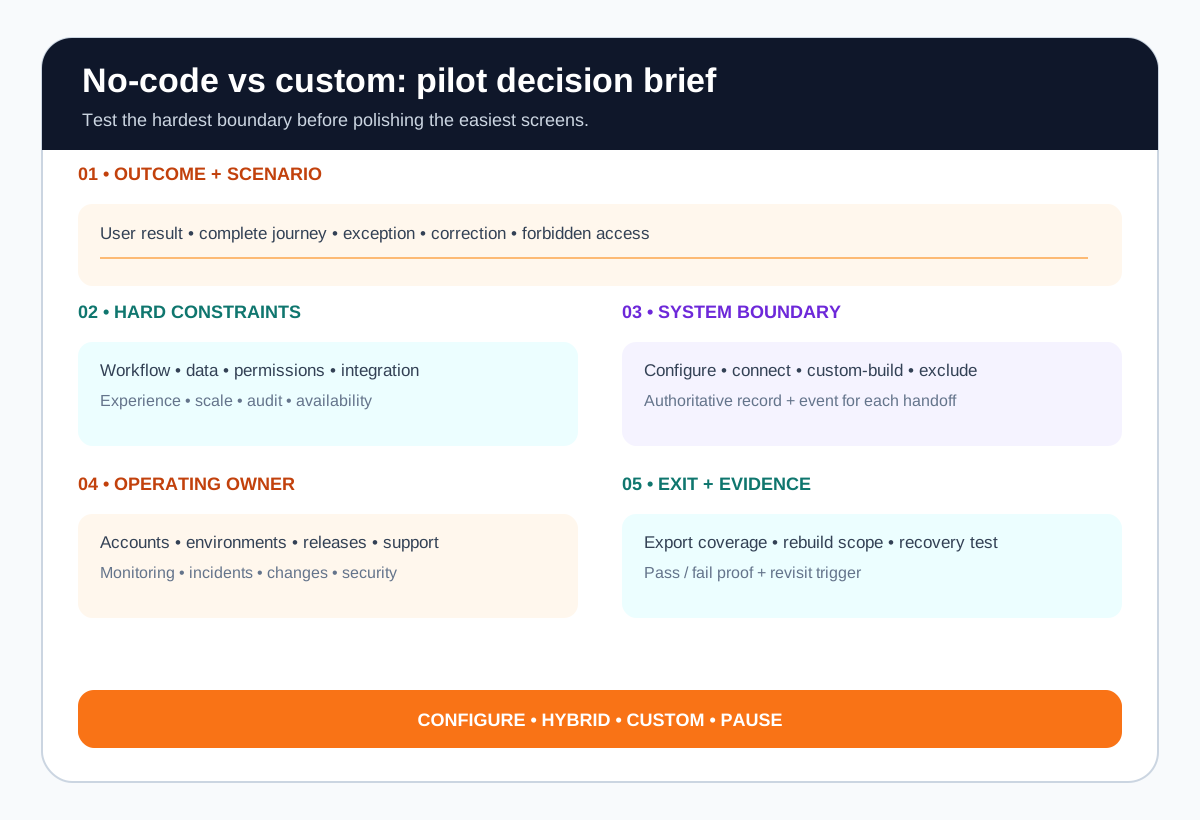
- Outcome: the user and business result the system must create.
- Scenario: one complete journey plus exception, correction, and forbidden access.
- Constraints: workflow, data, permissions, integration, experience, and scale.
- Boundary: what stays configurable, what becomes custom, and each system of record.
- Ownership: accounts, roles, environments, releases, monitoring, support, and security.
- Exit: export coverage, rebuild scope, migration dependencies, and decision triggers.
- Evidence: the pilot checks that justify no-code, hybrid, custom, or pause.
No-code versus custom software FAQ
Is no-code better than custom software for an MVP?
No-code can be the better MVP path when the goal is to test a workflow or demand quickly and the platform supports the required data, permissions, integrations, and user experience. Custom development is more suitable when the risky assumption depends on behavior the platform cannot represent safely or when the product itself needs an owned technical foundation.
When should a business move from no-code to custom software?
Consider moving when a business-critical workflow relies on fragile workarounds, required permissions or data rules cannot be enforced, integration failures cannot be recovered reliably, user experience is materially constrained, operating cost grows out of proportion to value, or platform exit would become harder with every new dependency.
Can no-code and custom code work together?
Yes. A hybrid can use no-code for forms, approvals, notifications, or administrative workflows while custom services own specialized business rules, customer experiences, integrations, or governed data. The boundary needs explicit systems of record, authentication, error handling, monitoring, and ownership.
Does no-code mean the business owns the application?
Ownership varies by platform and contract. A business may own its content and data while the executable application logic depends on the vendor platform. Verify export coverage, runtime dependency, API access, backups, transfer rights, and what would need to be rebuilt before choosing a platform.
How should teams compare no-code and custom software cost?
Compare the same operating horizon and include discovery, configuration or engineering, licenses and usage, integrations, security review, administration, testing, monitoring, support, changes, training, vendor limits, migration, and exit. Do not compare a subscription with only the initial custom build estimate.