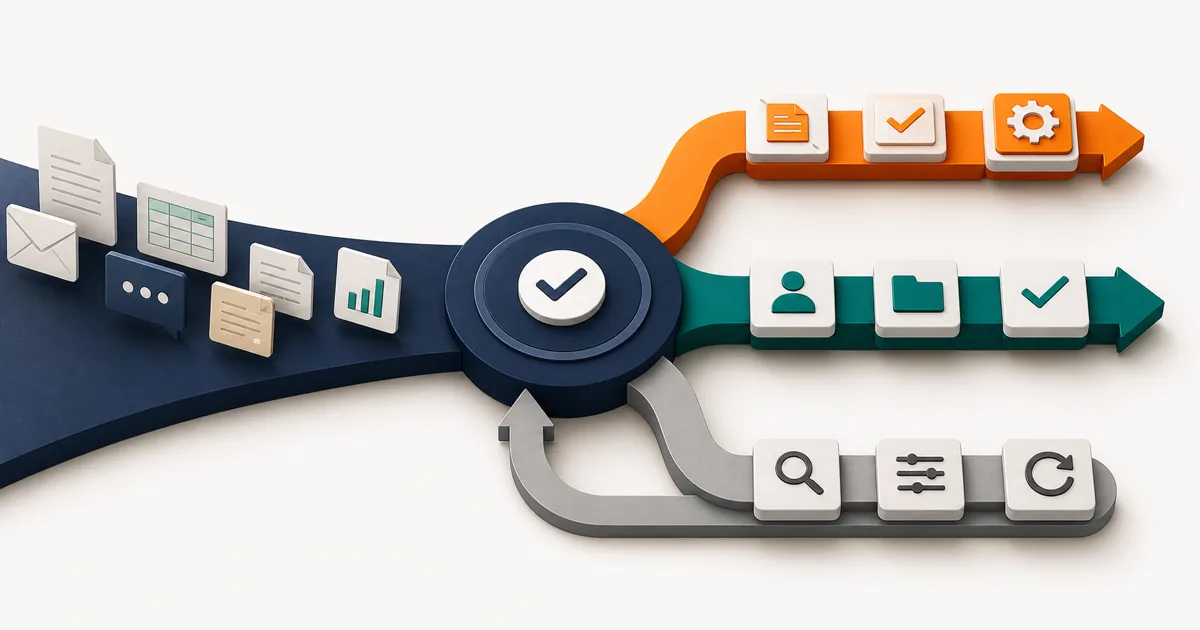
The short answer: audit the workflow before choosing AI
A workflow is a strong AI automation candidate when it happens often, follows a stable core path, uses accessible digital inputs, contains a step that genuinely requires interpretation, and produces an outcome you can evaluate. Start with a narrow assistive step. Keep a person in control when errors are costly, sensitive, customer-facing, or difficult to reverse.
If the work is inconsistent because nobody agrees on the process, fix the process first. If every decision can be written as a reliable rule, use ordinary automation. If the job depends on contextual judgment and the consequences are high, keep it human-led and let AI prepare information rather than make the decision.
This guide assesses one workflow. If your team has a backlog of competing requests, start with the AI opportunity portfolio prioritization concept study. It shows how to compare workflow value, evidence, feasibility, failure cost, operating ownership, and learning value before choosing which opportunity deserves a detailed readiness review.
| Workflow condition | Best first move | Example | Control |
|---|---|---|---|
| Stable rules, structured data | Deterministic automation | Validate fields and route a request by region | Tests, retries, and error alerts |
| Variable language or documents | AI-assisted workflow | Classify a ticket and prepare a response draft | Evaluation, thresholds, and review |
| High-impact contextual decision | Human-led with AI support | Approve a refund exception or sensitive communication | Named decision owner and audit trail |
| Unclear ownership and changing steps | Repair the process | Requests move through inboxes with no defined state | Process owner, states, and handoff rules |
Score one workflow for automation readiness
Do not score “sales,” “finance,” or “customer support.” Those are departments, not workflows. Score a bounded unit with a trigger and an outcome: qualifying an inbound lead, extracting fields from a supplier invoice, drafting a weekly account summary, or routing a support request.
Give the workflow zero, one, or two points across the six factors below. The total is a prioritization aid, not a promise of feasibility or return. A single red-line risk can still stop a high-scoring workflow.
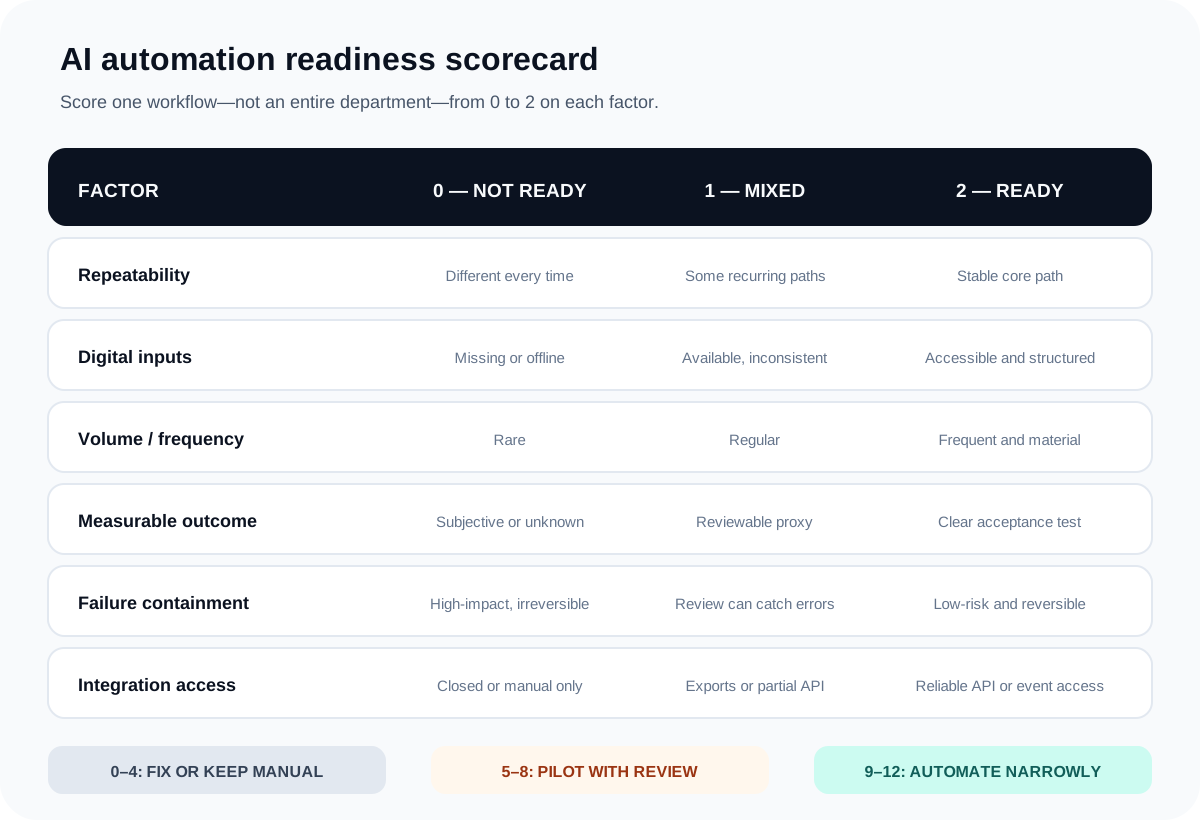
1. Repeatability: is there a stable core path?
Record several recent cases and map what actually happened. A workflow can contain exceptions and still be repeatable, but the normal path and the reasons for branching must be visible. If each employee invents a different sequence, automation will encode confusion rather than remove it.
2. Digital inputs: can the system access the work?
Identify every required input, its owner, format, location, and access method. Clean text in a form is easier than scans arriving through several inboxes. Accessible does not automatically mean permitted: personal, customer, financial, or confidential data may require additional policy and technical controls.
When the workflow depends on operational reporting, use the dashboard data readiness checklist to reconcile metric definitions, authoritative sources, data quality, and refresh ownership before automating downstream decisions.
3. Volume: does the repetition justify a system?
Count cases per week, handling time, waiting time, and exception frequency. A painful task that happens twice a year may deserve a checklist, template, or small script—not a maintained AI workflow. Volume also needs to be stable enough to test the system against representative cases.
4. Measurable outcome: can you tell when it is correct?
Define acceptance in operational language. A classification may be compared with expert labels. A draft may be scored for factual completeness, policy compliance, and edit effort. A summary may be checked against required fields. “Feels helpful” is not a dependable production test.
5. Failure containment: what happens when it is wrong?
List the worst plausible error, who is affected, whether the action can be reversed, and how quickly it can be detected. A flawed internal draft that a trained employee reviews is very different from an autonomous payment, deletion, account change, or customer promise.
6. Integration access: can it operate reliably?
Check for APIs, webhooks, structured exports, authentication, rate limits, and a safe test environment. If the proposed system depends on fragile screen clicks or broad administrator access, the integration risk may outweigh the intelligence in the middle. Leeonex’s API and integration work can address this foundation when disconnected systems are the real bottleneck.
Choose AI, ordinary automation, human work, or process repair
AI is not the default destination of the audit. The useful outcome is choosing the simplest mechanism that handles the job reliably.
Use ordinary automation for explicit rules
Fixed calculations, required-field checks, status transitions, scheduled exports, record synchronization, and known notification rules should usually remain deterministic. They are easier to test and explain. An AI model does not improve “if the country is India, assign the APAC queue.” It makes the outcome less certain.
Use AI for bounded interpretation
AI becomes useful when a step must interpret variable text, images, intent, or context: extracting facts from differently formatted documents, grouping tickets by meaning, summarizing conversation history, matching content to a taxonomy, or preparing a draft from approved sources.
Keep the task bounded. “Handle support” is not a task. “Suggest one of eight approved categories from the message and explain the evidence” is testable. The surrounding workflow should still use ordinary code for permissions, state changes, validation, logging, and retries.
Keep people in control of costly judgment
A person should own decisions that involve policy exceptions, material financial impact, legal commitments, sensitive personal circumstances, irreversible actions, or important customer relationships. AI can collect context and prepare options without becoming the accountable decision-maker.
Repair the workflow when the operating model is unclear
If nobody owns the outcome, inputs are routinely missing, or the team cannot agree what “done” means, first define states, responsibilities, and exception routes. Sometimes a shared form, queue, dashboard, or policy removes more friction than an AI layer. Leeonex’s AI consulting is intentionally able to end with a simpler non-AI recommendation.
Design human review as a real workflow state
“A human will check it” is not a control until the product defines who receives the item, what context they see, which decisions they can make, how quickly they must respond, and what happens after correction or rejection.
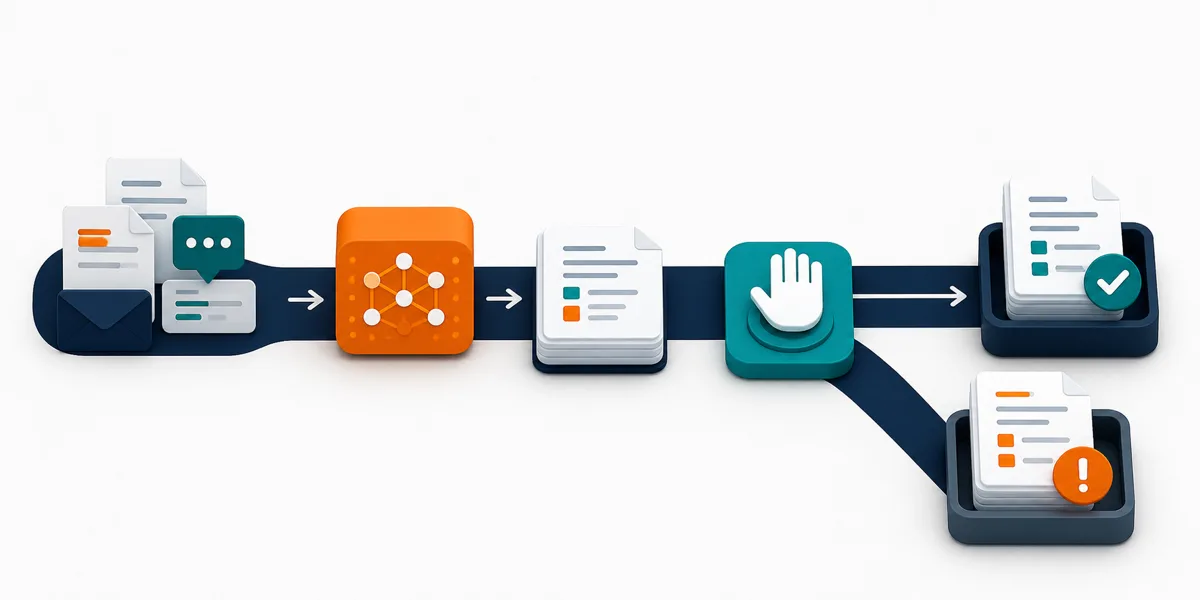
The NIST AI Risk Management Framework Core calls for documented roles, responsibilities, targeted scope, human oversight, measurement, and ongoing monitoring. The practical lesson for a small workflow is straightforward: decide who owns the risk and what the system is allowed to do before connecting it to live tools.
OWASP describes excessive agency as giving an AI system too much functionality, permission, or autonomy. Its guidance recommends minimizing available tools and permissions and requiring user approval for high-impact actions. See OWASP’s Excessive Agency guidance.
Define three routes, not one confidence number
- Proceed: low-impact cases that pass explicit validation and evaluation criteria.
- Review: uncertain, unusual, sensitive, or consequential cases with all supporting context attached.
- Stop: missing data, disallowed actions, failed validation, unavailable systems, or cases outside the approved scope.
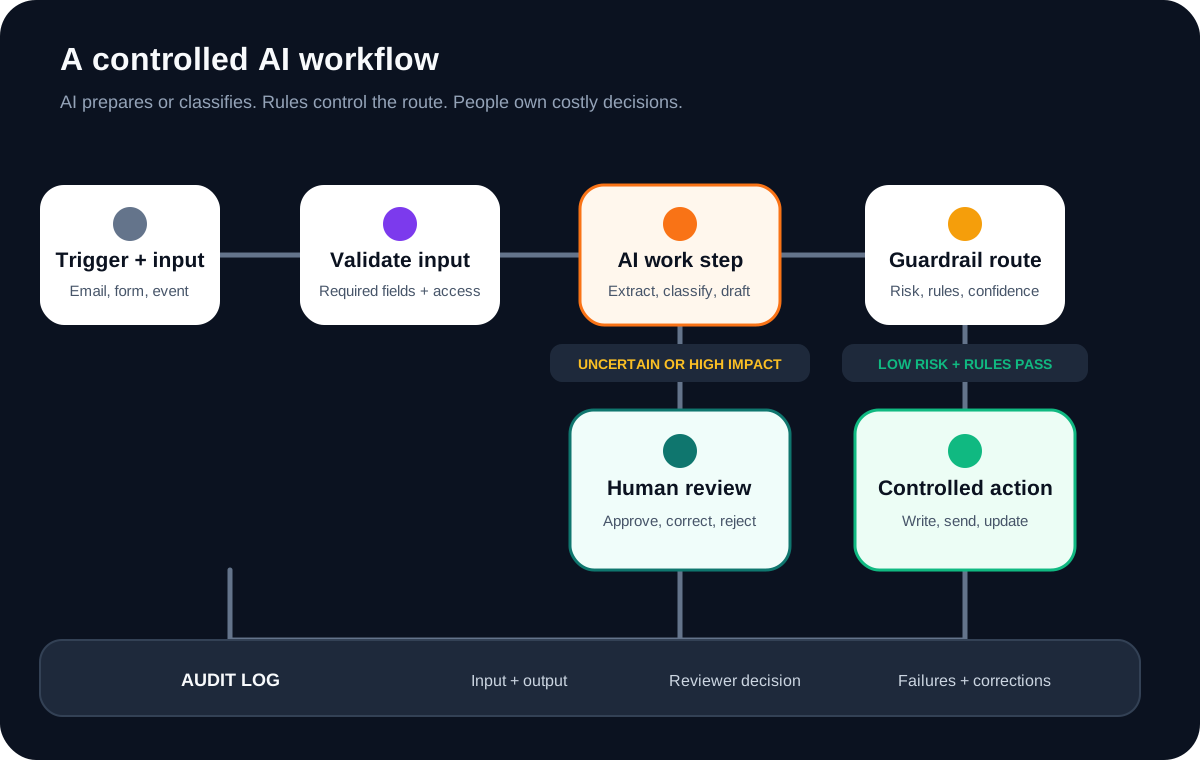
The audit log should preserve the relevant input, system output, rule result, reviewer decision, correction, final action, and timestamps without collecting unnecessary sensitive data. Those records support debugging and create the evaluation examples needed to improve the workflow safely.
Pilot one narrow path before automating end to end
A useful pilot begins in shadow or assistive mode. The system processes real representative cases but does not take the final action independently. Operators compare its output with the normal result, record corrections, and expose exception types.
1. Build a representative evaluation set
Include ordinary cases, difficult cases, known failure patterns, incomplete inputs, and disallowed requests. Separate the examples used while developing prompts or rules from the cases used for a final evaluation. Otherwise, the team can tune the workflow to a small familiar set without learning how it handles new work.
OpenAI’s official evaluation guidance treats tests as structured criteria applied to a dataset. The specific platform is optional; the important practice is repeatable evaluation instead of reviewing a few impressive examples.
2. Measure the whole operation
Model accuracy alone is not the business outcome. Track completion rate, correction rate, review time, false actions avoided, exceptions created, end-to-end cycle time, cost per completed case, and operator experience. A workflow that saves drafting time but creates a difficult approval queue may move effort rather than remove it.
3. Set launch and stop conditions in advance
Define which error patterns are unacceptable, what review coverage is required, who can pause the system, and what evidence would justify expanding its scope. Do not graduate to autonomous action because a demonstration looked good. Expand one action type at a time after the preceding version is understood.
4. Plan for change
Inputs, policies, connected tools, and model behavior can change. Name an owner for monitoring, review the evaluation set when the workflow changes, and keep a safe fallback route. Automation is an operated system, not a one-time setup.
Leeonex’s AI workflow automation service starts from this workflow and control design rather than from a model demo. The educational human-reviewed invoice intake automation concept study shows how the same boundary becomes a source-to-approved-record scope for one document-heavy finance workflow without claiming a deployed result.
When document extraction is the selected workflow, continue with the AI document processing requirements checklist to define document populations, output provenance, validation, review authority, and downstream reconciliation.
For a content-operations example, the AI product catalog enrichment concept study narrows the problem to one product family, preserves supplier facts, separates exact validation from AI drafting, and keeps publishing under human authority. It is an educational proposal, not a delivered catalog or measured automation result.
Common mistakes that make AI automation fragile
Automating a department instead of a task
Broad goals hide inputs, owners, and failure modes. Narrow the target until one trigger, one bounded job, one outcome, and one accountable owner can be named.
Using AI where a rule would be better
Models are valuable for variable interpretation, not for making fixed logic look sophisticated. Keep calculations, permissions, allowed actions, and required fields deterministic wherever possible.
Giving the pilot production-level permissions
Start read-only or draft-only. Grant the minimum tool access and scope required for the current test. A pilot that can delete, publish, pay, or message broadly creates risk before it creates evidence.
Treating every exception as more prompt text
Some exceptions require a new rule, missing source data, a process change, or a human decision—not a longer instruction. Classify failures by root cause before changing the AI step.
Ignoring adoption and correction effort
Operators need to understand why an item was routed, how to correct it, and whether their correction matters. If the review interface is slow or untrusted, people will work around it and the measured workflow will no longer match reality.
A 30-minute workflow audit worksheet
Use one recent real case. If the group cannot answer a field, record the gap rather than guessing.
- Name the workflow: one verb and one object, such as “triage inbound support requests.”
- Define boundaries: trigger, finish state, owner, and systems touched.
- Map the actual path: steps, waits, copies, decisions, approvals, and exceptions.
- Score readiness: use the six-factor worksheet and note every zero.
- Choose the mechanism: process repair, deterministic rule, AI assistance, or human judgment.
- Name the failure: worst plausible error, affected party, detection path, and reversal plan.
- Define the pilot: representative cases, evaluation criteria, review owner, and stop condition.
- Choose the next decision: what result would justify stopping, revising, or expanding?
This follows the same principle as choosing a startup’s first product artifact: build the smallest credible version that can answer the next expensive question. See our guide to deciding between a landing page, prototype, pilot, or MVP.
If the pilot must choose tools or decide its own next step, use the AI agent versus workflow automation guide to set the autonomy, permission, evaluation, and human-review boundary before expanding access.
When a working AI feature is approaching live users, continue with the AI feature production-readiness checklist to turn the pilot into evidence-based launch, narrow, hold, or stop decisions.
If an external partner will design or operate the pilot, use the AI automation vendor selection checklist to compare evaluation evidence, data and permission boundaries, operating ownership, commercial assumptions, and the exit path against the same workflow.
Frequently asked questions
Which business process should be automated with AI first?
Start with one frequent, stable, digitally accessible workflow where an AI step handles variable language or judgment, success can be reviewed, and errors are reversible. Avoid beginning with an entire department or a high-impact decision that has no reliable approval path.
When should a workflow use normal automation instead of AI?
Use deterministic automation when inputs and rules are explicit: moving records, applying fixed calculations, validating required fields, sending known notifications, or syncing systems. Add AI only where the workflow must interpret variable text, images, intent, or context.
Does an AI workflow need human approval?
Not every step does. Require approval when an action is costly, sensitive, customer-facing, difficult to reverse, or based on an uncertain output. Low-risk suggestions can remain assistive, while stable low-impact actions may proceed automatically after evaluation and monitoring.
Do our existing tools need APIs before we can automate?
Reliable APIs, webhooks, or structured exports make automation safer and easier to monitor, but a limited pilot may work with other controlled interfaces. If the workflow depends on fragile screen automation or manual copying, integration risk should lower its readiness score.
How long should an AI automation pilot run?
Run it long enough to capture normal cases, meaningful exceptions, and operator corrections rather than choosing an arbitrary duration. Define the evaluation set, acceptable error patterns, review workload, and stop conditions before the pilot starts.
Sources and further reading
The readiness scores in this guide are a Leeonex prioritization framework, not an industry benchmark, security assessment, or guarantee of project value. Legal, privacy, security, and domain review should match the data and consequences of the workflow.