
The short answer: launch from evidence, not confidence
Before a website goes live, verify the business-critical journeys, approved content, search configuration, accessibility, performance, measurement, technical ownership, and recovery path. Give every check an owner, environment, expected result, evidence link, severity, and status. Repeat the checks that depend on the real domain immediately after release.
A green build and a final visual review are necessary but not sufficient. They do not prove that an inquiry reaches the right inbox, consent changes analytics behavior correctly, canonical URLs match the live domain, a keyboard user can finish a form, or the team can restore service after a failed deployment.
Prove
Record the result, not “looks good”
Decide
Separate blockers from accepted defects
Observe
Keep owners active after DNS changes
Run seven launch evidence gates
A large checklist can create false safety when trivial items and business blockers carry the same weight. Group checks into seven gates and define what would stop launch before testing begins.
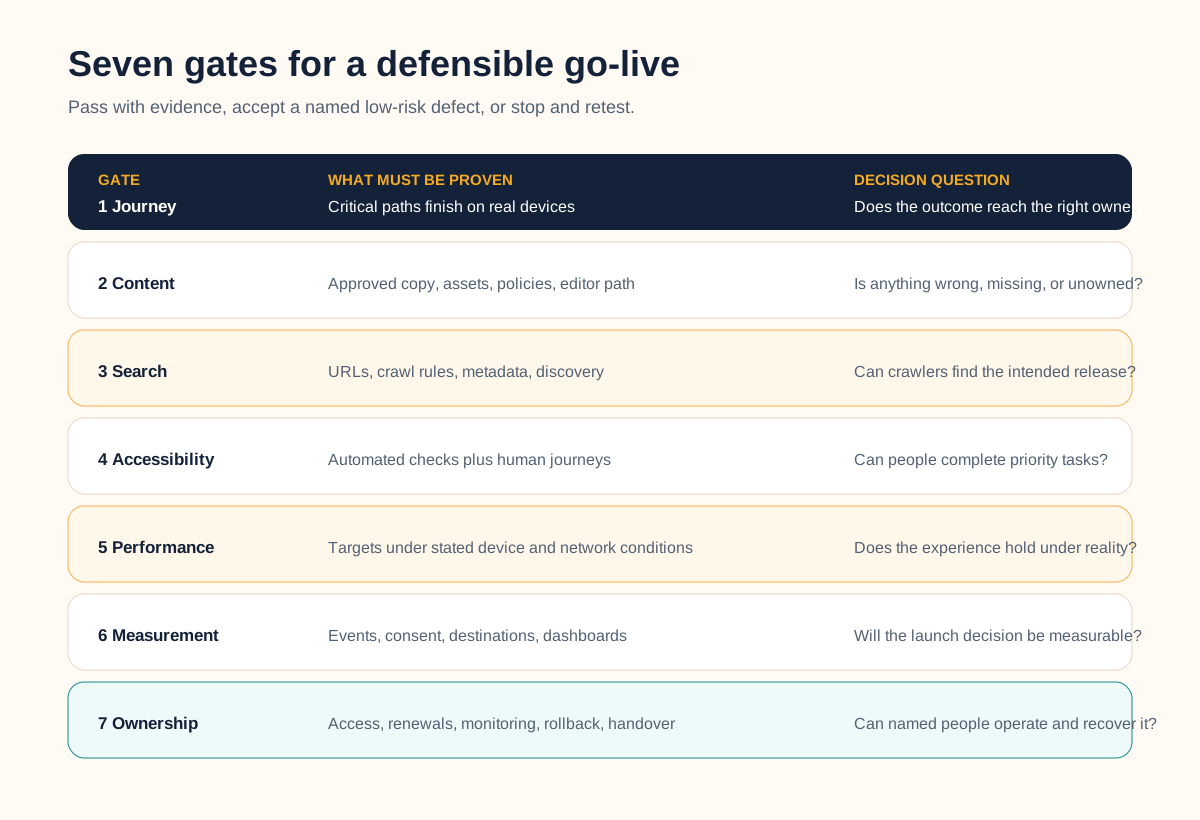
1. Journey and conversion
Test each priority path from a real entry point to a confirmed outcome on representative phones and desktops. Include navigation, links, validation, error states, thank-you states, downloads, booking, payments, search, and account actions that actually exist. Submit every important form and confirm both the visitor response and the internal handoff.
2. Content and governance
Confirm final copy, contact details, offers, prices where used, imagery rights, alt text, policies, author or approver, publication state, and expiry or review dates. Remove placeholders, test long headings and real data, and prove editors can update the content they will own after handover.
3. Search and discovery
Compare the intended URL inventory with a crawl. Verify status codes, titles, descriptions, headings, canonicals, robots rules, sitemap membership, internal links, structured data, social cards, image discovery, and redirects when URLs change. Google recommends verifying site ownership, using URL Inspection for a small set or a sitemap for many URLs, and monitoring indexing after an ecommerce launch; the same discovery controls are useful for other public sites. See the official launch guidance and adapt it to your site type.
4. Accessibility and interaction
Test keyboard order and focus, landmarks, headings, labels, alternatives, contrast, zoom and reflow, errors, status messages, motion, media, and representative assistive-technology journeys. Automated tools help find issues but do not determine accessibility alone. The W3C evaluation overview explicitly calls for knowledgeable human evaluation alongside tools.
5. Performance and resilience
Test representative templates, devices, networks, third-party scripts, caching states, and error conditions. Record the agreed targets and test conditions rather than one floating score. Google describes Core Web Vitals as field metrics: lab tools are valuable during development, but lab results do not replace real-user measurement. Use the Web Vitals guidance to keep those evidence types distinct.
6. Measurement and consent
Verify approved analytics, consent behavior, campaign parameters, event names, conversion destinations, filters, internal traffic, dashboards, search-console access, and release annotations. Watch the live debugging or realtime view while completing the journey; the mere presence of a tracking script proves little.
7. Ownership and recovery
Name who controls the domain, DNS, hosting, repository, deployment, CMS, forms, analytics, search tools, accounts, renewals, backups, incidents, and vendor contacts. Verify access before launch. Record the last safe release, rollback procedure, rollback triggers, and the person authorized to make that decision.
Separate staging proof from live verification
Freeze a release candidate and record its identifier, content snapshot, environment configuration, browser and device coverage, test accounts, and known issues. Staging is where the team should find ordinary defects without exposing visitors to them.
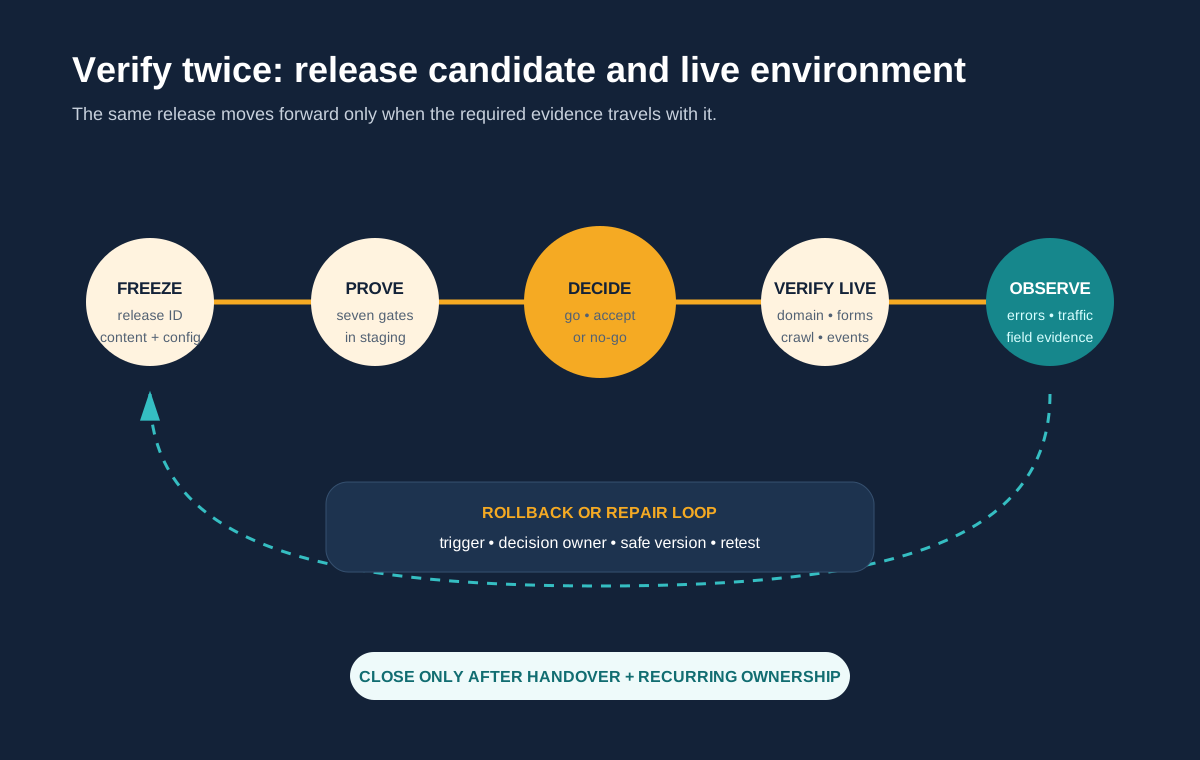
After release, recheck the controls that can differ in production: HTTPS and certificates, redirects, canonical and Open Graph URLs, robots and sitemap responses, CDN or cache behavior, environment variables, forms, email or CRM delivery, analytics and consent, third-party credentials, server errors, asset loading, and the actual rollback route. Do this before paid campaigns, announcements, or a large email send creates avoidable traffic pressure.
A redesign or replatform also needs old-to-new URL and content preservation. Use the website migration checklist for inventory, redirect, canonical, content, and cutover controls that are intentionally deeper than this general launch pass.
Make go, accepted-risk, and no-go explicit
| Status | Meaning | Required record |
|---|---|---|
| Pass | Expected behavior is verified | Environment, evidence, reviewer, time |
| Accepted | Known non-critical issue can ship | Impact, owner, due date, approver |
| No-go | Critical journey, trust, measurement, or recovery fails | Blocker, repair owner, retest condition |
| Unknown | No reliable test or evidence exists | Decision owner and evidence plan |
Define severity in business terms. A critical issue prevents a priority journey, exposes data or control, publishes materially wrong information, blocks required accessibility, destroys measurement needed for the launch decision, or leaves no safe recovery path. A cosmetic defect on a low-priority template may be accepted; a missing lead notification should not be hidden in the same list.
One named launch owner should consolidate the evidence and make the final call. Content, legal, design, development, marketing, analytics, accessibility, and operations owners provide their approvals where relevant. Clear responsibility prevents “the agency signed off” from masking decisions only the business can make.
Keep the launch window open after go-live
The deployment is an event; launch is an observation window. Staff the escalation path and watch availability, server and browser errors, form and integration delivery, analytics events, consent, page performance, search discovery, redirects, support messages, and important third-party services. Compare live results with the pre-launch baseline.
- Immediately: verify the live domain, certificates, critical journeys, events, notifications, crawl controls, and rollback access.
- During the first traffic cycle: watch errors, delivery queues, performance, campaigns, conversions, and user reports while owners are available.
- After enough real use: compare field evidence with launch assumptions, close accepted defects, update documentation, and move recurring controls into maintenance.
Do not promise a universal number of hours for this window. A brochure site with one form and a SaaS marketing site connected to billing, experimentation, localization, and several lead systems have different risk and traffic cycles.
Complete this website launch control brief
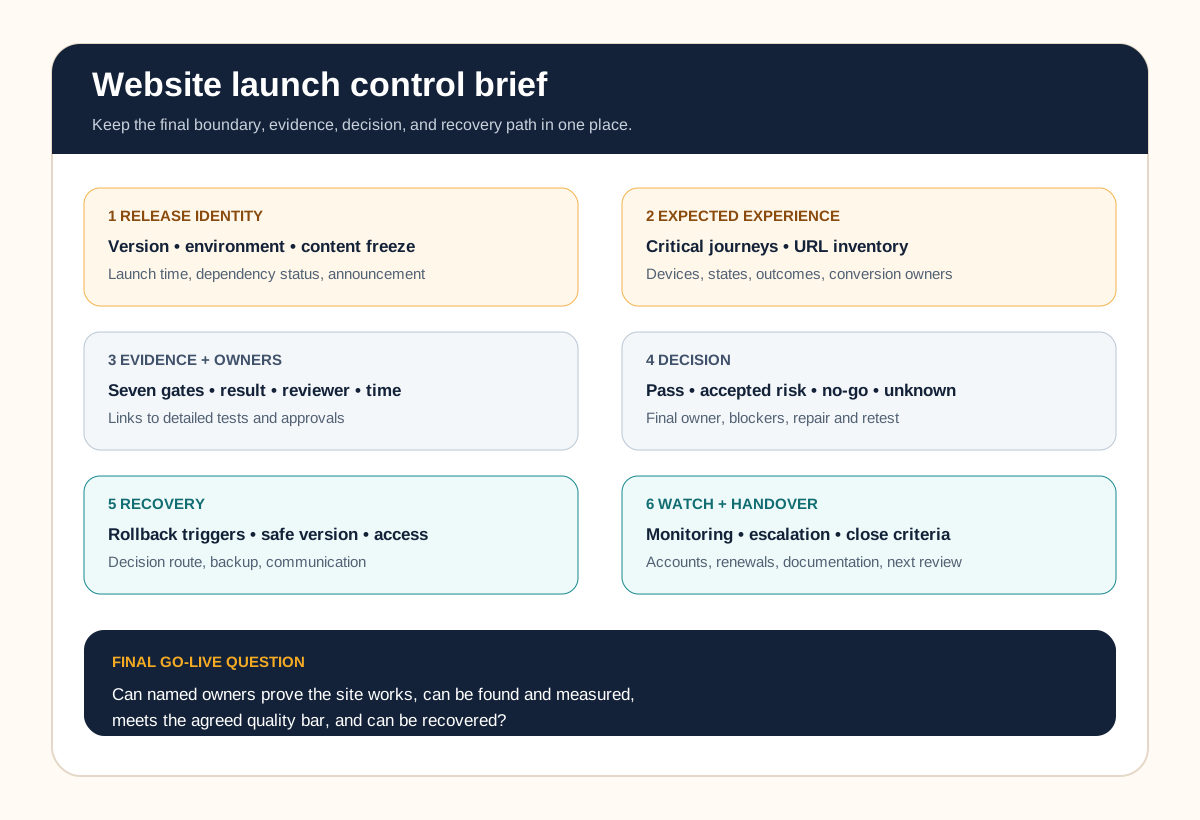
Keep one page with the release identifier, critical journeys, expected URL set, content freeze, gate owners, test environments, evidence links, open issues, final decision owner, launch steps, rollback triggers, safe release, monitoring views, escalation contacts, announcement time, and handover date. Link to detailed test records instead of making the control page unreadable.
If those controls are still being discovered during final QA, revisit the website requirements checklist. It helps define audiences, content, functionality, quality, integrations, ownership, and acceptance before development. This launch guide is the execution gate for the resulting release.
Go-live test
Can the team show that the site works for priority visitors, can be found and measured, meets the agreed quality bar, and can be recovered by named owners?
Leeonex’s company website development service supports teams that want structure, responsive design, maintainable implementation, inquiry flows, and launch ownership handled as one focused release. A scoping conversation can also end with a repair plan or a decision that the current site needs only a smaller launch-readiness pass.
Website launch FAQ
What should be checked before launching a website?
Check critical visitor journeys, approved content and legal ownership, URLs and search directives, responsive behavior, accessibility, performance, forms and integrations, analytics and consent behavior, security basics, domain and certificate configuration, backups or rollback, monitoring, and handover. Record evidence and an owner rather than relying on a verbal confirmation.
When should website launch QA begin?
Define launch acceptance while requirements are being written, then test continuously as templates and journeys are built. Run a complete pass against a frozen release candidate in staging and repeat environment-dependent checks immediately on the live domain. Starting QA at the final handoff leaves too little room to fix structural issues.
Who should approve a website launch?
One named decision owner should make the final go or no-go call after receiving evidence from content, business, design, development, analytics, accessibility, and operations owners as applicable. The developer should not silently own business accuracy, legal approval, measurement policy, or inbox readiness unless those responsibilities were explicitly assigned.
Can a website launch with known issues?
Yes, when the issue is documented, non-critical, has a named owner and due date, and does not break a critical journey, create unacceptable risk, block measurement, or prevent recovery. A severity model makes that decision explicit. Unknown issues and failed critical checks are not the same as an accepted low-priority defect.
What should be monitored after a website goes live?
Monitor availability, server and browser errors, form and integration delivery, analytics events, consent behavior, key page performance, crawl and indexing signals, redirects where applicable, broken links, and real customer feedback. Keep a staffed escalation path and compare results with the pre-launch baseline before closing the launch window.