
The short answer: define the release, not just the pages
A useful website requirements checklist defines who the site is for, what those people must understand or do, which content and systems support the journey, who owns each dependency, and what observable evidence will make the release acceptable. A sitemap and a mood board help, but neither is a complete development brief.
Before requesting proposals, separate launch requirements from later ideas and preferences. Give every supplier the same outcome, journeys, content inventory, functional needs, constraints, responsibilities, and acceptance checks. That makes assumptions visible and proposals more comparable.
Outcome
What must change for the business or visitor.
Boundary
What is included, connected, migrated, and owned.
Evidence
How the team will prove the release works.
Start with one business outcome and priority audience
“Build a modern website” is a visual preference, not an outcome. State the change you need: help qualified prospects understand a complex offer, turn campaign traffic into inquiries, let candidates find relevant roles, reduce repetitive support questions, or give an existing content team a maintainable publishing workflow.
Then name the priority audience and triggering situation. What do they already know? What doubt blocks the next step? What evidence do they need? What action should they complete? A service-business buyer comparing specialists needs a different information path from an existing customer looking for support.
Define one primary conversion and the few supporting actions that genuinely matter. If the project is still testing whether the offer earns interest, the landing page or MVP decision guide can help keep the first release smaller. If an established site is being replaced, use the website migration checklist to preserve routes, content, tracking, and search equity.
Cover seven connected requirement layers
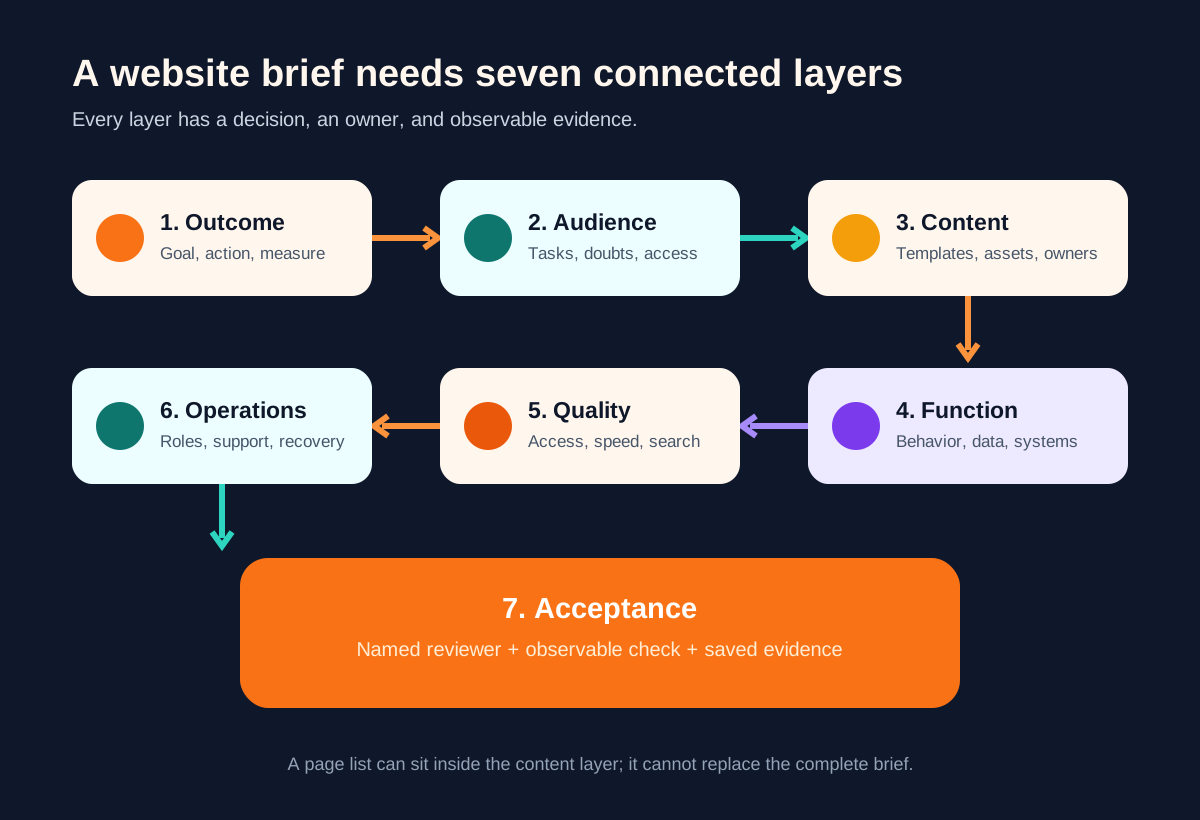
| Layer | Decisions to record | Acceptance evidence |
|---|---|---|
| Outcome | Goal, priority action, baseline, owner | Measurement plan and event definitions |
| Audience | Tasks, questions, objections, access needs | Journey review with representative users |
| Content | Pages, templates, assets, owners, approvals | Approved inventory and representative copy |
| Function | Forms, search, CMS, accounts, integrations | Scenario and failure-path tests |
| Quality | Accessibility, performance, security, SEO | Named checks, devices, tools, and reviewers |
| Operations | Hosting, roles, updates, backups, support | Handover and recovery evidence |
| Acceptance | Who approves what and when | Signed release checklist and known issues |
Make content a project input, not a late dependency
Inventory content by purpose and template, not only URL. Record which pages are retained, rewritten, merged, redirected, or removed; which fields repeat across services or locations; and which assets need permissions, alternatives, or new production. Name a content owner and approval path for every priority template.
Supply final or representative copy early enough to test hierarchy and responsive behavior. Real headings, tables, proof, forms, pricing conditions, and legal notices expose layout needs that placeholder copy hides. If several editors or channels reuse the same material, the headless versus traditional CMS guide helps evaluate the publishing model without assuming headless is automatically better.
Create a journey for each priority audience: entry page, decision questions, evidence, next action, confirmation, and follow-up. The page architecture should support that journey while keeping navigation predictable and URLs descriptive. Google’s SEO Starter Guide recommends organizing sites logically and using descriptive URLs; those are content and information-architecture requirements, not post-launch decorations.
Trace every function into its system and owner
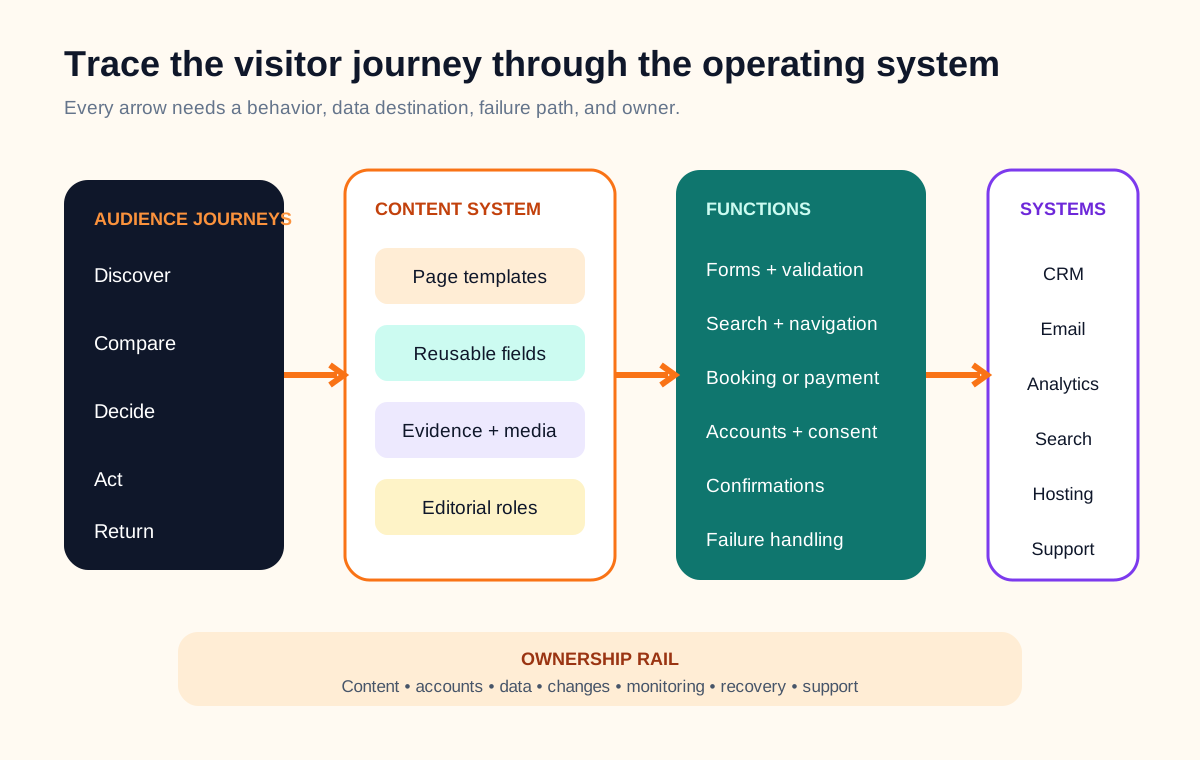
For forms, booking, payments, search, gated content, localization, analytics, CRM delivery, email, or recruitment tools, write the complete behavior. Define fields, validation, consent language, routing, duplicate handling, confirmation, notification, failure behavior, retention, access, and the authoritative system for the resulting record.
If localization is in scope, define more than translated body copy. The multilingual company website concept study shows how a focused two-locale release can connect source ownership, market review, forms, routing, metadata, QA, and change control without treating page count as readiness.
Label credentials, vendor accounts, domains, analytics properties, DNS, repositories, and content systems by owner. State who supplies access, who pays for third-party services, who can change configuration, and what must be handed over. A requirement that depends on an unnamed account or approver is not ready for estimation.
Write quality requirements so they can be checked
Avoid “fast, secure, accessible, and SEO-friendly.” Name the target, scope, tools, environments, and reviewer. For accessibility, decide whether the project targets WCAG 2.2 Level AA and which templates, components, content, keyboard paths, zoom levels, and assistive technologies will be reviewed. W3C describes WCAG 2.2 success criteria as testable and technology-independent, and advises using the current version for future applicability in its WCAG 2.2 Recommendation.
Use the website accessibility requirements checklist to turn that target into scoped journeys, workstream owners, layered evaluation evidence, release exceptions, and an ongoing monitoring plan.
For performance, name representative routes, device and network assumptions, measurement tooling, and the point in the project when issues must be fixed. Google’s page-experience guidance explicitly warns that good Core Web Vitals alone do not guarantee rankings; treat performance as part of a useful overall experience, not a score-chasing exercise.
Also define browser and device coverage, structured data where appropriate, canonical and redirect behavior, metadata ownership, indexation rules, analytics events, security-sensitive form behavior, backup and restore expectations, and the content-editing roles the CMS must support.
Turn preferences into launch acceptance evidence
Write acceptance checks around observable outcomes: a visitor can complete the priority inquiry on a target viewport; a failed integration does not silently lose the submission; an editor can publish a service page without developer help; legacy priority URLs reach their approved destinations; and required metadata appears in rendered HTML.
Name the reviewer and evidence for each check: screen recording, test record, analytics debug event, crawl report, keyboard review, redirect map, restore exercise, or editor walkthrough. Record known exceptions with an owner and decision date instead of hiding them inside a launch chat.
Once the release candidate exists, use the proof-based website launch checklist to run the staging and live gates, classify blockers, verify the rollback path, and keep owners active through the first traffic cycle.
Use the same brief to compare proposals. Ask each supplier to identify exclusions, assumptions, client responsibilities, third-party costs, migration approach, test scope, handover artifacts, warranty or support boundary, and how scope changes are approved. If the existing platform may constrain the project, start with the website redesign or rebuild decision guide before committing to a cosmetic redesign.
Complete this website acceptance brief
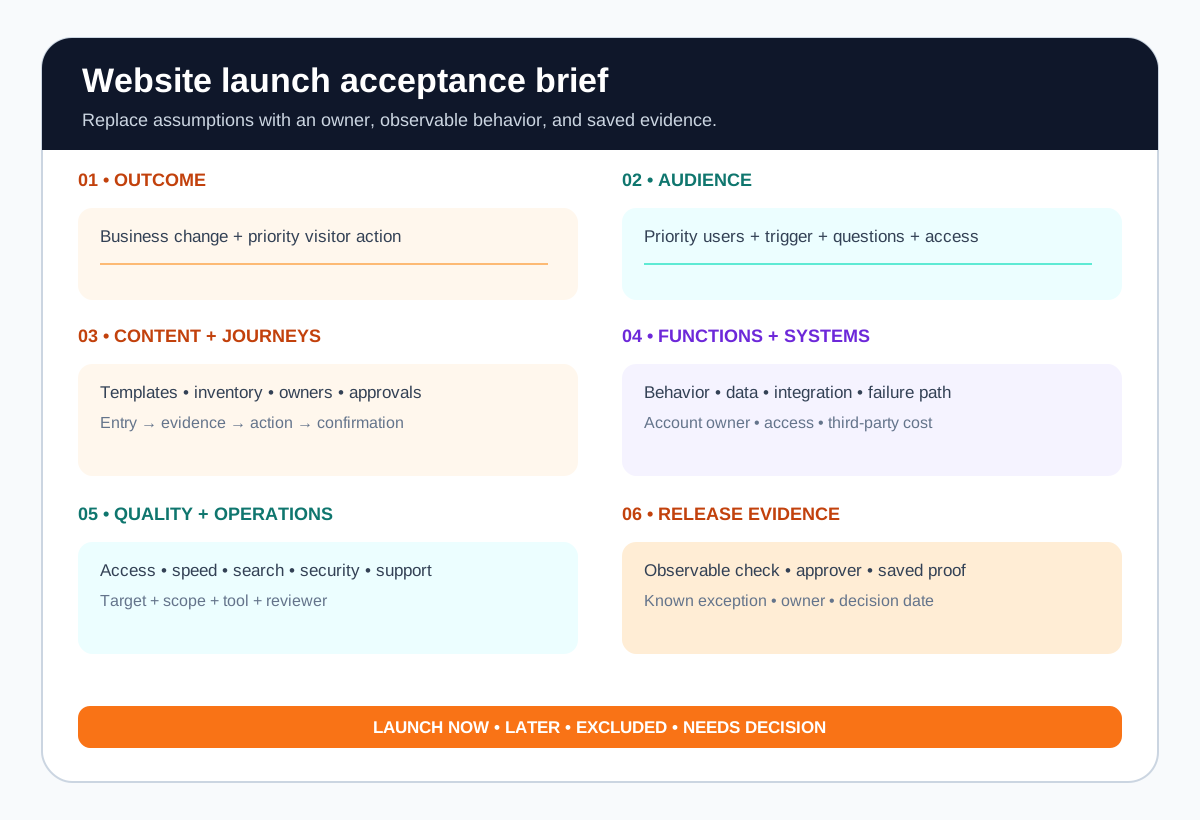
- Outcome: what must change, the priority action, baseline, and measurement owner.
- Audience: priority users, triggering situations, questions, evidence, and access needs.
- Content: inventory, page templates, migration decisions, asset gaps, owners, and approvals.
- Functions: complete scenarios, data destinations, integrations, exceptions, and confirmations.
- Quality: accessibility, performance, browser, security, search, and analytics checks.
- Operations: accounts, hosting, roles, backups, monitoring, support, and handover.
- Release: launch requirements, later ideas, approvers, evidence, and known exceptions.
Website requirements FAQ
What should be included in website requirements?
Include the business outcome, priority audiences and tasks, required content and page templates, functional behavior, integrations and data handling, accessibility and performance expectations, search requirements, analytics, content and technical ownership, migration needs, and observable acceptance checks. Separate launch requirements from later ideas.
Do I need every page written before website development starts?
Not always, but the team should know the content model, priority journeys, representative final copy, asset owners, approval process, and when remaining content will arrive. Design built around placeholder copy often breaks when real headings, proof, pricing, forms, and legal content appear.
How detailed should a website brief be?
Detailed enough that a developer can identify scope boundaries, risks, dependencies, and acceptance evidence without guessing the business process. Avoid prescribing implementation details you cannot justify. Describe the user need and required behavior first, then label genuine technical constraints separately.
Should accessibility and SEO be in the website requirements?
Yes. Name the accessibility target and testing approach, plus crawlability, canonical rules, redirects, metadata, structured content, page ownership, and measurement needs. These affect content, design, engineering, and launch—not only a final audit.
How do I compare website development proposals?
Give suppliers the same outcome, journeys, content inventory, functional scope, constraints, responsibilities, and acceptance checks. Then compare exclusions, assumptions, team responsibilities, migration approach, testing, handover, support, and change process instead of comparing headline totals alone.