
The short answer: make accessibility a testable delivery system
A useful website accessibility requirement names the user need, applicable content or interaction, required behavior, owner, evaluation method, acceptance evidence, and review trigger. Set a standards baseline such as WCAG 2.2, but do not stop at a conformance label or an automated score.
Scope representative page types, important user journeys, responsive states, content and media, forms, third-party tools, and the process that keeps the site accessible after launch. Evaluate during planning, design, development, content entry, and release—not only at the end.
Baseline
Version, level, scope, exceptions.
Evidence
Automation, human review, task testing.
Ownership
Build, content, accept, monitor, repair.
Cover seven workstreams, not a developer-only checklist
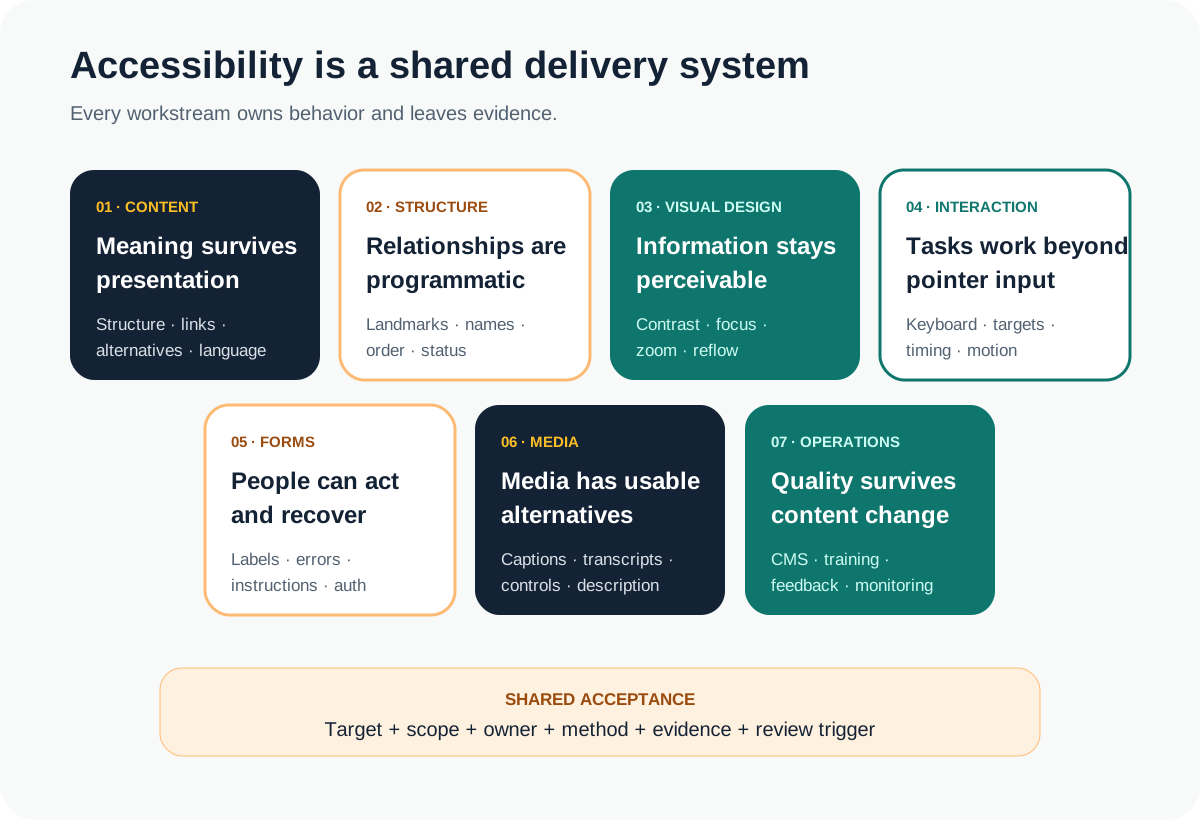
| Workstream | Decisions to define | Example evidence |
|---|---|---|
| Content | Headings, link purpose, plain language, alternatives | Content review on real pages |
| Structure | Landmarks, names, relationships, reading order | DOM and screen-reader review |
| Visual design | Contrast, zoom, reflow, focus, error cues | Responsive and high-zoom checks |
| Interaction | Keyboard path, target behavior, timing, motion | Keyboard task walkthrough |
| Forms | Labels, instructions, errors, recovery, authentication | Successful and failed task cases |
| Media | Captions, transcripts, controls, audio description | Media alternative review |
| Operations | CMS guardrails, training, feedback, monitoring | Owner and remediation record |
Tailor the matrix to what the site actually contains. A small brochure site may not need media or authenticated flows. A membership platform may need deeper work around complex forms, status messages, timeout behavior, and accessible authentication. Mark “not applicable” with a reason instead of silently dropping a lane.
Define the target, version, scope, and claim boundary
The Web Content Accessibility Guidelines 2.2 are technology-neutral, testable success criteria organized under perceivable, operable, understandable, and robust principles. Record the exact version and intended level. Level AA is a common project target, but it is not a substitute for determining applicable legal, procurement, sector, or customer obligations.
WCAG 2.2 added criteria addressing focus that is obscured, dragging alternatives, minimum target size, consistent help, redundant entry, and accessible authentication. The W3C summary of changes in WCAG 2.2 is a useful orientation, but each applicable success criterion still needs design, content, implementation, and testing decisions.
Define which domains, templates, languages, documents, embeds, account states, and third-party services are included. Record dependencies the delivery team cannot fully control, who owns them, and what fallback or replacement is acceptable. A vague “site must be accessible” line cannot reveal exclusions or make proposals comparable. Add the target and evaluation plan to a complete website requirements brief before design and platform decisions harden.
Scope journeys and states, not only a list of URLs
Pages are only one part of the experience. Identify the tasks a visitor must complete: understand the offer, navigate the site, find contact details, submit a form, recover from an error, control media, sign in, or complete a purchase. Include empty, loading, validation, success, failure, disabled, expanded, modal, and mobile-navigation states where they exist.
Build a representative sample across templates and components, then add every critical journey even if some screens repeat. Test at supported viewport sizes, high zoom, text enlargement, keyboard-only use, and with the assistive technologies and browser combinations appropriate to the audience and risk. Do not promise universal coverage from a tiny sample; document what was evaluated and what the evidence supports.
Build an evidence loop across the project lifecycle
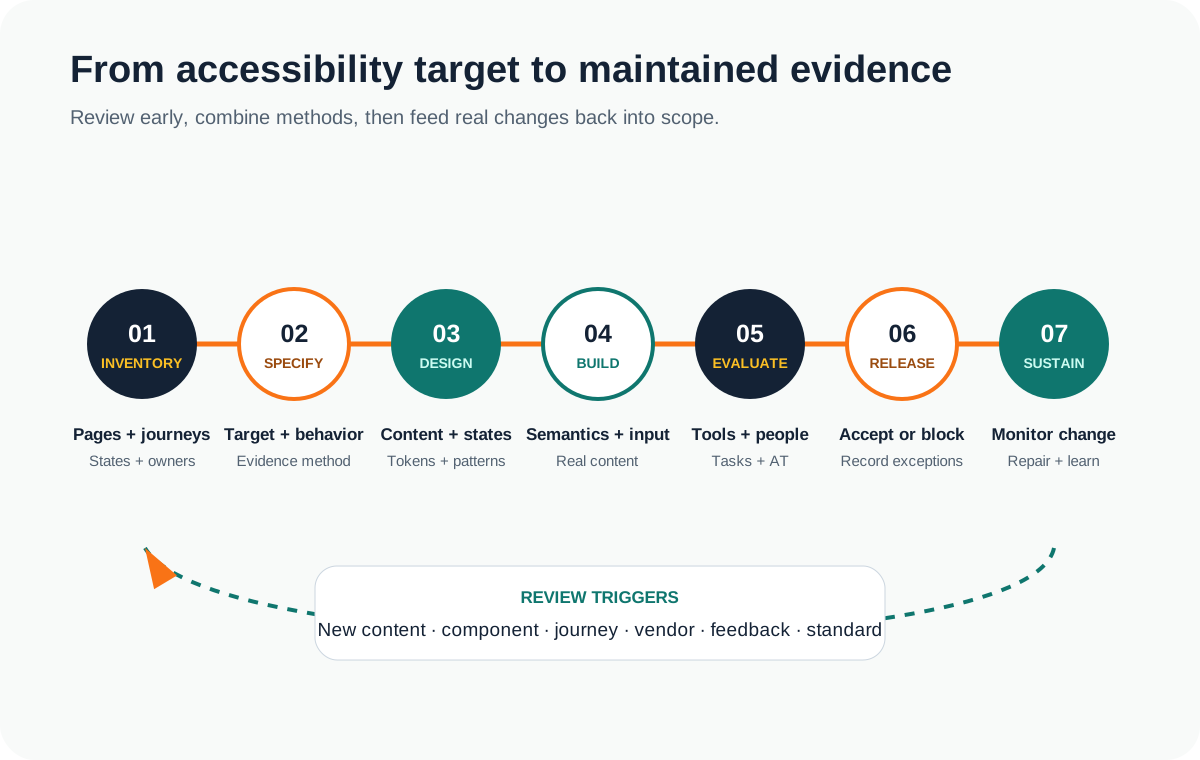
The W3C accessibility evaluation overview says evaluation should happen early and throughout development, and that no tool alone can determine whether a site meets accessibility standards. Use automation for fast, repeatable detection of supported rules; add design and content review, keyboard testing, manual inspection, assistive-technology task testing, and specialist evaluation where the scope requires it.
- Inventory. Map templates, components, content types, journeys, states, embeds, and owners.
- Specify. Translate the chosen baseline into requirements and acceptance examples for this site.
- Review before code. Check content models, wireframes, visual tokens, interactions, and component states.
- Test in layers. Combine automated regression checks with human evaluation of meaning and task completion.
- Decide release. Record resolved issues, residual barriers, owners, target dates, and accepted risk.
- Sustain. Re-check after component, content, integration, platform, or standards changes and user feedback.
For a formal conformance evaluation, the WCAG Evaluation Methodology overview provides a structured procedure. Decide whether the engagement needs a build-time acceptance review, a broader audit, a formal conformance evaluation, user research, or several of these. They answer related but different questions.
Assign ownership before the first content entry
Business or product owner
Sets target, scope, priorities, exceptions, and release decision.
Content and media owners
Maintain structure, alternatives, captions, instructions, and link meaning.
Design and engineering
Build reusable patterns, complete states, semantics, and keyboard behavior.
Evaluation owner
Defines methods, sample, environments, evidence, severity, and limitations.
Site operations
Monitors changes, feedback, third parties, regressions, and remediation.
Specialist advisers
Review legal, policy, procurement, or high-risk accessibility questions.
The W3C's planning and management guidance treats accessibility as an ongoing organizational activity: set objectives, assign responsibilities, provide skills and tools, evaluate regularly, prioritize issues, monitor, and incorporate feedback. Put those operating responsibilities in the scope and handover, not only the launch checklist.
Write requirements that connect behavior to evidence
Requirement formula
For [user and context], [content or component] must [required behavior], including [relevant states]. [Owner] verifies this with [methods and evidence] before [release gate] and reviews it when [change trigger] occurs.
“All images have alt text” is too broad and sometimes wrong: decorative images should usually be ignored by assistive technology, while complex informative images may need a nearby explanation. A stronger requirement distinguishes image purpose, content-owner guidance, CMS behavior, review evidence, and what happens when an alternative is missing.
Avoid five accessibility planning mistakes
- Treating accessibility as alt text. The real scope includes structure, interaction, forms, media, visual presentation, authentication, and operations.
- Using one tool score as acceptance. Automated coverage is valuable but partial; human judgment remains necessary.
- Auditing only after build. Content models, component behavior, and visual decisions are cheaper to correct before they multiply across templates.
- Ignoring third parties. Consent tools, schedulers, chat, maps, payments, and media players can sit inside a critical journey even when another vendor owns them.
- Stopping at launch. New campaigns, editors, components, plugins, and integrations can reintroduce barriers.
When the project also changes URLs, templates, navigation, and content, coordinate this plan with the website migration checklist so accessibility, search preservation, analytics, and release acceptance share the same inventory and owners.
For learning platforms, the learning management system requirements checklist extends this work into learner and author workflows, content packages, assessments, external tools, and defensible completion evidence.
Turn the checklist into a website accessibility brief
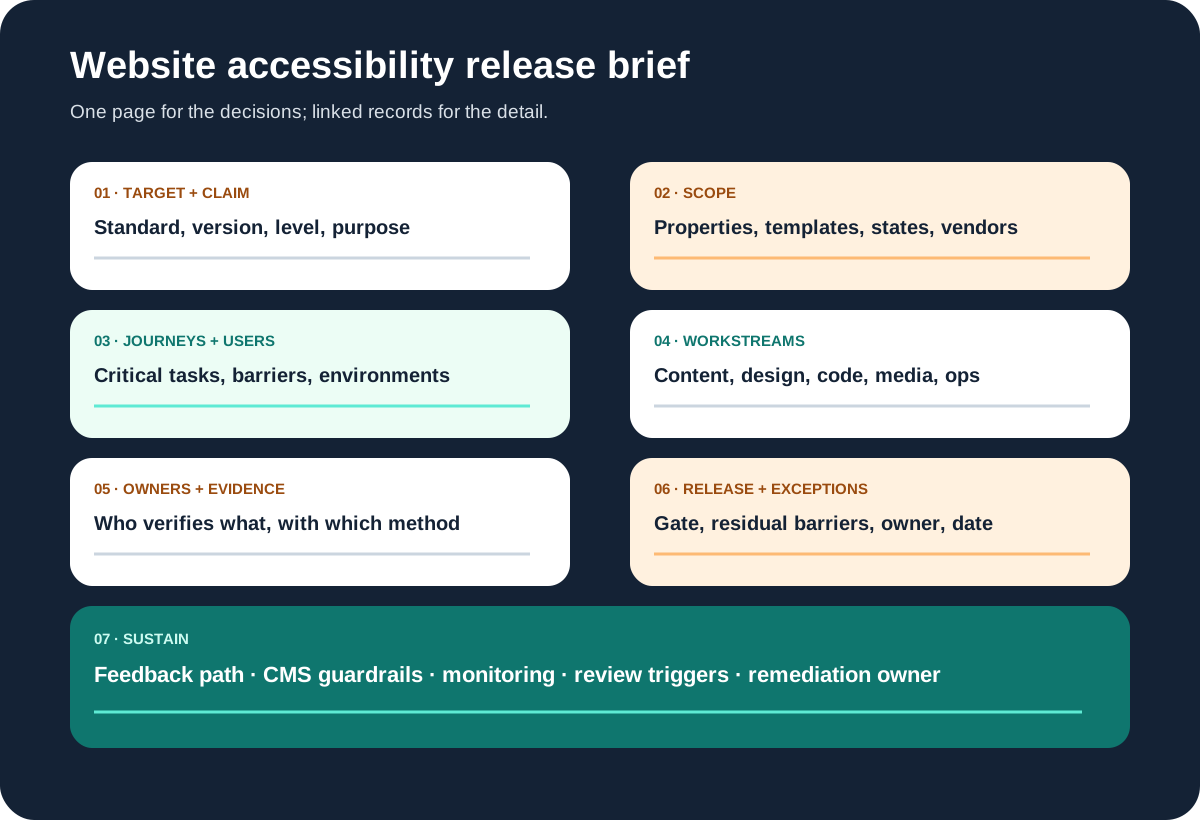
Keep the first brief to one reviewable page: target and version, included properties, representative page types, critical journeys and states, workstream requirements, third-party boundaries, evaluation methods and environments, owners, acceptance evidence, exceptions, feedback path, and monitoring triggers. Link detailed criterion mappings and test records rather than turning the brief into a second standards document.
Review it with the site owner, content lead, designer, engineering lead, evaluator, and appropriate legal or policy adviser before proposals or implementation. If the current site has known barriers, separate immediate high-impact repairs from the longer rebuild or content-governance plan.
If you need a new or redesigned site, Leeonex can help translate this brief into a focused website development scope with reusable components, content responsibilities, testing, and a maintainable handover. The engagement should still bring in specialist accessibility or legal review when the risk and claim require it.
If you already have a mixed findings list, the website accessibility remediation release concept study shows how a team could separate journey blockers, shared patterns, content work, and third-party constraints—then connect repairs to automated regression, knowledgeable human evaluation, explicit exceptions, and ongoing ownership. It is an educational concept, not a client audit or conformance claim.
Website accessibility requirements FAQ
What should website accessibility requirements include?
Website accessibility requirements should identify the standards baseline and conformance target, included pages and states, critical user journeys, content and media needs, keyboard and focus behavior, semantic structure, forms and errors, responsive and zoom behavior, third-party boundaries, testing methods, owners, acceptance evidence, exceptions, and post-launch monitoring.
Is WCAG 2.2 AA a legal guarantee?
No. WCAG 2.2 Level AA is a useful technical target, but a conformance target does not by itself determine every legal obligation or guarantee that every user can complete every task. Applicable law varies by organization, sector, audience, and jurisdiction. Obtain qualified legal and accessibility advice when compliance exposure matters.
Can an automated accessibility tool prove WCAG conformance?
No. Automated tools can quickly identify some issues and support regression checks, but they cannot evaluate every accessibility requirement or judge the quality of every experience. Combine automation with manual inspection, keyboard and assistive-technology testing, content review, and appropriately scoped evaluation by knowledgeable people.
When should accessibility testing happen in a website project?
Start during requirements and content planning, review designs and components before implementation, test representative templates and critical journeys during development, run broader evaluation before release, and continue checking after content, components, integrations, or standards change. Late testing turns preventable design decisions into expensive remediation.
Who owns website accessibility after launch?
Ownership is shared but should be explicit. Product or business owners set the target and risk decisions; designers and developers build accessible patterns; content and media owners maintain alternatives and structure; QA or specialists evaluate; and the site owner monitors templates, third-party changes, feedback, and remediation after launch.