
The short answer: migrate assets, not just pages
A safe website migration gives every valuable URL, piece of content, search signal, conversion path, integration, and measurement event an explicit destination. Inventory the current site, decide what stays or changes, build direct redirects where URLs move, prove parity on staging, define a launch and rollback gate, then monitor users and crawlers until the new site is behaving as intended.
The safest route is often to keep strong public URLs unchanged. A new CMS, frontend, hosting platform, or visual system does not require a new information architecture by default. Change a URL because the content decision requires it—not because the new platform generated a different slug.
Preserve
Keep the routes, meaning, proof, links, and events that already serve users.
Prove
Test destination, content, access, conversion, tracking, and response behavior.
Recover
Name rollback triggers, owners, evidence, and the path to a stable service.
Define what is moving before combining the risks
“Website migration” can mean a hosting move with identical URLs, a CMS replatform, a redesign, a domain change, an HTTP-to-HTTPS move, or a restructuring of paths and content. List each change separately. Record why it is needed, who owns it, what could fail, and how completion will be demonstrated.
Google’s current site-move guidance recommends changing one major thing at a time where practical. That separation is useful beyond SEO: when hosting, content, URLs, design, forms, analytics, and domain all change together, one failed outcome has many plausible causes.
If the core decision is still whether to repair the existing experience or replace its foundations, use the website redesign-or-rebuild framework first. Migration planning begins after the preservation boundary is understood.
| Change | Primary risk | Evidence before launch |
|---|---|---|
| Hosting only | Availability, headers, caching | Response and load tests |
| CMS or frontend | Content and feature parity | Route-level acceptance ledger |
| URL structure | Broken discovery and links | Complete redirect map and crawl |
| Domain | Ownership and signal transfer | Verified properties and cutover plan |
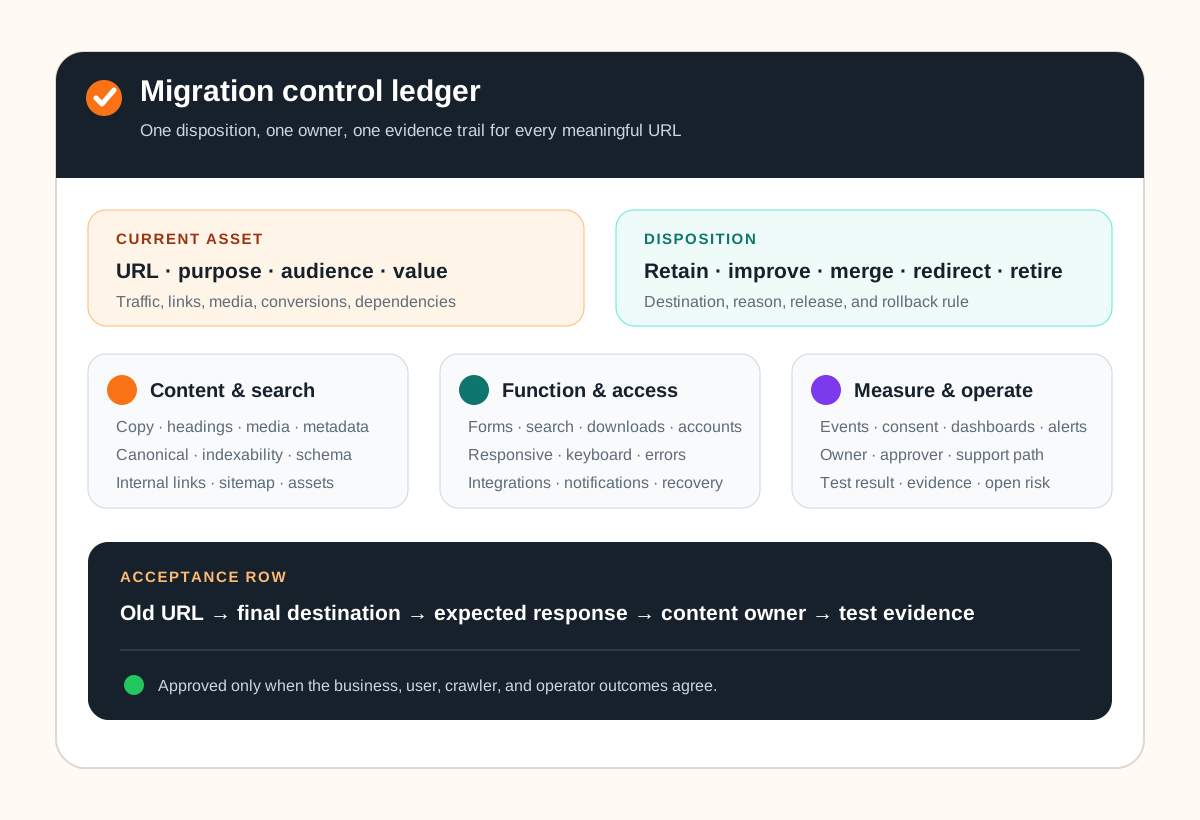
Build one migration control ledger
Start the URL inventory from several sources: current sitemaps, the CMS, analytics, search-console data, server logs, internal crawls, important backlinks, advertising destinations, and manually known campaign or utility pages. Include images, documents, feeds, scripts, and other public assets that have stable URLs or business value.
Give each meaningful URL one disposition: retain, improve, consolidate, redirect, or retire. Then record the destination, purpose, content owner, primary query or audience, inbound and internal-link importance, canonical, indexability, metadata, structured data, conversion action, analytics events, dependencies, accessibility acceptance, redirect rule, test result, and approver.
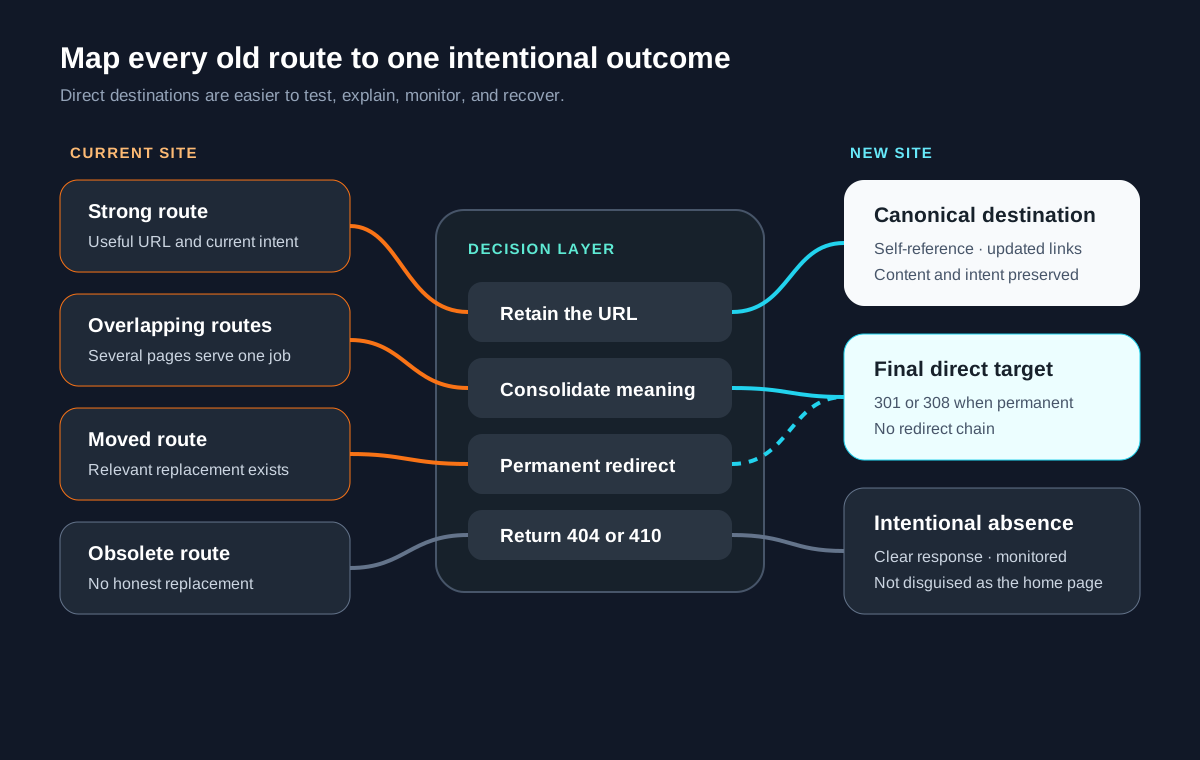
This is not a promise to recreate every low-value page. It is a way to make deletion and consolidation deliberate. A page can be retired when it has no useful replacement; the expected response may be 404 or 410 rather than an irrelevant redirect.
Map old routes directly to meaningful destinations
When a URL must change, map the old route to the most relevant final destination. Do not send many unrelated pages to the home page. Google notes that irrelevant mass redirects can confuse users and may be treated as soft 404s. Use server-side permanent redirects for permanent moves where the platform supports them, and update internal links so users and crawlers do not traverse a redirect chain.
The mapping also exposes content decisions. If five old pages become one stronger guide, record which useful sections, proof, calls to action, and inbound intent are preserved. If one page splits into several new routes, choose the primary destination rather than creating an ambiguous fan-out redirect.
Prove parity on staging without exposing staging to search
Protect staging with authentication or another access boundary. A temporary `noindex` directive can be a secondary safeguard, but it must not survive launch. Test with representative content and production-like integrations rather than empty templates.
Content and discovery
Compare headings, body copy, media, links, metadata, canonicals, hreflang where applicable, robots directives, structured data, sitemap membership, image discovery, pagination, and feeds. Run an internal crawl and compare the expected and actual URL sets.
Conversion and operations
Submit forms end to end. Verify validation, consent, spam controls, notification delivery, CRM or email handoff, thank-you state, failure recovery, and the person who will notice a missed lead. Test search, downloads, account flows, payments, and other revenue or service paths with both success and failure cases.
Accessibility and performance
Check keyboard order, focus, landmarks, labels, alternatives, contrast, zoom, responsive overflow, reduced motion, error messaging, and representative assistive-technology journeys. Use the W3C’s WCAG 2.2 as the current standard reference. Compare real page templates, not only the home page, under realistic network and device conditions.
Measurement
Document each decision event and where it should appear. Verify analytics configuration, consent behavior, campaign parameters, conversions, advertising pixels where approved, search-console ownership, dashboards, alerting, and release annotations. A migration is not measurable merely because a generic page-view event fires.
Use a launch gate with rollback and monitoring
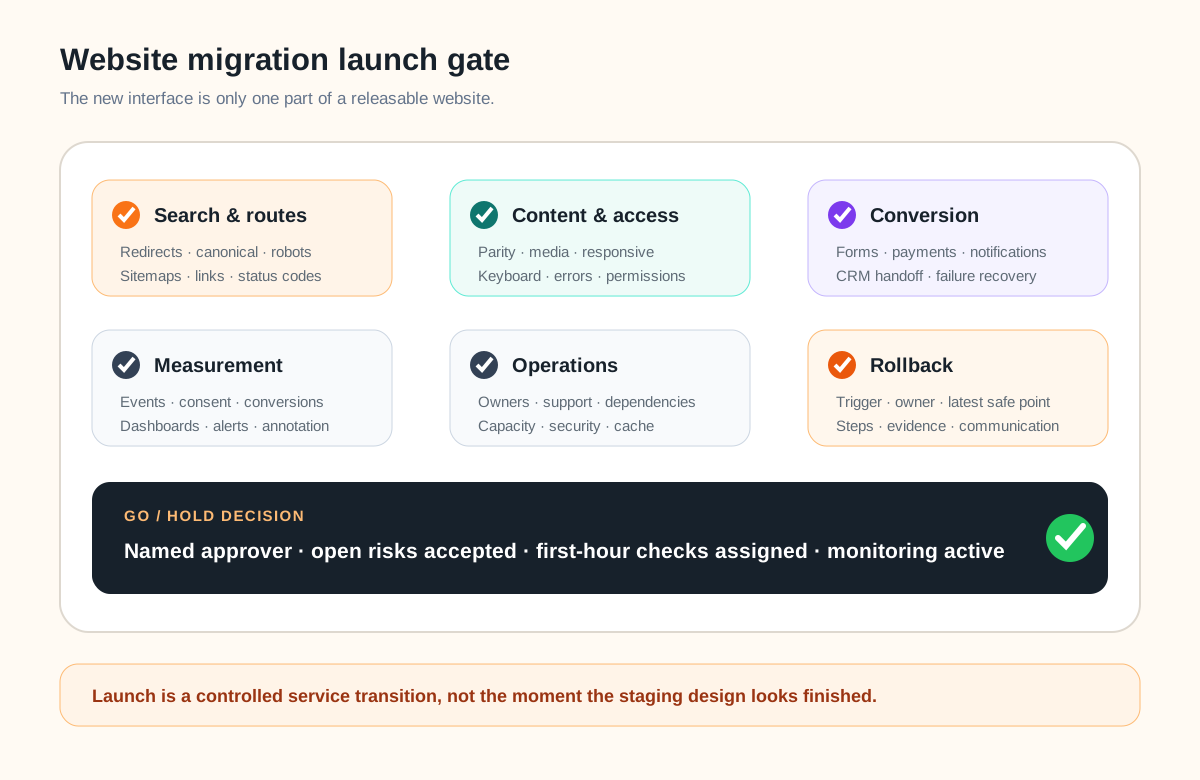
Set an owner for DNS or routing, deployment, redirects, content, forms, analytics, search checks, customer support, and the final go/no-go decision. Record backups, configuration snapshots, cache behavior, dependency status, rollback steps, the latest safe decision point, and explicit rollback triggers.
Immediately after launch, test high-value and sampled long-tail old URLs, direct new URLs, redirect status and destination, canonicals, robots, sitemap, forms, events, mobile rendering, assets, certificates, security headers, and clean server responses. Submit the new sitemap and use Search Console where appropriate. A Change of Address request is for a domain or subdomain move, not ordinary path changes.
Monitor crawl errors, redirect failures, indexed old and new URLs, search queries, organic landing pages, conversions, support issues, server errors, latency, and third-party integrations. Google recommends keeping redirects as long as possible and generally for at least one year; useful user-facing redirects may remain longer.
If the new site is also validating a new offer, separate the migration decision from the first-version decision. The landing-page-or-MVP guide helps define the smallest useful validation surface, while Leeonex’s company website development service supports teams that need the design, engineering, content system, and migration boundary handled as one maintainable release.
Website migration FAQ
What should a website migration checklist include?
It should include the migration type and owners; an inventory of current URLs, assets, search signals, forms, integrations, and analytics; a keep, improve, merge, redirect, or retire decision for each meaningful URL; staging acceptance tests; a direct redirect map; canonical, sitemap, robots, structured-data, and internal-link checks; launch roles and rollback triggers; and post-launch monitoring of users, conversions, crawling, indexing, and errors.
Can a website be redesigned without changing its URLs?
Yes, and preserving useful URLs often removes unnecessary migration risk. A redesign can change layout, components, CMS, hosting, and code while retaining the public URL structure. Change a URL only when the new information architecture or content decision provides a clear benefit, then map the old URL directly to its most relevant replacement.
How should old URLs be redirected during a migration?
Use a server-side permanent redirect such as 301 or 308 for a page that has permanently moved. Map each old URL to the closest relevant destination, avoid sending unrelated pages to the home page, avoid redirect chains, update internal links to the final URL, and test representative and high-value routes before and after launch.
Should a redesign and domain migration happen at the same time?
Separating major changes reduces the number of variables when something fails. Google recommends changing one thing at a time where practical. If business timing requires a redesign, CMS move, and domain change together, strengthen the URL inventory, acceptance evidence, rollback plan, monitoring, and ownership because diagnosis will be harder.
How long should website migration redirects remain active?
Google recommends keeping redirects for as long as possible and generally at least one year so signals can transfer as URLs are recrawled. From a user perspective, useful redirects may be worth keeping indefinitely. Update internal links and important controlled external links so visitors do not rely on the redirect hop.