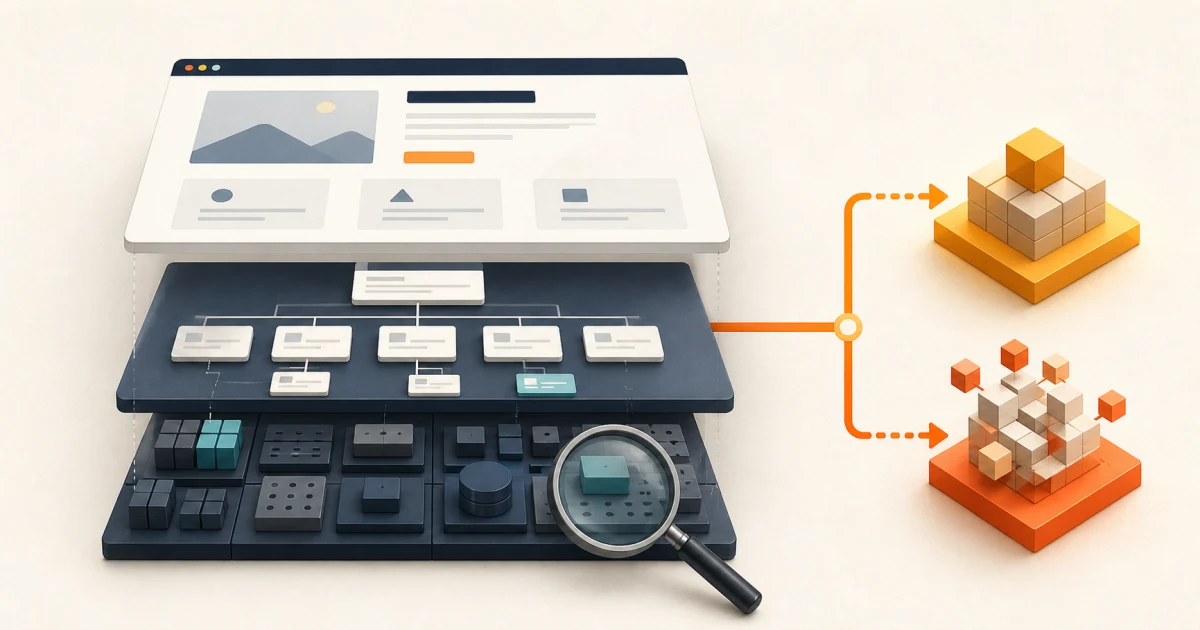
The short answer: redesign the experience; rebuild the blocked system
Choose a redesign when the platform, content model, integrations, and publishing workflow are healthy, but the site communicates poorly or makes key tasks difficult. Choose a rebuild when the technical foundation, page structure, editing model, security posture, or integrations cannot support the required result safely. Use a staged hybrid when only part of the system is blocking progress.
“The site feels old” is a symptom, not a project brief. A dated visual layer may need a focused refresh. An unclear offer may need new positioning and page architecture. A fragile CMS may need replacement even if the current design is acceptable. The right scope starts by separating the surface, structure, and system instead of treating every problem as a full rebuild.
| Evidence | Likely scope | Do not assume |
|---|---|---|
| Weak hierarchy, messaging, mobile layout, or calls to action | Redesign | The CMS must be replaced |
| Wrong page map, duplicated content, or inflexible content types | Structural redesign or hybrid | New colours will fix findability |
| Unsupported platform, unsafe updates, structural accessibility defects, or brittle integrations | Rebuild or replatform | Everything visible should start from zero |
Run a three-layer website constraint audit
Review evidence from the live site before vendors propose a solution. Use analytics and search data to find valuable pages, task testing to observe where people get stuck, editor interviews to expose publishing friction, and technical checks to identify platform risk. A single automated score cannot make the decision.
If the immediate concern is why qualified visitors are not becoming inquiries, begin with the website conversion audit checklist. It traces one entry page through measurement, decision evidence, form completion, receipt, and follow-up before the team commits to a redesign.
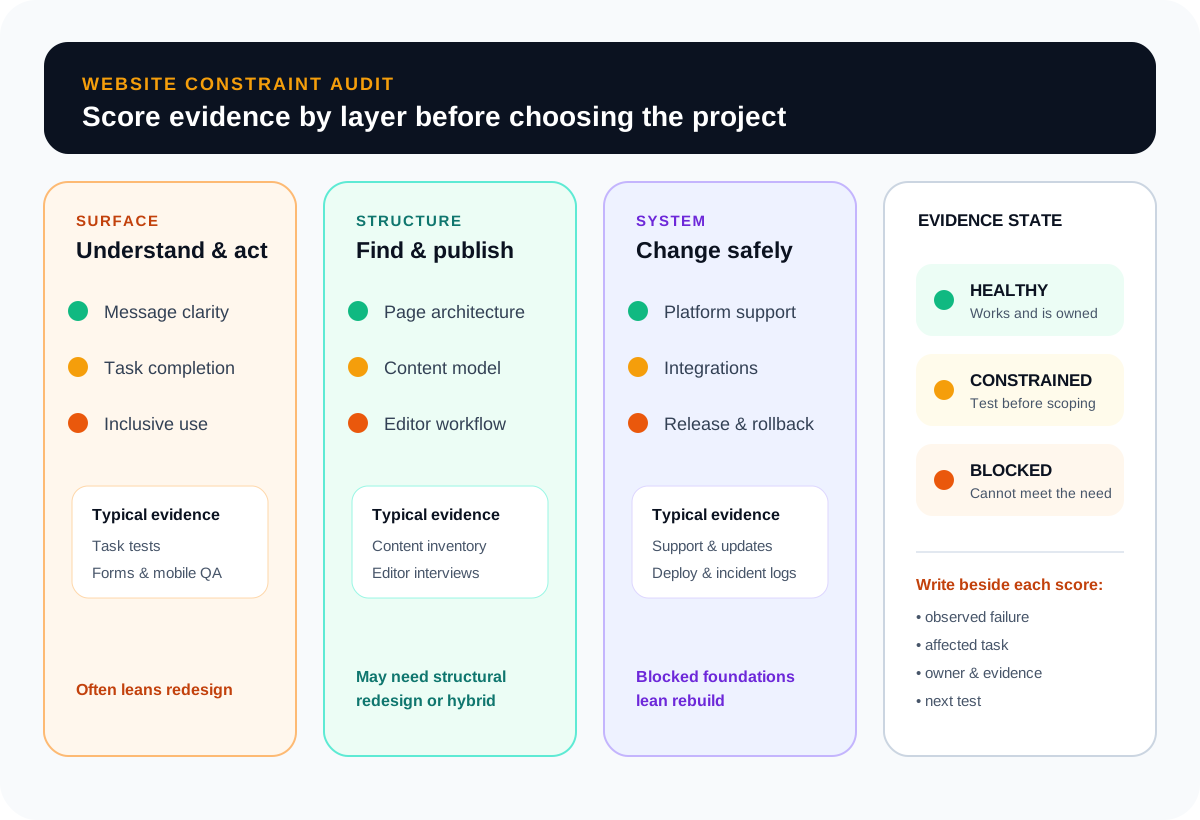
Surface: can visitors understand and act?
Test the pages that should create a business result. Can a qualified visitor identify the service, audience, outcome, evidence, and next step without assembling the story from several pages? Observe mobile navigation, form completion, keyboard use, focus states, contrast, and error messages. The W3C publishes WCAG 2.2 as testable, technology-neutral criteria; use the relevant conformance target in the project brief instead of promising that a visual refresh is automatically accessible.
Structure: are the right pages and fields available?
Map each audience to a task and each task to a page or journey. Review service boundaries, navigation labels, internal links, reusable content, and ownership. If editors repeatedly paste layout fragments into one rich-text field, the problem is not only presentation. The content model may need structured fields, reusable page types, preview, roles, and approval states. Leeonex's multi-location CMS concept study shows how shared service truth, local facts, page eligibility, and editorial ownership can be separated before a team creates a large route estate.
System: can the foundation change safely?
Check platform and dependency support, update procedures, hosting, deployment, backups, forms, consent, analytics, search, CRM and booking integrations, redirects, and rollback. Measure real-user performance where available. Google defines Core Web Vitals around loading, responsiveness, and visual stability and publishes the current metrics and recommended thresholds. Treat them as diagnostic evidence and user-experience targets, not as a guaranteed ranking or conversion result.
Compare four project options, not two
- Focused repair: correct a form, template, performance bottleneck, tracking gap, or critical accessibility defect when the rest of the system is sound.
- Experience redesign: improve messaging, hierarchy, interface, responsive behaviour, and conversion paths while retaining a maintainable platform and content model.
- Staged hybrid: preserve valuable URLs and content, rebuild constrained templates or publishing layers, and migrate in a controlled sequence.
- Full rebuild or replatform: replace the technical and content foundation when required capabilities cannot be delivered responsibly on the current system.
A company site that needs clearer service pages may fit Leeonex’s company website development path. A team publishing frequently may need an editor-centred CMS website. The headless-versus-traditional CMS guide helps define whether publishing and delivery should remain coupled, separate, or use a deliberate hybrid boundary. If the actual uncertainty is whether one new offer will attract action, a focused landing page may be the better test; the landing page or MVP decision guide explains how to match that artifact to the evidence required.
A rebuild should preserve proven value
Starting fresh visually does not justify discarding every URL, content asset, integration, or analytics baseline. Inventory the current system before creating the new page map. Mark each item preserve, improve, merge, replace, redirect, or retire, and record the evidence behind that choice.
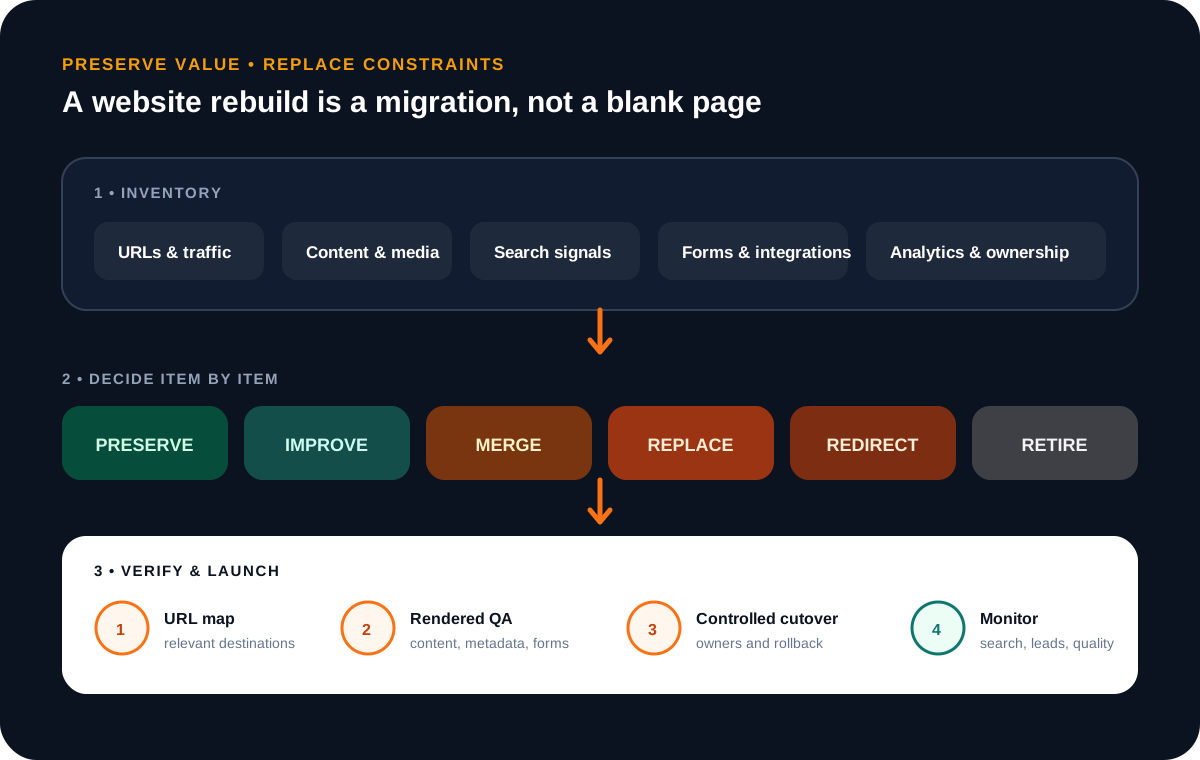
Preserve a URL when its content and purpose remain useful. Redirect a moved page to the closest relevant replacement, not automatically to the home page. Keep original analytics events or create an explicit measurement bridge. Re-test lead delivery, CRM fields, booking flows, consent, email notifications, and downloadable assets instead of assuming they survived the redesign.
When URLs, platforms, or domains will change, use the website migration checklist to turn that preservation work into a route ledger, launch gate, rollback plan, and monitored cutover.
Write the requirements before designing the home page
A comparable website estimate needs more than a page count. Define the job, audience, content system, behaviours, migration, and ownership. Otherwise one proposal may include research, copy structure, CMS modelling, redirects, and QA while another prices only templates that look similar in a presentation.
Use the website requirements checklist to turn those inputs into seven connected layers with named owners and observable launch evidence before comparing proposals.
- Business job: the inquiry, booking, purchase, application, or credibility decision the site must support.
- Audience and priority tasks: who arrives, what they need to understand, and the next useful action.
- Page and content model: required page types, reusable fields, relationships, search, and localization.
- Editing workflow: authors, reviewers, permissions, preview, publishing frequency, and training.
- Quality acceptance: supported browsers and devices, accessibility target, performance testing, privacy, security, and content approval.
- Migration: URL map, redirects, metadata, media, structured data, analytics, integrations, QA, rollback, and monitoring owner.
Treat launch as a controlled migration
Build and test the URL map before cutover. Crawl the existing site, include known campaign and linked URLs, and map every page to a relevant destination or an intentional removal. Google’s site-move guidance recommends preparing the new site, mapping old to new URLs, using server-side permanent redirects where possible, updating canonicals and internal links, submitting the new sitemap, and monitoring both versions.
Before release, render representative pages and verify title, description, canonical, indexability, headings, structured data, images, alt text, forms, analytics events, consent behaviour, error states, keyboard paths, redirects, and response codes. Save the old URL inventory, launch checklist, owners, and rollback rule. After launch, watch crawl errors, search visibility, lead delivery, performance, and user-reported issues using the same definitions captured before the project.
Common redesign and rebuild mistakes
Starting with visual references
Reference sites can express taste, but they do not identify the business task, content gap, or system constraint.
Replacing the CMS by fashion
Choose from editing, integration, support, ownership, and deployment needs—not the newest platform label.
Changing every variable at once
A simultaneous domain, CMS, URL, content, analytics, and design change makes failures harder to isolate.
Calling launch the outcome
Define observable visitor and editor tasks, quality gates, and post-launch measures before approving scope.
Complete this worksheet before requesting proposals
Fill it with evidence, not aspirations. Attach examples of a failed visitor task, editor workaround, integration incident, valuable page, or unsupported dependency. Mark unknowns openly; they belong in discovery rather than inside a fixed promise.
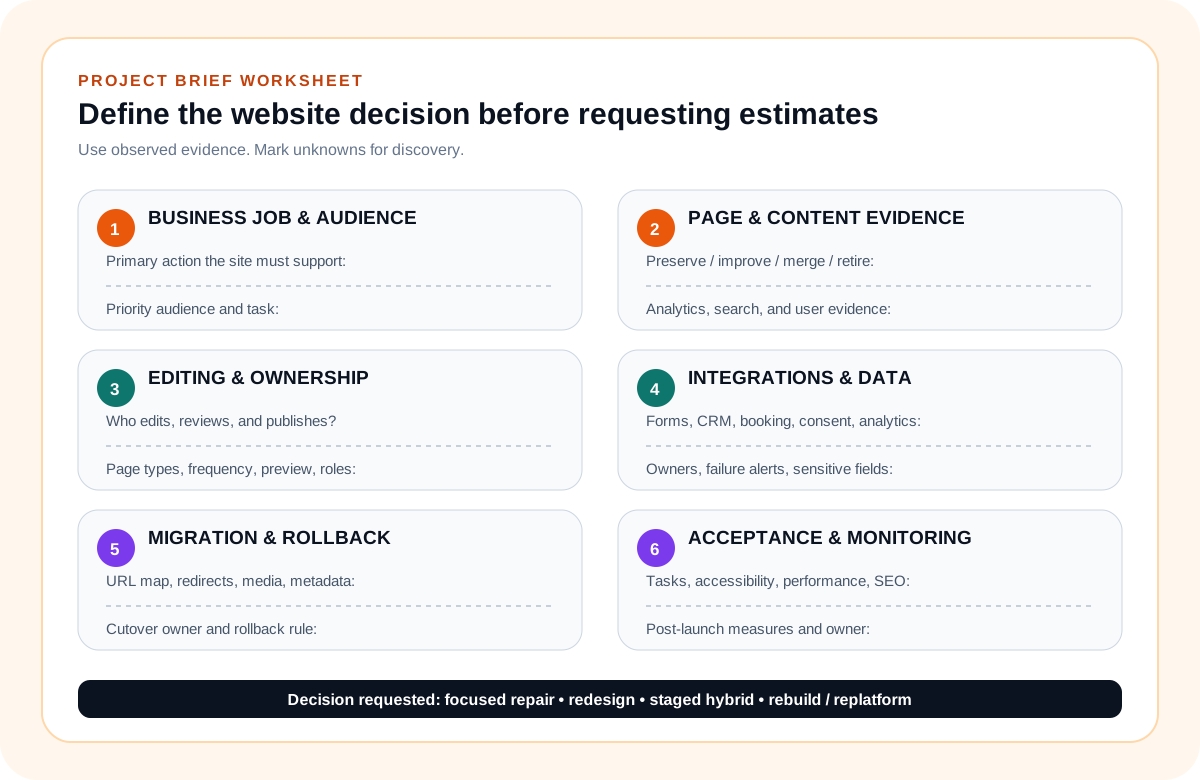
Once the worksheet is complete, ask each delivery partner to state what will be preserved, what will change, which unknowns require investigation, how migration will be verified, and who owns content and acceptance. Leeonex’s website development service starts from that kind of page, content, and conversion plan so the build solves the named problem instead of merely replacing the visible layer.
Website redesign or rebuild FAQ
What is the difference between a website redesign and a rebuild?
A redesign changes the site’s presentation, messaging, interaction, and conversion flow while retaining a viable platform and much of its structure. A rebuild replaces or materially restructures the technical foundation, content model, information architecture, or integrations because those layers cannot support the required result safely.
Can we redesign a website without changing its CMS?
Yes, when the CMS is supported, secure, maintainable, and flexible enough for the required page types and editing workflow. Validate templates, content fields, preview, permissions, integrations, and performance before assuming either that the CMS must stay or that it must be replaced.
Will rebuilding a website hurt SEO?
A rebuild creates migration risk when valuable URLs, content, internal links, metadata, structured data, images, or crawl rules change without a controlled map. Preserve useful URLs where possible, redirect moved pages to relevant destinations, update canonicals and sitemaps, test the rendered site, and monitor after launch.
Should every outdated website be rebuilt?
No. An outdated visual style may be resolved through a focused refresh or redesign if the content structure, CMS, integrations, security posture, and performance foundation remain healthy. Rebuild only where evidence shows that the current system blocks the business requirement or makes change unreasonably risky.
What should we prepare before asking for a website estimate?
Prepare the site’s primary business job, target audiences, priority pages, current analytics and search evidence, editing responsibilities, required integrations, accessibility and performance expectations, URL inventory, known technical constraints, and an approval owner. This makes redesign and rebuild estimates comparable.