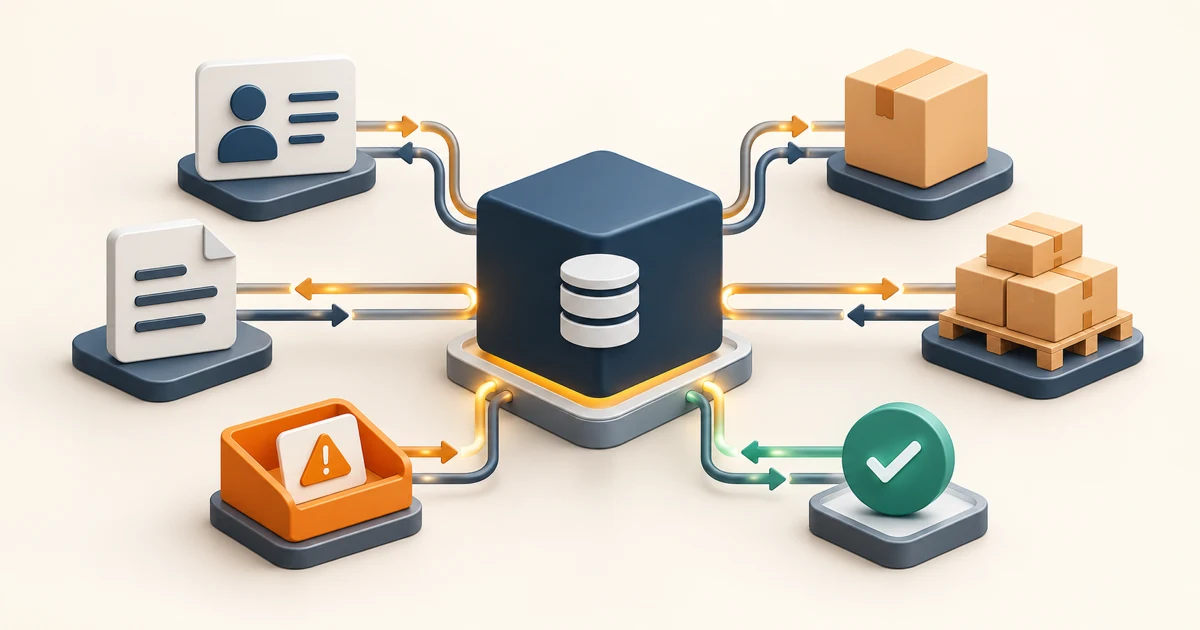
ERP integration requirements should describe a business transaction, not merely a connection
A complete ERP integration requirement identifies the business event and intended result, authoritative system and fields, stable identifiers, data contract, timing and volume, security, success acknowledgement, failure states, retry and recovery, reconciliation, accountable owners, cutover plan, monitoring, and acceptance evidence. “Sync customers” or “connect our storefront to ERP” leaves the risky decisions unresolved.
Start with one transaction such as creating an accepted sales order, updating available-to-promise stock, sending a shipment, or posting an approved invoice. Trace its ordinary path and the cases where a reference is missing, data is duplicated, one system is unavailable, or the result is uncertain. Only then choose API, event, file, queue, middleware or custom code.
Use this guide for an ERP-to-commerce, CRM, warehouse, procurement, reporting or custom application boundary. The broader API integration checklist covers general interfaces; this article adds ERP transaction ownership, reconciliation, cutover and operating control.
Give every ERP transaction ten explicit fields
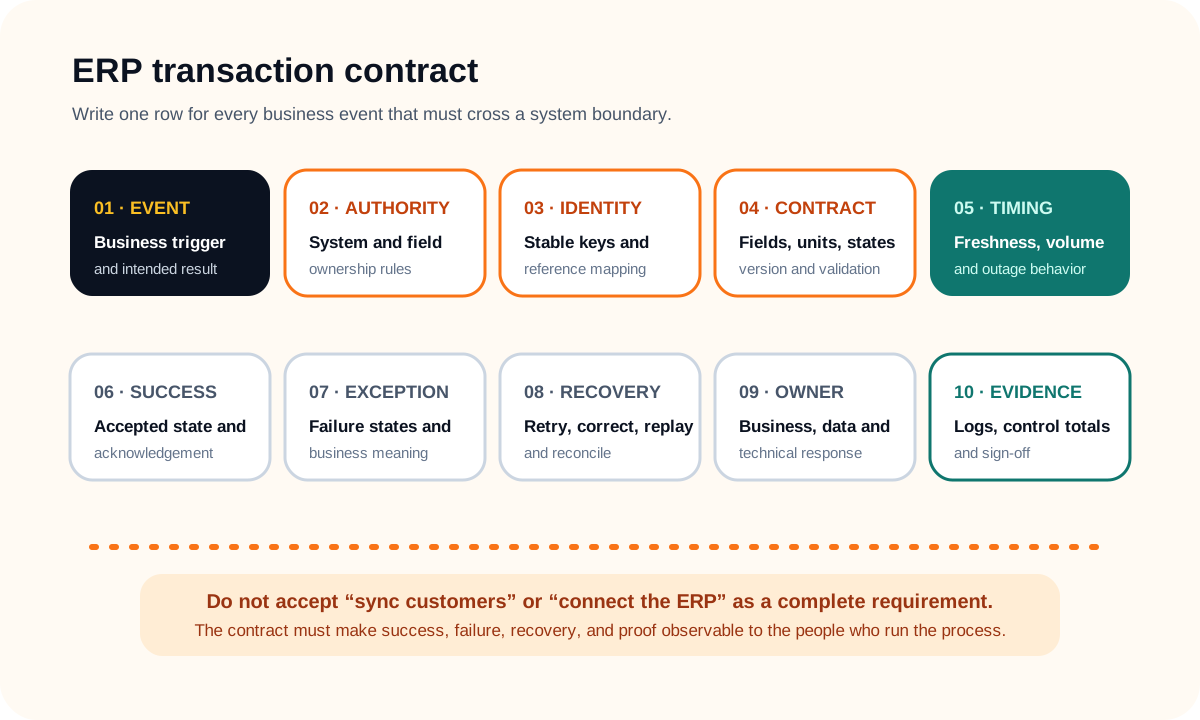
Write one row per transaction: business event, authority, identity, data contract, timing, successful outcome, exceptions, recovery, owners and proof. Split a vague requirement when different records have different clocks or consequences. A customer-master update and a checkout stock lookup should not inherit the same design simply because both touch ERP.
Microsoft's current Dynamics 365 guidance similarly treats data synchronization as an operating process with initial and recurring synchronization, failure monitoring and correction. See its official data synchronization overview. The specific technology will vary, but a requirement should still cover all four responsibilities.
Cover nine ERP integration requirement lanes
| Lane | Define | Acceptance evidence |
|---|---|---|
| Business transaction | Trigger, preconditions, intended result and operational consequence | Business owner confirms the before-and-after state for real examples |
| Authority | System and field owner, permitted writers and conflict policy | Competing edits resolve by an explicit rule, not last-write accident |
| Identity | Customer, vendor, item, location, order and reference keys | Records match without names, row positions or manual guesswork |
| Data contract | Fields, types, units, currency, timezone, states, version and validation | Invalid and changed payloads fail visibly with useful reasons |
| Pattern and capacity | Direction, freshness, peak volume, batch size, throttling and outage behavior | Representative load meets the agreed business window |
| Security | Authentication, authorization, secrets, network, data minimization and audit | Access is least-privileged, rotatable and reviewable |
| Reliability | Acknowledgement, idempotency, ordering, retries, dead letters and replay | Duplicates and uncertainty cannot create an uncontrolled business effect |
| Reconciliation | Control totals, comparison scope, tolerance, cadence and exception owner | Drift is detected, explained, corrected and closed |
| Lifecycle | Environments, test data, backfill, cutover, monitoring, changes and support | The team can launch, operate, change and retire the interface safely |
Choose the integration pattern from the business clock
Define the maximum useful age of each fact and what happens during an outage. A checkout may need a current stock or credit response before it can promise an order. Product enrichment, customer updates, approved invoices and reporting extracts can often arrive asynchronously or in scheduled batches. “Real time” is not a requirement until the team defines a deadline and the cost of waiting or being stale.
Microsoft documents synchronous OData and custom-service options alongside asynchronous batch patterns in its official finance and operations integration overview. Its broader integration guidance also distinguishes lower-volume synchronous interfaces from large-volume data packages and event or queue-based processing. Treat vendor limits as inputs to testing, not universal performance promises.
Decide whether an integration is one-way, bidirectional, request-response, event-driven, batch, virtualized or embedded. Bidirectional sync adds conflict responsibility; batching adds latency; a synchronous dependency adds availability risk. If a managed integration platform may fit, compare it with custom code using the iPaaS versus custom integration guide.
Design failure, reconciliation and recovery together
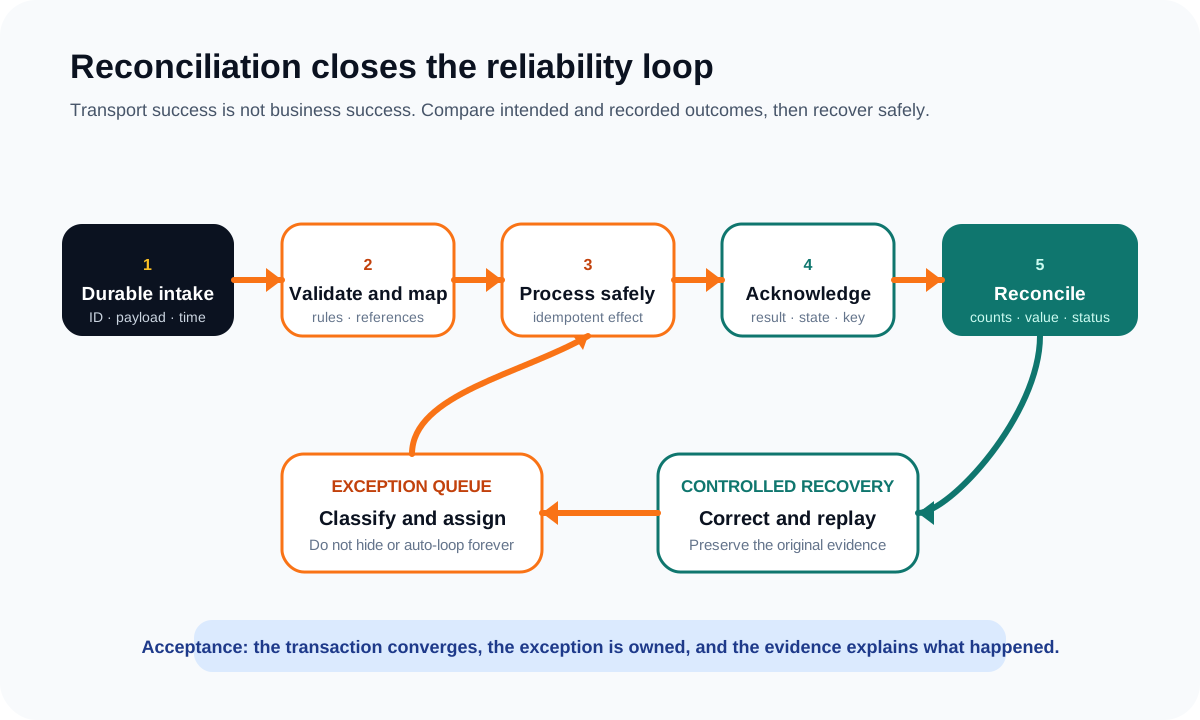
Persist enough information to distinguish received, validated, accepted, rejected, applied and reconciled. A timeout creates an unknown result, not automatic failure. Retrying without a stable key or state check can duplicate an order, invoice, shipment or financial posting. Define idempotency at the business effect, not only the HTTP request.
Classify errors into retryable technical failures, correctable data problems, missing prerequisites, authorization failures, business rejections and uncertain outcomes. Each class needs a limit, owner, alert, customer or operator message, correction path and replay rule. Do not leave failed records in a log that only developers can interpret.
Reconciliation independently compares what should exist with what each system recorded. Use identifiers, counts, quantities, values and statuses appropriate to the transaction. Set a cadence and tolerance, retain comparison evidence, and close exceptions only after systems converge or an authorized person accepts the difference. This is especially important for commerce, procurement and reporting boundaries such as those in the procure-to-pay requirements guide.
Plan initial load, cutover and day-two support as one release
Decide which records and history will be loaded, cleansed, transformed or left behind. Rehearse the sequence with representative volume and measure each step. Define the freeze window, delta capture, credential and endpoint switch, control totals, business sign-off, rollback trigger and ownership of transactions created during the transition.
Production readiness includes dashboards for throughput, latency, error class, queue age and reconciliation gaps; alerts with business impact; a searchable transaction trail; support runbooks; access to replay tools; retention rules; and a change process for ERP releases, schema revisions and new business rules. Test secret rotation and an unavailable ERP before go live, not during the first incident.
Keep scope honest. The first release can support one transaction and one operating team if it includes complete recovery and proof. It should not claim to “integrate ERP” while silently excluding corrections, backfill, monitoring or support.
Complete this ERP integration acceptance worksheet
- 1Transaction: trigger, source actor, intended result and business consequence if late or wrong.
- 2Authority: owning system and field, permitted writers, version rule and conflict owner.
- 3Identity and contract: keys, references, fields, units, time, states, validation and version.
- 4Pattern: direction, business deadline, expected and peak volume, throttling and outage behavior.
- 5Failure: duplicates, ordering, timeouts, missing references, partial batches and uncertain results.
- 6Recovery: retry limits, exception queue, correction rights, replay guard and customer impact.
- 7Reconciliation: comparison keys, totals, tolerance, cadence, evidence and closure owner.
- 8Release and operation: environments, sample data, backfill, rehearsal, sign-off, rollback, monitoring and support.
Attach sample source and target records, error examples, control totals and named owners. Ask every vendor or delivery team to demonstrate the same ordinary and failure scenarios. Mark assumptions as unknown until the ERP version, licensed modules, supported interfaces, limits and environment behavior are verified in current vendor documentation and a representative test environment.
ERP integration requirements FAQ
What should ERP integration requirements include?
Include the business transaction, source and destination, system and field authority, identifiers, schema and mapping, timing and volume, security, validation, acknowledgement, idempotency, ordering, retries, exception ownership, reconciliation, historical backfill, test data, environments, cutover, monitoring, support, change management, and acceptance evidence.
Does an ERP integration need to be real time?
Only when the business decision cannot safely wait. Current stock at checkout may need a synchronous lookup, while product updates, customer masters, invoices, or reporting can often move asynchronously or in batches. Define the maximum useful age and outage behavior for each transaction before choosing the pattern.
Who owns data when ERP and another system can both edit it?
Assign authority by object and sometimes by field. If both systems can edit the same fact, define precedence, version or timestamp rules, permitted states, conflict handling, and the operator who resolves ambiguity. Bidirectional synchronization without an explicit conflict contract creates quiet drift.
How should an ERP integration be tested before cutover?
Test ordinary transactions plus missing references, duplicates, stale versions, invalid units, partial batches, timeouts, throttling, out-of-order events, ERP downtime, credential rotation, mapping changes, replay, and reconciliation. Rehearse initial load and cutover with representative volumes, named sign-off, control totals, rollback triggers, and support handover.