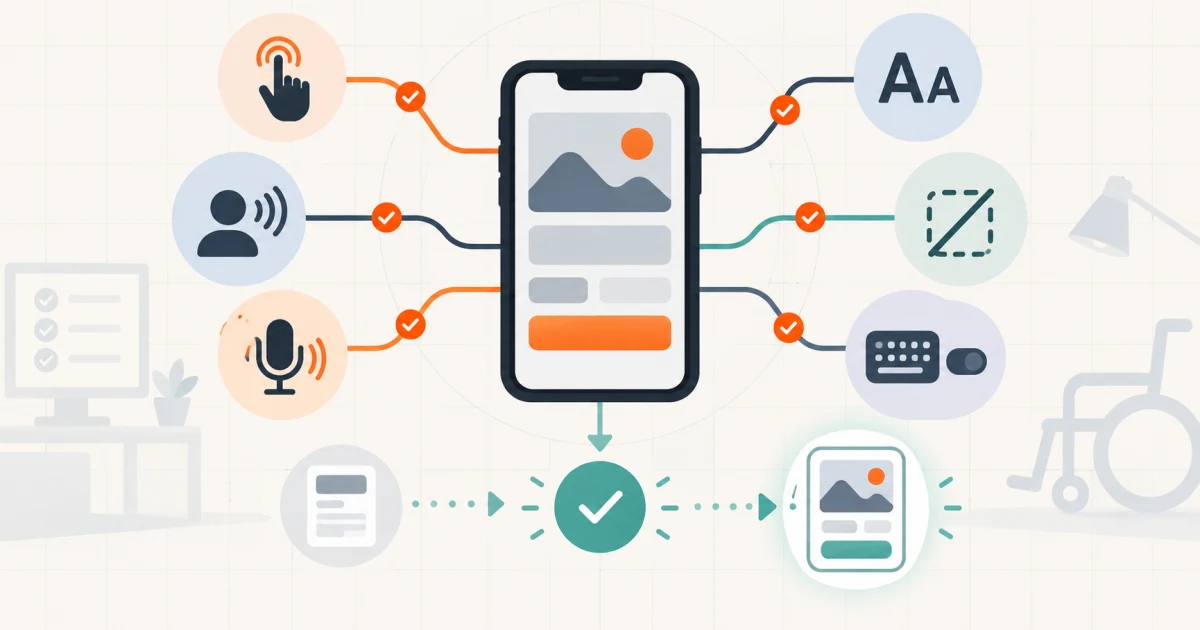
Specify accessible journeys, access methods, states, and proof
Mobile app accessibility requirements should define which users and standards matter, which complete journeys and states are in scope, how content and controls are exposed to assistive technologies, how text, touch, voice, switch or keyboard input, motion, media, errors, and time limits behave, and which real-device evidence is required before release. “Follow WCAG” or “support screen readers” is not a build-ready requirement.
Start with one priority task—sign in, book, pay, submit, approve, message, or recover an account. Run it through first use, loading, empty, success, validation, denied, offline, expired, and recovery states. Then repeat it with relevant access methods. This exposes journey failures that a control-by-control checklist misses.
Use this guide with the broader mobile app requirements checklist. That article defines product scope and operating boundaries; this one turns accessibility into release criteria across the native or cross-platform experience.
Set the target without pretending one document covers all risk
Name the app surfaces—native iOS, native Android, cross-platform views, embedded web content, authentication providers, payment sheets, maps, documents, media, notifications, widgets, and support channels. Record supported OS versions, device classes, orientations, locales, text settings, input methods, and the critical journeys that must work.
W3C's guidance on applying WCAG 2.2 to mobile applications maps WCAG Level A and AA concepts to native, mobile-web, and hybrid apps. It explicitly describes itself as informative guidance, not a standard that by itself establishes mobile conformance. Use its success-criterion mapping as a technical baseline alongside platform guidance, product context, user research, contracts, procurement needs, and qualified legal or accessibility advice where required.
State the target version and review date. Accessibility guidance, operating systems, components, and third-party SDKs change. Keep an exception register with affected journeys, user impact, workaround, owner, approval, target fix, and retest evidence. “Known issue” without an owner and release decision is not a controlled exception.
Build a journey-by-access-method matrix
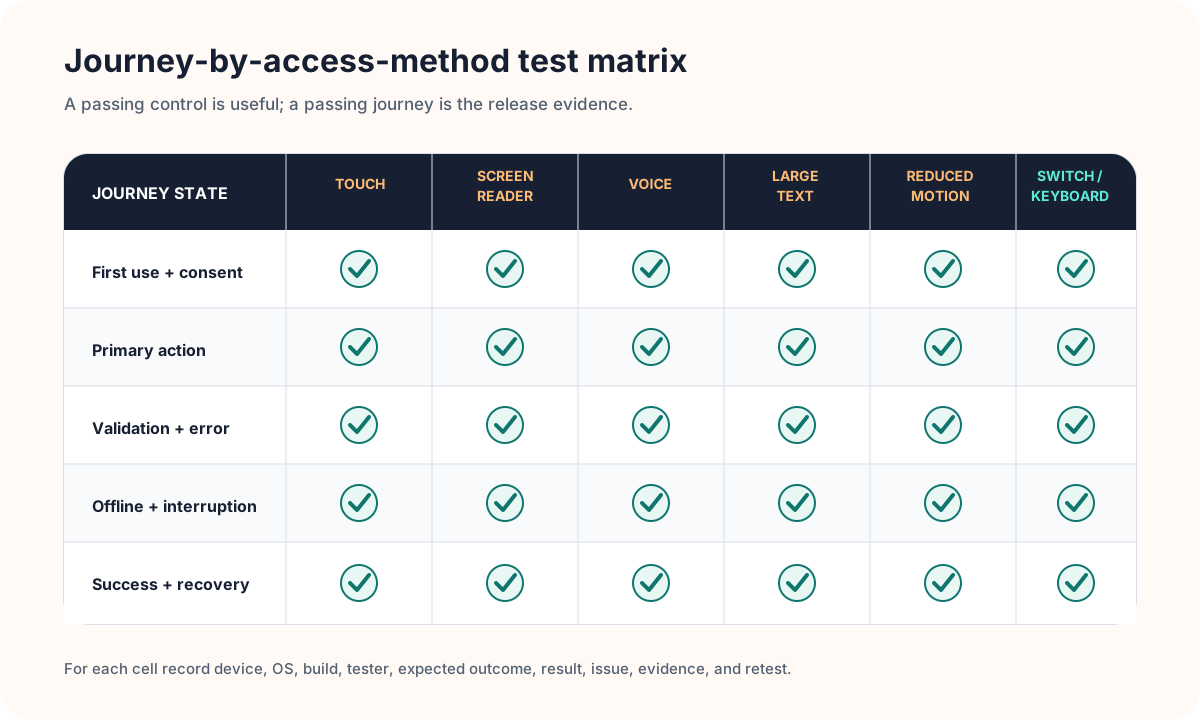
Rows should be product journeys and important states, not only screens. Columns should be the access methods relevant to the audience and platforms: direct touch, larger text and display settings, VoiceOver, TalkBack, voice control, switch access, external keyboard, reduced motion, captions or transcripts, and landscape where supported. Assign a tester, device, build, expected outcome, evidence, issue, and retest result.
Prioritize by user harm and business importance. Authentication, consent, purchasing, payments, safety actions, communication, primary creation or submission, and recovery usually deserve deeper coverage than decorative or rarely reached surfaces. Include a path to report a barrier without forcing the same inaccessible interaction that failed.
Cover eight mobile accessibility requirement lanes
| Lane | Define | Acceptance evidence |
|---|---|---|
| Semantics | Names, roles, values, states, headings, groups, relationships, announcements | Assistive technology exposes accurate purpose and change without visual inference |
| Navigation | Reading order, focus movement, focus return, modals, tabs, lists, escape and back | A user completes the journey without lost, trapped, or surprising focus |
| Visual | Text scaling, clipping, contrast, non-color cues, zoom, dark mode, orientation | Content and actions remain perceivable at supported settings and sizes |
| Touch and gestures | Target size, spacing, drag, multipoint, swipe, long-press, device-motion alternatives | Every required action has a discoverable and operable alternative |
| Alternative input | Voice labels, switch traversal, external keyboard, shortcuts, input focus | Visible labels and programmatic names support reliable command and navigation |
| Time and motion | Timeout warnings, extension, reduced motion, flashing, autoplay, interruption | Users can finish safely without avoidable motion or silent expiry |
| Content and media | Plain labels, instructions, errors, captions, transcripts, audio description, localization | Meaning and recovery do not depend on one sense or language pattern |
| System and release | Permissions, authentication, notifications, third parties, tests, exceptions, feedback | Priority journeys pass the agreed device and access-method matrix |
Requirements should describe behavior, not only component properties. A date picker may have labels and still be unusable if focus jumps unpredictably, a selected date is not announced, errors cannot be found, or the only alternative is a complex gesture. Write acceptance criteria around the user's task and observable outcome.
Authentication and permissions deserve special treatment. Avoid inaccessible CAPTCHAs, unexplained biometric-only paths, disappearing one-time-code context, unlabeled passkey actions, and timeouts that erase work without warning. Pair the journey with the mobile authentication requirements checklist when sign-in and recovery are material to release.
Use platform conventions before inventing custom interaction
Prefer native semantics and familiar controls where they meet the product need. Custom components must reproduce names, roles, states, actions, focus behavior, hit areas, dynamic text, contrast, input support, and platform feedback. Visual parity between iOS and Android does not require identical accessibility mechanics; the user experience should respect each platform.
Apple's app accessibility testing guidance recommends identifying the main tasks on each screen, creating a device-and-assistive-technology matrix, and testing with tools such as VoiceOver, Voice Control, and Switch Control. It also emphasizes physical-device testing for relevant technologies.
Android's accessibility testing guidance calls for manual testing with accessibility services, analysis tools, automated tests, and user testing. Treat those as complementary evidence. A scanner can flag a missing label; it cannot decide whether the label, focus order, recovery path, and whole task make sense together.
Layer automated checks with manual and user evidence
Put inexpensive checks close to implementation: lint and static analysis, component tests for semantics, UI tests for focus and state, contrast verification, screenshot review at text scales, and regression coverage for reusable patterns. Fail the build on agreed critical rules, but keep results triaged so noisy tooling does not become a ignored dashboard.
Manual testing should complete priority journeys using only the chosen access method. Verify exploration and linear navigation, order and grouping, announcements, labels and hints, editable controls, custom actions, errors, loading, dynamic updates, interruption, rotation, text scaling, reduced motion, and return after backgrounding. Test real content, long labels, empty and error states, not only the happy-path demo account.
Involve people who use assistive technologies when the product, audience, and risk warrant it. Define recruitment, consent, privacy, devices, tasks, facilitation, compensation, issue handling, and how findings affect release. User testing adds lived evidence; it does not transfer accountability away from the product team.
Run accessibility as a release and maintenance loop
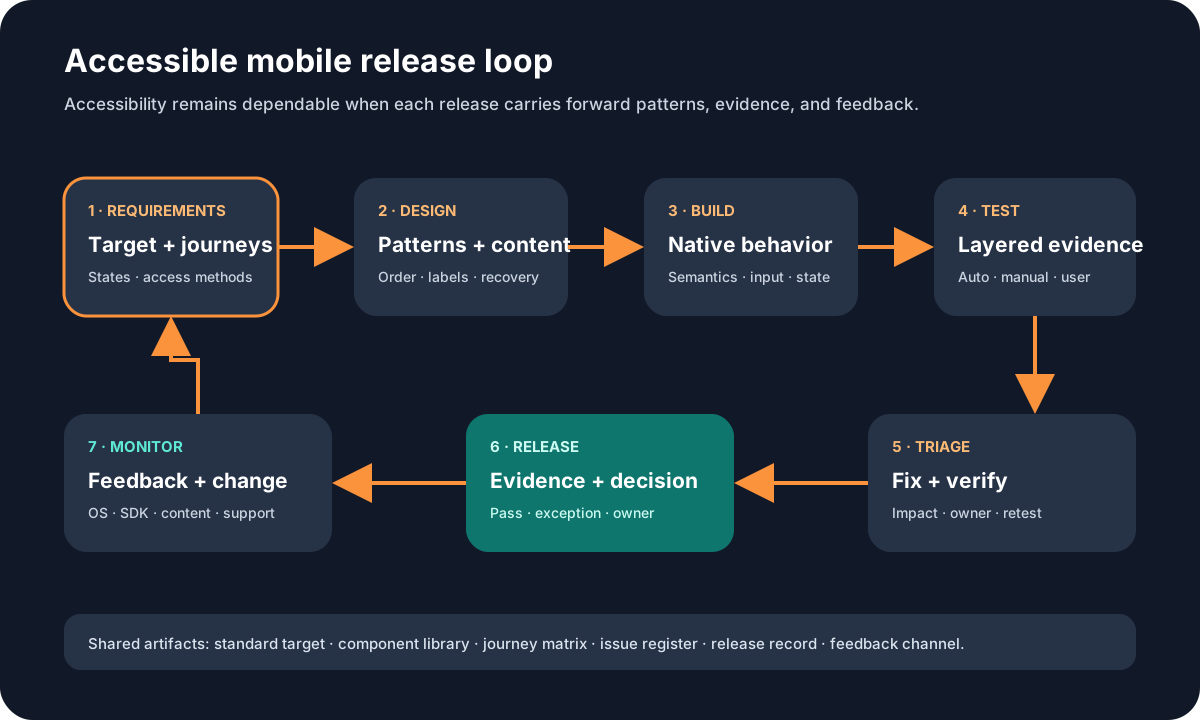
Give product ownership to the target and priority journeys; design ownership to patterns, content, and interaction; engineering ownership to semantics and platform behavior; QA or specialist ownership to the matrix and evidence; and release ownership to the decision on unresolved barriers. Name one accountable owner for exceptions and post-release feedback.
The release record should include build, devices, OS versions, journeys, access methods, tools, testers, results, unresolved issues, severity, workaround, approval, and retest evidence. After launch, monitor support and accessibility feedback, component and OS changes, third-party SDK updates, analytics for journey abandonment where appropriate, and regressions in the agreed test suite.
If the app shares content or authentication with a website, keep the targets connected without assuming they are identical. The website accessibility requirements guide covers browser, content, keyboard, responsive, and publishing concerns that may sit beside the native release.
Use this accessible mobile release worksheet
- Target: Which standard version, level, platform guidance, contracts, and specialist decisions apply?
- Scope: Which apps, surfaces, OS versions, devices, locales, settings, and third parties are included?
- Journeys: Which tasks and loading, empty, error, denied, offline, expired, and recovery states matter?
- Access methods: Which screen readers, text settings, voice, switch, keyboard, motion, media, and orientation cases apply?
- Patterns: Which reusable controls, navigation rules, content conventions, and platform behaviors carry the target?
- Evidence: Which automated, manual, specialist, and user tests prove each acceptance case?
- Exceptions: Which barriers remain, with what impact, workaround, approval, owner, fix date, and retest?
- Maintenance: Who handles feedback, regressions, platform changes, dependencies, and future release gates?
Keep the first scope honest. It is better to prove one complete, high-value journey across its meaningful states and access methods than to mark an entire app “accessible” after a shallow scan. Reuse the accepted patterns in the next journey and keep the release matrix alive.
A focused mobile app development engagement can combine that matrix with platform architecture, product scope, component work, and release evidence without treating accessibility as a final polish task.
Frequently asked questions
What should mobile app accessibility requirements include?
Include the target standard and product scope, priority journeys and states, semantic names and roles, reading and focus order, text scaling, contrast and non-color cues, touch and gesture alternatives, screen reader, voice, switch or keyboard access, motion and timeout behavior, media alternatives, errors, authentication, platform conventions, third-party boundaries, testing methods, acceptance evidence, exceptions, and post-release ownership.
Does WCAG 2.2 apply to native mobile apps?
WCAG is a web standard, while W3C publishes informative guidance on applying its principles and Level A and AA success criteria to native, mobile-web, and hybrid apps. That guidance is useful but does not by itself define every platform, contractual, or legal requirement. Set the target with qualified accessibility and legal input where exposure matters.
Can automated mobile accessibility tests prove conformance?
No. Automation can catch some missing semantics, labels, sizes, or regressions, but it cannot prove that a complete task is understandable and operable. Combine automated checks with code and design review, real-device testing, VoiceOver and TalkBack, other relevant access methods, and testing by people who use assistive technologies when the scope warrants it.
When should accessibility be tested in a mobile project?
Start in requirements and interaction design, verify reusable components during implementation, test priority journeys throughout development, run a defined release matrix before launch, and keep regression and user-feedback paths after release. A final scan is too late to repair foundational navigation, state, or content decisions cheaply.