The short answer: write a contract for each alert
Mobile push notification requirements should define the event, eligible recipient, user permission and preference, time window, message content, in-app destination, expiry, fallback, and proof of the intended action. A push request accepted by a provider is one delivery state, not evidence that the person saw or acted on it.
Suppose a field supervisor needs to review a completed inspection. The product may send one alert when work is ready, but the authoritative assignment and review state live on the server. If permission is denied, the supervisor should still find the task in the app. If approval is reassigned, an old alert must not open a record the former supervisor can no longer access.
This is narrower than a general mobile app requirements checklist. It focuses on the event-to-action path, including the cases where the operating system delays, hides, or drops a notification.
Sort events before designing messages
List candidate alerts against the job they help the user complete. Use three classes as a starting point: an actionable event requiring timely attention, a useful status change, and an optional engagement message. Do not treat every database update as a reason to interrupt someone. For each event, specify which user or role is eligible, what business state triggers it, the duplicate rule, and the last moment it is useful.
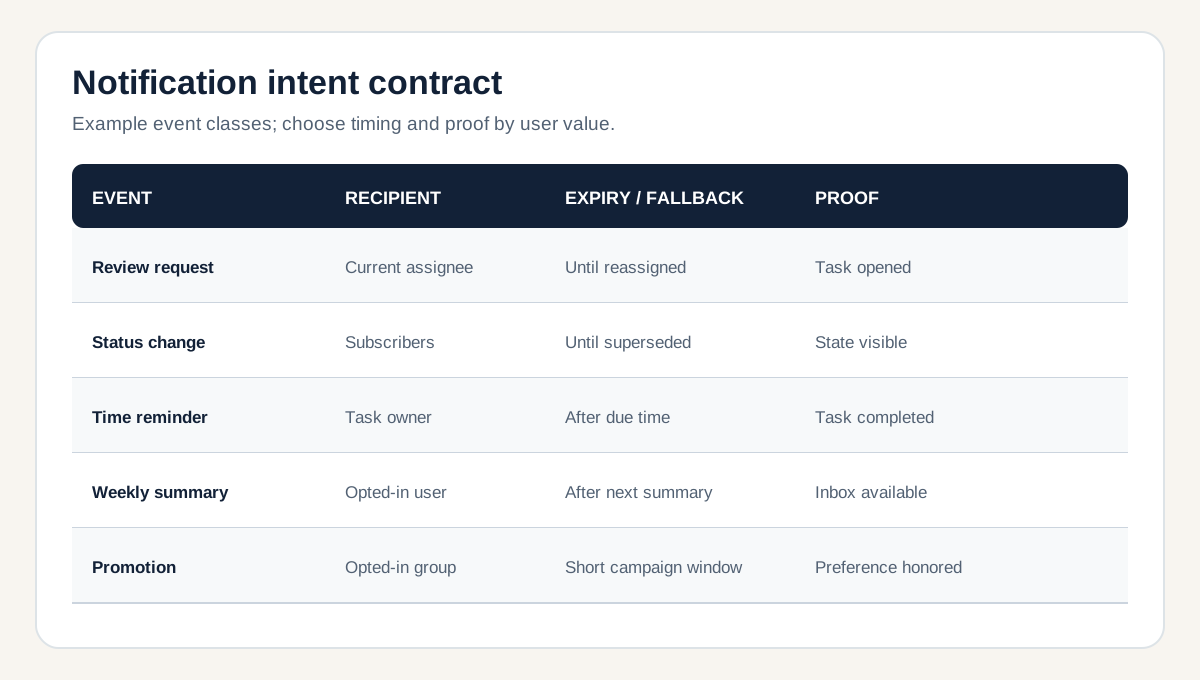
For a hypothetical inspection app, “review requested” might be actionable for the currently assigned supervisor, expire when the request is withdrawn, and link to the review screen. “Weekly activity summary” may be optional, grouped, and delivered at a user-selected time. That distinction changes priority, expiry, preference controls, and whether an in-app inbox is enough.
Decide what happens after the event changes. A reminder should not continue after completion. An urgent alert that cannot be delivered may need an alternate operational path; a marketing message may simply expire. Record the fallback owner instead of assuming the push service is a guaranteed alarm system.
Separate operating-system permission from product preference
The app needs both an allowed platform channel and a product-level reason to send. On iOS, Apple recommends requesting authorization in context and checking current settings because people can change them later. On Android 13 and later, non-exempt notifications require the runtime permission. Treat platform behavior as a design input and verify it against the app's supported OS versions.
Product preferences answer a different question: which categories the user wants, for which account, and during what hours. A granted OS permission should not override an in-app opt-out. Model mandatory service communication separately from optional promotions, and have privacy or legal owners review consent language where needed. Provide an explanation before the system prompt; if permission is denied, preserve the core workflow and show a clear route to settings when the user later chooses to enable alerts.
Account and device changes need attention. A shared device, sign-out, tenant switch, or revoked role must break the old targeting relationship. The server should maintain current installation registrations and remove invalid ones. Firebase's registration guidance discusses freshness and invalid registrations; adapt the lifecycle to the actual push provider rather than promising that a stored token remains valid forever.
Build the event-to-action path with expiry and fallback
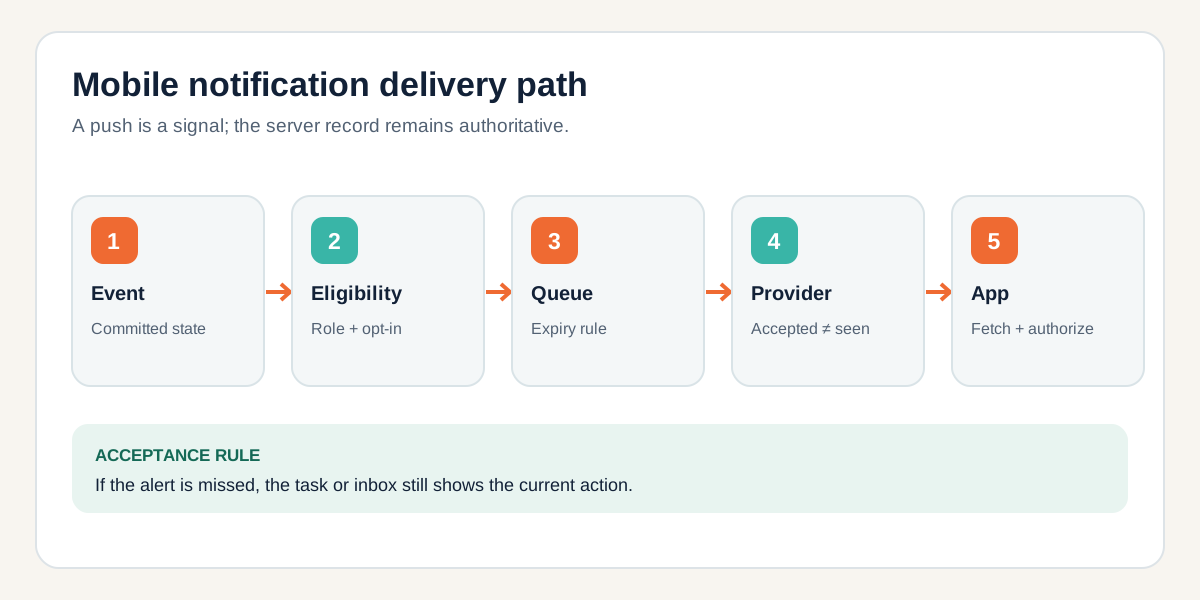
A dependable design starts when a committed product event enters a queue. Check current recipient eligibility, category preference, quiet-hours policy, and whether the event is still relevant. Then create a minimal payload with an opaque record reference and a route. On open, the app fetches the latest record and checks authorization again. The lock screen should not carry a sensitive customer name or decision detail that a bystander can read.
Specify expiration instead of letting yesterday's alert arrive after the work is done. Firebase documents message time to live and notes that a returned message ID means acceptance for delivery, not device delivery. It also describes how queued messages may arrive later. Decide whether newer updates replace an older pending alert, and test the provider's collapse behavior for each event class.
Track separate states: event created, eligible, queued, provider accepted or rejected, app opened from alert, destination loaded, and business action completed. Not every platform exposes a reliable device-display receipt. Do not report provider acceptance as a read rate or use it to close a safety-critical task. For work that must be completed, the task record and escalation rule are the source of truth.
Keep the notification system connected to the wider workflow. The offline-first mobile guide explains why locally visible state can lag the server, while the API integration guide covers retry ownership and idempotent handoff between systems.
Test transitions, not only the happy-path screenshot
Build a test matrix for iOS and Android versions you support. Start with permission undecided, granted, denied, changed in settings, and product preference disabled. Then test app foreground, background, terminated, device offline, device restored after expiry, multiple signed-in devices, account switch, revoked role, duplicate event, and a deep link to a deleted or reassigned record.
For each case, check the server event and target decision, provider response, visible or absent alert, in-app inbox state, deep-link result, and whether the business action remains possible. If the provider rejects an invalid registration, confirm the system removes or refreshes it and exposes enough evidence for support. A screenshot of one delivered notification cannot establish these properties.
Set an operational owner for failed sends and stale registrations. Document what can be retried safely, what expires, and what should be surfaced as an unresolved task. This is where a notification feature becomes a dependable product workflow rather than a thin SDK integration.
A small first-release notification brief
- One event: define the business trigger and the user action it supports.
- One audience: specify current role, account, installation, permission, and preference checks.
- One timing rule: set urgency, quiet-hours behavior, expiry, and duplicate or collapse policy.
- One destination: define the safe payload, deep link, current-access check, and state shown when the record changes.
- One proof plan: name supported OS versions, transition cases, event logs, fallback, and the owner who accepts release.
Start with an actionable event users already care about. Add summaries and engagement messages only after permission, preferences, lifecycle, and support are sound. Leeonex's mobile app development service can help scope the app, backend, and notification path around that first complete journey.
Mobile push notification FAQ
When should a mobile app ask for notification permission?
Ask when the user can understand a relevant benefit, such as after scheduling a reminder or subscribing to a status update. Explain what the app will send, and keep the core task usable when permission is denied. Platform prompts and settings behave differently on iOS and Android.
Can push delivery confirm that a user saw a message?
No. A push provider accepting a request does not prove device delivery, display, reading, or task completion. Model those as separate states and use the product's own event or read state for decisions that matter.
What belongs in a push payload?
Use the minimum content needed to tell the recipient why to open the app, plus an opaque destination reference. Avoid sensitive details on the lock screen; fetch the authoritative record after the app opens and checks the user's current access.