
Define partner work before choosing portal modules
Partner portal requirements should explain how an external organization joins a program, who may act for it, how an opportunity or request is submitted, who owns the decision, which approved resources are visible, how training and support are tracked, and how CRM or finance records change. A branded login and document library do not resolve the operating work.
Start with one partner type and one valuable transaction: a referral, registered deal, co-selling request, implementation handoff, certification, content approval, support escalation, or incentive claim. Include one disagreement—a duplicate deal, expired agreement, territory conflict, stale price sheet, or disputed attribution. The exception exposes the authority rules a feature list hides.
Separate partner, customer, and supplier portal intent
A customer portal helps an organization manage the service it receives. A supplier portal coordinates procurement, fulfilment, invoices, and supplier evidence. A channel partner portal helps an external organization market, refer, sell, implement, or support work with you. Some organizations play more than one role, but the records and authority should not blur together.
Use the existing customer portal checklist for service relationships and the supplier portal checklist for procurement transactions. For a partner portal, name the program types—referral, reseller, distributor, agency, implementation, technology, or service—and remove requirements that do not belong to the first release.
Define organization states separately from user states. A partner may be applicant, approved, active, suspended, expired, or exited while an individual user is invited, active, locked, revoked, or moved to another organization. State which signed terms, territories, products, competencies, and dates determine what the organization and its delegated users may do.
Write a transaction contract for every partner action
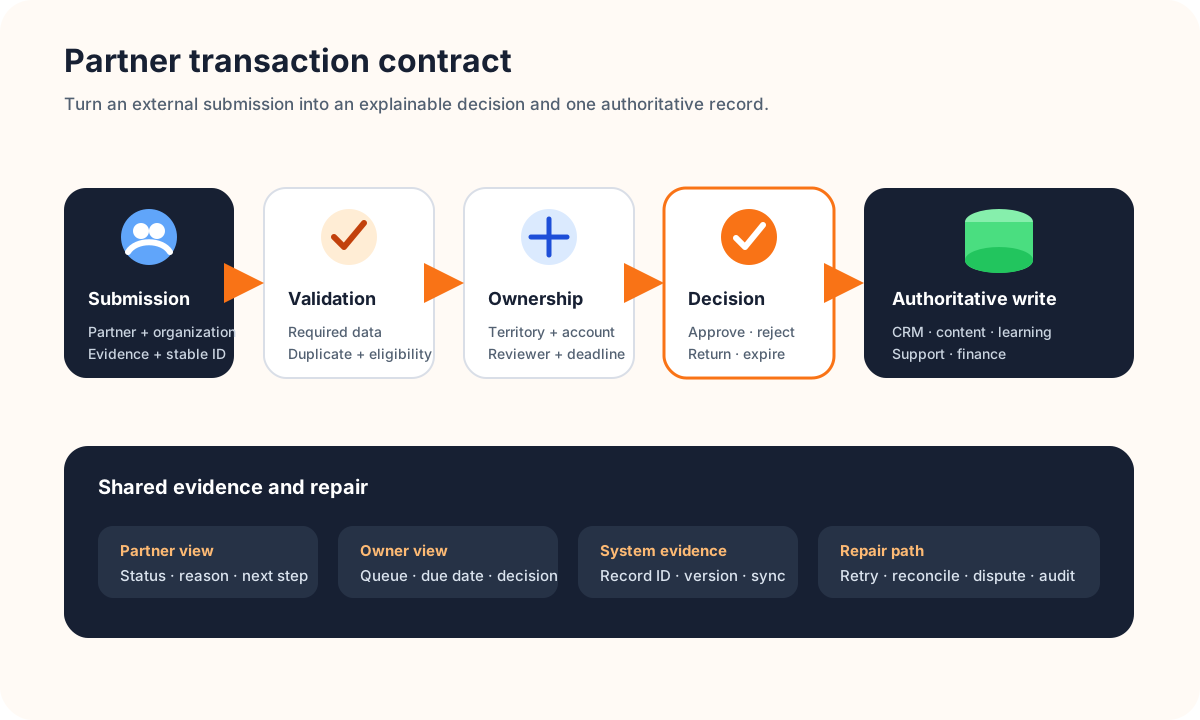
For each submission, record the actor and partner organization, stable identifiers, evidence, required fields, validation, duplicate check, owner, permitted decisions, deadline, system of record, notification, retained history, and correction path. Distinguish submitted, received, validated, under review, approved, rejected, expired, withdrawn, and superseded when they represent different facts.
A deal registration, for example, should state what identifies the end-customer opportunity, how account matching works, which overlapping registrations are allowed, whether territory or product rules apply, who can see conflict details, when protection expires, which CRM stage changes, and how a partner challenges a decision. Do not let a portal status imply a contractual promise the workflow cannot support.
Define eight requirement lanes around the channel workflow
| Lane | What to define | Acceptance evidence |
|---|---|---|
| Organization | Partner type, legal identity, parent/child accounts, territory, program, tier, owner, lifecycle | The same organization is not duplicated or given the wrong program scope |
| Identity and access | Sponsors, invitations, roles, delegation, federation, recovery, removal, support impersonation | Every view and action is correct for the organization, role, program, and state |
| Onboarding | Application, terms, data, reviews, training, milestones, remediation, activation | The partner and internal owner see the same next step and blocker |
| Opportunities | Leads, deals, accounts, matching, ownership, conflicts, protection, expiry, handoff | A disputed and a duplicate submission reach explainable outcomes |
| Enablement | Approved content, versions, audience, locale, expiry, acknowledgement, learning evidence | Withdrawn or restricted material cannot be found through old links or search |
| Collaboration | Requests, referrals, implementation handoffs, support, comments, files, service levels | A request has one owner, due state, history, and escalation route |
| Incentives | Eligibility, attribution, claim evidence, approval, adjustments, payout status, disputes | Displayed status reconciles to the authoritative financial record |
| Operations | Administration, audit, analytics, consent, accessibility, migration, support, retention, exit | Operators can diagnose and repair failure without hidden data edits |
Make permissions object- and action-specific. A distributor administrator may manage its own users but should not see another partner's opportunities. An internal channel manager may review assigned partners without automatically gaining unrestricted finance or customer-data access. OWASP recommends enforcing authorization close to the protected resource and validating the action, object, and tenant in its authorization patterns guidance.
Include accessible authentication, form labels, error recovery, keyboard operation, focus, status announcements, tables, downloads, and time limits in acceptance criteria. W3C's accessible authentication guidance explains that login should work with browser and password-manager assistance rather than blocking paste or relying on a cognitive test.
Keep system ownership visible across the portal
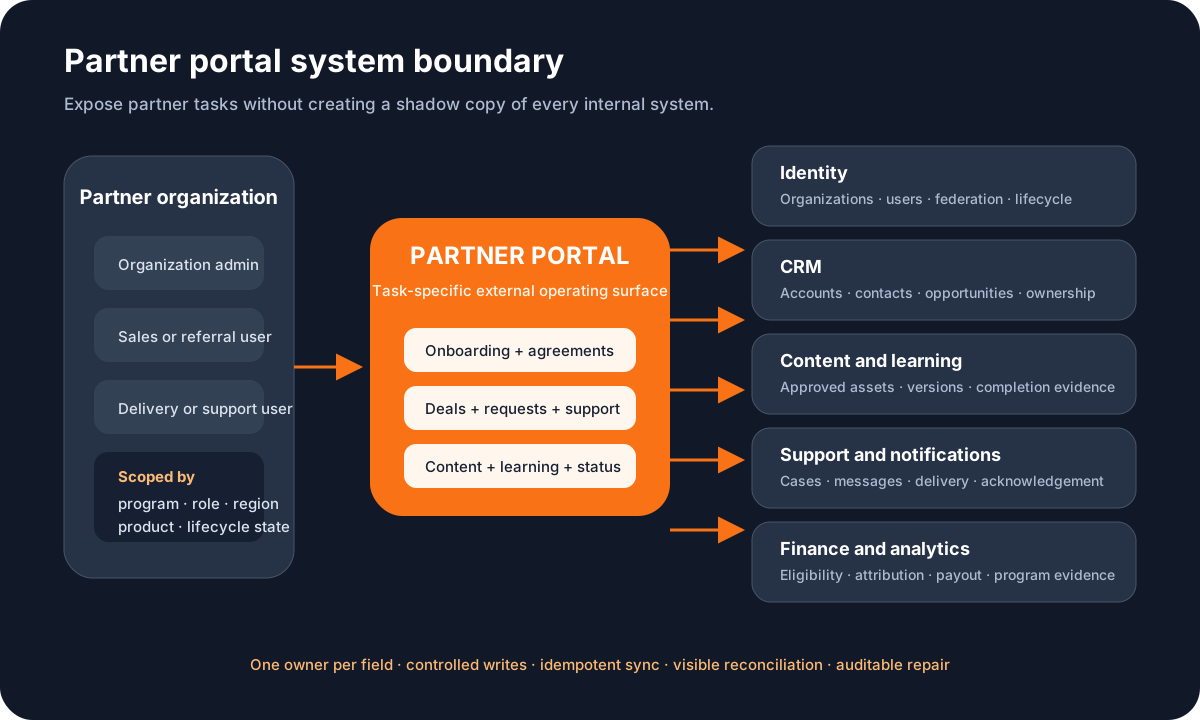
Decide whether CRM owns partner accounts, contacts, opportunities, and sales stages; a content system owns approved assets; a learning system owns course completion; support owns cases; and finance owns payable or paid incentive records. The portal should expose the right task and status without quietly becoming an ungoverned second copy of each system.
For every integration, define create and update authority, stable keys, field mappings, timestamps, replay protection, ordering, retries, dead-letter handling, reconciliation, monitoring, and a manual repair path. The broader API integration requirements checklist covers the delivery contract; the portal brief must also state the business meaning and owner of every synchronized field.
Minimize data shown to partners and internal operators. State what a partner can export, what happens when a relationship ends, how shared customer records remain protected, and which history must be retained. Cross-partner reporting should use controlled aggregation rather than exposing underlying records.
Choose buy, extend, or build from workflow fit
Buy or configure a partner relationship management platform when standard onboarding, deal registration, content, training, and incentive workflows fit and supported integrations match your systems. Prove the fit with scripted demonstrations using one representative partner, one conflict, one role change, one failed integration, and one exit—not a generic product tour.
Extend when the platform owns the common program model but a focused workflow, integration, or branded surface is distinctive. Consider custom development when partner operations are a strategic product capability or existing platforms force unsafe workarounds. Custom ownership includes accessibility, security, releases, support, audit, data migration, and integration maintenance; it is not only the first build.
Use this first-release partner portal worksheet
- Partner: Which one partner type, program, region, and lifecycle stage is in scope?
- Transaction: Which valuable partner action will the portal complete end to end?
- Exception: Which duplicate, conflict, expiry, rejection, or integration failure must the pilot repair?
- Authority: Who may submit, view, review, decide, override, and audit each step?
- Systems: Which system owns each organization, user, deal, content, learning, support, and financial field?
- Evidence: What proves the workflow, access boundary, notification, sync, and recovery worked?
- Decision: Which facts will justify configure, extend, custom-build, expand, or stop?
Keep the first release small enough to observe. One partner type, one transaction, a small role matrix, the necessary content, one system-of-record integration, and an operator repair queue often reveal more than a broad portal roadmap. If the workflow is distinctive, a scoped custom web application engagement can turn the worksheet into testable product requirements.
Partner portal requirements FAQ
What should partner portal requirements include?
Include partner types and lifecycle states, organization and user identity, invitation and access, agreements, onboarding, deal or lead registration, ownership and conflict rules, approved content, training and certification, support, communications, incentive evidence, CRM and finance boundaries, reporting, accessibility, security, administration, migration, support, and scenario-based acceptance tests.
What is the difference between a partner portal and a customer portal?
A customer portal helps a customer manage their own service relationship, such as requests, documents, usage, or billing. A partner portal supports an external organization that markets, sells, implements, refers, or supports work with you. It therefore needs partner tiers, delegated users, opportunity ownership, approved enablement, program terms, and channel attribution.
Should a partner portal replace the CRM?
Usually no. The portal can give partners a safe, task-specific view and capture structured submissions, while the CRM remains authoritative for accounts, contacts, opportunities, ownership, and sales stages. Define exactly which fields each side may create or change, how duplicates and conflicts are resolved, and how failed synchronization is repaired.
Should a business buy or build a partner portal?
Buy or configure when a PRM platform represents the program, integrations, permissions, and commercial model well. Extend when the core platform works but a few workflows or surfaces are distinctive. Consider custom ownership when partner work creates strategic advantage or requires unusual cross-system rules—and the organization can own product decisions, operations, security, and support.