
The short answer: track events that explain current custody
Asset tracking software requirements should define a stable identity for each physical asset and the events that change its custodian, location, condition, availability, maintenance state, or lifecycle status. A barcode, QR code, RFID tag, or map pin is only a capture method. The system of record must still explain what happened, where, when, why, by whom, with what evidence, and what state resulted.
Start with one asset journey: receive it, identify it, place it, assign it, move it, inspect or service it, return it, audit it, and retire it. Add an uncomfortable exception such as a missing label, duplicate scan, unreturned loan, damaged item, offline transfer, wrong location, or asset found after retirement.
This is different from the inventory management software checklist, which explains stock quantities and movements. Asset tracking follows a particular object and its history. Some operations need both models, but they should not share one ambiguous “quantity or serial number” record.
Separate asset identity from labels and events
Give each asset one stable internal identifier that survives a replaced label, changed custodian, moved location, imported source, or renamed category. Keep manufacturer serial numbers, supplier references, finance IDs, tag values, and legacy keys as linked identifiers with source and validity—not interchangeable primary keys.
Where an operation participates in a standards-based ecosystem, GS1's current General Specifications define a Global Individual Asset Identifier for a particular physical entity and require it to remain unique well beyond the lifetime of the asset record. That principle is useful even for a private identifier: never reuse identity merely because an asset left service.
Define each event with asset ID, event type, effective and recorded time, actor, source device, from and to custodian or location, condition, business reason, related work or request, evidence, and resulting state. Keep corrections as linked events; do not silently rewrite history.
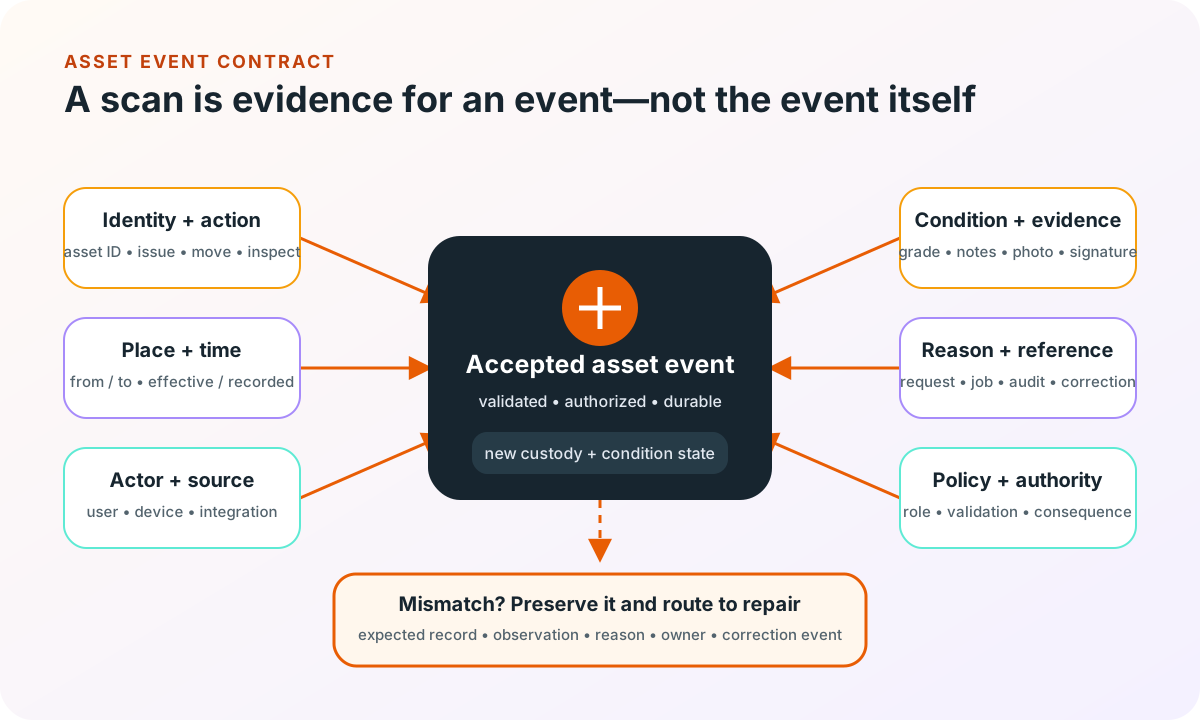
GS1 EPCIS describes traceability events through the what, when, where, why, and how of products and other assets. A custom asset system does not automatically need EPCIS, but an event that cannot answer those questions will be hard to reconcile or exchange later.
Define eight requirement lanes around the asset journey
Use real asset registers, tags, issue forms, service records, audit differences, lost-item investigations, write-offs, and spreadsheets as evidence. Separate policy from current habit, then write every requirement as behavior with a visible result.
| Lane | Decision to specify | Acceptance evidence |
|---|---|---|
| Identity and class | Stable ID, class schema, serials, labels, duplicates, hierarchy | One physical asset resolves to one active record |
| Location and custody | Sites, zones, people, teams, vendors, transfers, effective time | Current custody follows from an accepted event trail |
| Issue and return | Eligibility, reservation, acknowledgement, due date, overdue path | A handoff identifies both sides and the expected return |
| Condition and evidence | Condition scale, notes, photos, damage, inspection, dispute | A material condition change has proof and an owner |
| Maintenance and calibration | Triggers, schedules, work history, unavailable state, release gate | Unsafe or unready assets cannot appear available |
| Capture and offline | Devices, symbologies, batches, queued events, conflicts, feedback | Scans survive weak connectivity without duplicate custody |
| Control and lifecycle | Roles, bulk actions, adjustments, loss, disposal, retention | Consequential changes are authorized and reviewable |
| Integration and insight | People, procurement, finance, service, exports, reconciliation | External records match or expose a repairable difference |
Define the state that changes decisions
“Active” is usually too broad. An asset may be available, reserved, issued, in transit, awaiting inspection, damaged, quarantined, under maintenance, missing, retired, or disposed. Keep custody, operational readiness, and lifecycle status as separate dimensions where they drive different actions.
Avoid a universal asset form
A laptop, calibrated instrument, power tool, returnable container, and leased device do not need identical fields. Define a small shared identity core and class-specific schemas, validations, evidence, and lifecycle rules. This preserves reporting without forcing every user through irrelevant inputs.
Choose capture technology from the operating moment
Test labels where they will actually live: curved metal, outdoor equipment, dusty cases, shared tools, cold storage, small components, or frequently cleaned surfaces. Record scan distance, lighting, orientation, gloves, device ownership, throughput, batch size, label damage, fallback entry, and how a user confirms the selected asset before committing an event.
Barcodes and QR codes suit deliberate line-of-sight capture with common cameras. RFID may help read more items or reduce direct aiming, but hardware, tag selection, physical interference, unintended reads, and confirmation design become part of the system. Location trackers may suit selected moving assets, not every object. Avoid choosing a technology because it sounds more automatic; prove the full workflow and repair path.
Offline work needs a contract. Define which assignments, locations, asset records, and rules are cached; how a queued event is shown; how retries are made idempotent; what happens when two people transfer the same asset; when stale data blocks an action; and who repairs a conflict. The offline-first mobile requirements checklist provides a deeper model for queued writes, sync evidence, and human resolution.
Design reconciliation as a normal workflow
An audit should not merely replace the recorded location with the observed one. Preserve the expected record, observation, time, method, counter, difference, investigation, resolution, and approving actor. A found asset may reveal an unrecorded transfer, duplicate label, wrong location hierarchy, failed offline sync, or earlier disposal error.
Define count or verification campaigns by scope, assignment, freeze rules if any, blind versus expected views, progress, reassignment, evidence, discrepancy classes, escalation, and closure. For continuous operations, decide which new events are accepted during the campaign and how the comparison chooses an effective time.
Track operational signals with an owner and decision: overdue returns, missing assets, failed scans, queued events, repeated corrections, assets awaiting inspection, maintenance overdue, duplicate identities, and unresolved audit differences. A dashboard is useful only when each signal leads to a named action; the dashboard data readiness checklist helps define those metric contracts.
Give the asset ledger a clear system boundary
Map procurement, receiving, the asset ledger, identity and HR, sites and locations, maintenance or field service, finance, document storage, mobile capture, reporting, and external parties. Decide which system owns purchase value, employee status, service work, depreciation, customer assignment, and current physical custody.
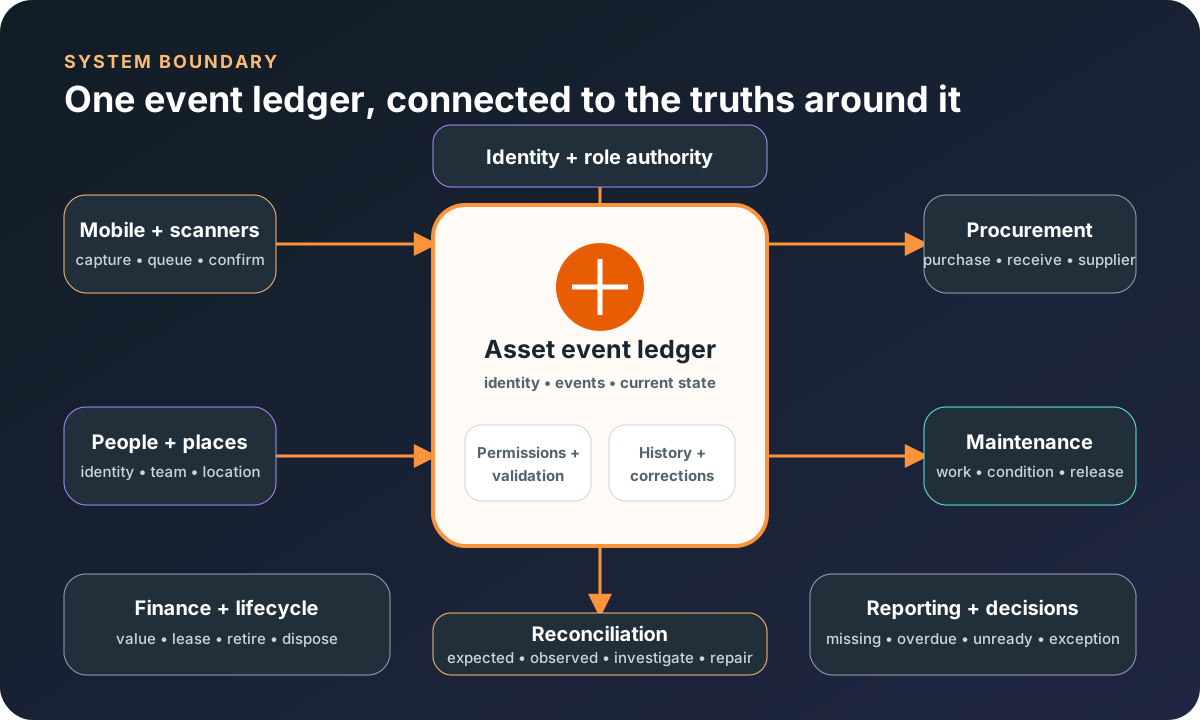
For each boundary, record the identifiers, fields, direction, timing, replay and duplicate rules, deletion or retention, reconciliation, failure visibility, and repair owner. Never let a departed employee, closed location, retired work order, or corrected purchase erase the asset history needed to explain custody.
If assets are tied to field jobs and service evidence, use the field service management requirements guide to define job, technician, parts, and customer boundaries without overloading the asset ledger.
Choose buy, extend, or build with representative events
Buy and configure
Standard assignment, audit, maintenance, reporting, and supported integrations fit the operation.
Extend
A stable asset product exists, but one focused mobile, device, customer, or integration gap matters.
Build
Distinct event rules, offline work, permissions, equipment, or reconciliation logic are central.
Compare options with the same asset classes, labels, devices, users, handoffs, offline condition, integrations, and exception scenarios. A fast demo scan is weak evidence if the product cannot prevent duplicate custody, preserve corrections, or reconcile observations against history.
Use configuration before custom code when it can safely fit the workflow. Use mobile app development or custom web application development when the field interaction and event boundary need a focused, maintainable product rather than another spreadsheet layer.
Use a one-journey asset pilot worksheet
Choose two or three representative asset classes and one real operating environment. Complete the worksheet with operators, finance, maintenance, security, and the system owners before a broad rollout.
- Identity: define the stable internal ID, linked identifiers, label content, replacement rule, and duplicate resolution.
- Events: list receive, place, issue, transfer, inspect, service, return, find, lose, retire, and correct with required evidence.
- Environment: record devices, labels, light, range, gloves, connectivity, batch size, and fallback entry.
- Authority: name who may issue, accept, transfer, adjust, quarantine, retire, reverse, and approve.
- Boundaries: assign ownership for people, sites, purchases, maintenance, finance, files, and custody.
- Exceptions: test duplicate, damaged, missing, offline, stale, simultaneous, wrong-location, and retired-item scenarios.
- Acceptance: reconcile expected and observed custody, review event history, verify permissions, and prove operator repair after each scenario.
The first release may cover issue, return, and audit for one location. That is enough if it creates trustworthy history, survives failure, and makes differences repairable. Add maintenance, reservations, customer access, or advanced capture only when evidence shows the next boundary.
Asset tracking software requirements FAQ
What should asset tracking software requirements include?
Include a stable asset identity, label and scanner strategy, asset classes and fields, locations and people, custody events, condition and evidence, reservations and loans where needed, maintenance and calibration, offline behavior, permissions, imports, integrations, reconciliation, reporting, retirement, support tools, and acceptance scenarios. Define the event and exception model before the screen list.
What is the difference between inventory and asset tracking?
Inventory management usually explains quantities of items by location and state. Asset tracking follows a specific serialized or individually identified object through custody, location, condition, maintenance, and retirement. A business may need both, but stock balance and individual asset history should not be collapsed into one ambiguous record model.
Should asset tracking use barcodes, QR codes, RFID, or GPS?
Choose the capture method from the operating environment and decision. Barcodes or QR codes suit deliberate line-of-sight scans; RFID can support faster or less direct reads with additional hardware and environmental constraints; GPS or other location signals serve selected moving assets but introduce power, coverage, privacy, and accuracy tradeoffs. Prove labels, devices, range, speed, failure handling, and total workflow in the real setting before standardizing.
When should a business buy or build asset tracking software?
Buy or configure a product when standard check-in, assignment, audit, maintenance, and reporting flows fit the operation. Extend one when a focused integration or field workflow is missing. Consider custom software when the asset event model, offline work, role boundaries, equipment integrations, customer-facing experience, or reconciliation logic is central and packaged workarounds repeatedly break custody truth.