
The short answer: specify one job from promise to close
Field service management software requirements should define how a service request becomes a committed visit, how dispatch changes the plan, what a technician can do with poor connectivity, which evidence proves the result, how exceptions return to an owner, and when the job is commercially complete. A calendar and a mobile checklist are only interfaces around that operating contract.
Start with one recent job and its hardest plausible exception. Follow it across intake, customer promise, site and asset identity, scheduling, travel, field work, parts, approval, evidence, follow-up, invoicing, and support. If a candidate system cannot run and explain both paths, more feature boxes will not make it fit.
Use this guide for the complete service operation. Pair it with the offline-first mobile requirements guide when crews must keep working through weak connectivity, and the appointment booking checklist when customers choose constrained time slots themselves.
Write a job state and exception contract
Avoid one overloaded status such as “open.” A job may be requested but unqualified, committed but not assigned, dispatched but delayed, on site but blocked, partly completed, waiting for a part, ready for customer review, or operationally complete while its invoice still needs correction. Model the states the business uses to make decisions.
For every transition, record the triggering fact, permitted actor, required fields, customer-facing promise, downstream effects, retained evidence, and next legal actions. “Technician completes job” becomes testable only when completion names the required result, measurements, parts, photos, customer acknowledgement, follow-up rule, and commercial handoff.
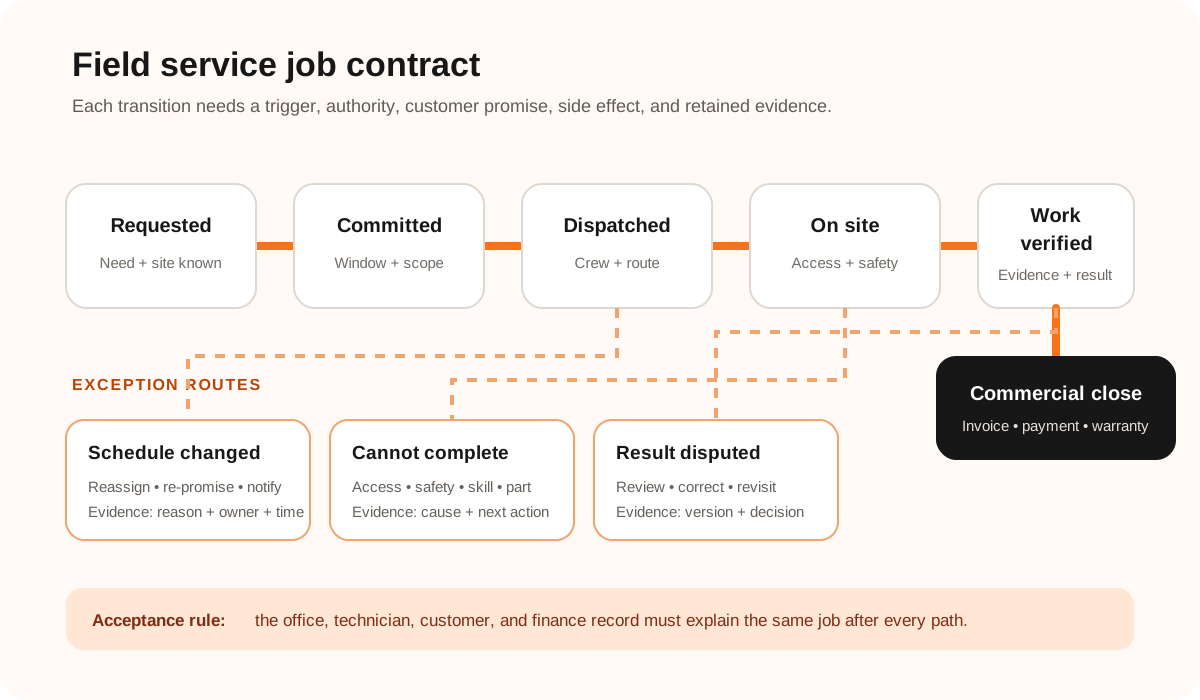
Separate job state from schedule state. Reassigning a technician, moving a time window, or changing a route should not erase what the customer requested or what has already happened. Keep versions of the plan and record who changed the promise, why, and what notification followed.
Define eight requirement lanes around real work
Use service tickets, call recordings where lawful, technician notes, parts adjustments, invoice corrections, complaints, and return visits as evidence. Write each requirement as behavior with an observable result.
| Lane | Decision to specify | Acceptance evidence |
|---|---|---|
| Intake and identity | Request source, customer, site, asset, priority, duplicate rule | One need creates one traceable job |
| Eligibility and promise | Coverage, contract, skill, access, duration, service window | The promise is feasible and reconstructable |
| Scheduling and dispatch | Capacity, territory, travel, breaks, urgency, reassignment authority | A change preserves history and alerts affected people |
| Technician workflow | Briefing, navigation, safety, steps, measurements, approvals | The worker can complete the critical path in context |
| Offline and sync | Cached scope, queued writes, conflicts, media, stale-data warning | Work survives loss, retry, and duplicate delivery |
| Parts and labour | Reserve, issue, substitute, return, time categories, price authority | Consumed resources reconcile to the job |
| Evidence and exceptions | Photos, notes, signature, blocked reason, revisit, escalation | Every outcome has an owner and sufficient proof |
| Commercial close | Estimate, approval, invoice, payment, warranty, accounting handoff | Operations and finance agree on closure |
Treat dispatch as constrained commitment
“Nearest technician” is rarely the whole rule. Define qualifications, territories, working hours, breaks, vehicle or equipment needs, parts availability, customer windows, job dependencies, emergency insertion, overtime authority, and the cost of breaking a preference. Google’s Route Optimization documentation distinguishes hard and soft time-window constraints; your requirement should likewise say what may move, what must not, and who accepts the tradeoff.
Design customer promises as data
Store the promised window, scope, price basis, access instructions, communication channel, and consent separately from internal notes. Decide what happens when a prior job runs long, a part is unavailable, the customer is absent, or the site is unsafe. The system should help someone make and communicate a new promise, not silently repaint the calendar.
Specify the field reality before the office dashboard
Observe a technician preparing, arriving, working, pausing, and closing a job. Record device type, gloves or protective equipment, lighting, interruptions, connectivity, photo volume, shared equipment, multilingual needs, and what must be visible without calling the office. A tidy desktop process can become unusable at a wet, noisy, or restricted site.
Define the critical offline subset: assigned jobs, customer-approved contact details, site instructions, asset history, forms, price or parts reference data, and safe actions. For writes, define local persistence, a visible pending state, retry behavior, duplicate protection, server acknowledgement, conflicts, and operator repair. Android’s official offline-first architecture guidance treats local and network data as distinct sources that must be synchronized; “works offline” is therefore a data contract, not a screen toggle.
Media deserves its own rules. Specify capture quality, annotations, timestamps, upload queue, compression, deletion, retention, sensitive content, and who may view or export it. Do not imply that a location, timestamp, signature, or photo proves more than it actually does; define the evidence needed for the business decision and its limits.
Give each connected system one truth to own
Map request channels, CRM, customer and site records, asset history, scheduling, technician identity, maps, inventory, pricing, payments, accounting, messaging, document storage, and reporting. For every boundary, record the owning system, stable identifiers, direction, freshness, retry and duplicate behavior, reconciliation, failure owner, and safe repair.
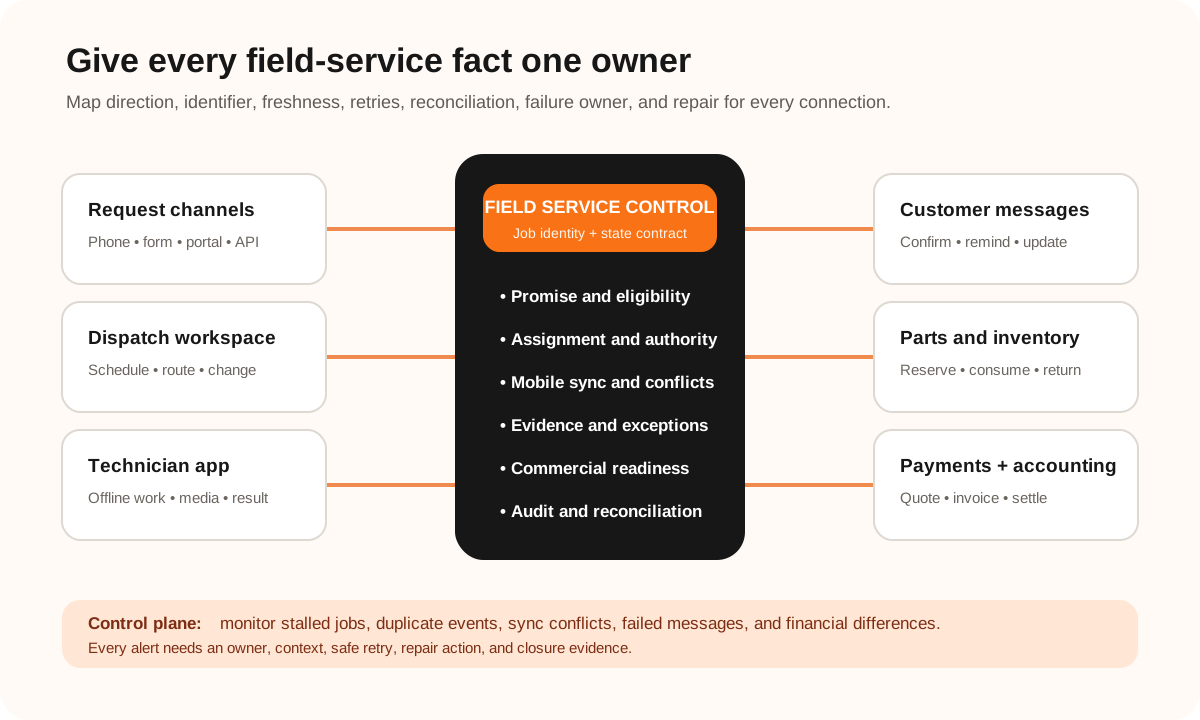
The field-service layer should coordinate job state without pretending to own every customer, stock, payment, or accounting fact. When several systems must stay consistent, use the API integration requirements checklist to specify delivery, replay, reconciliation, and operational ownership.
When vehicles have their own readiness, operator eligibility, telematics, inspections, defects, maintenance, fuel, and dispatch rules, keep that operating model explicit. The fleet management software requirements checklist shows how fleet state can integrate with field jobs without turning either system into an ambiguous duplicate.
Choose packaged, extended, or custom by workflow pressure
Configure a platform
Use when the business can adopt a proven job lifecycle, mobile flow, and commercial model.
Extend a stable core
Use when standard scheduling and records fit, but a few integrations or differentiated workflows do not.
Build an owned system
Consider when constraints, exceptions, evidence, or coordination are central to how the business delivers value.
Compare options with representative scenarios rather than a weighted feature spreadsheet alone. Ask each option to demonstrate an ordinary visit, a same-day urgent insertion, a weak-signal completion with media, a missing part and follow-up, a customer dispute, and an invoice correction. Count configuration, devices, migration, integrations, training, support, reporting, and exit—not only subscription or build cost.
If the workflow genuinely needs a tailored operating system, Leeonex’s custom web application service can scope the office control plane, while cross-platform app development can cover a focused field experience where that delivery model fits.
Use this field-service pilot worksheet
- Boundary: one team, territory, job type, customer segment, and commercial path.
- Actors: requester, scheduler, dispatcher, technician, supervisor, customer, inventory, finance, and support.
- Scenario pack: normal job plus the ten exception cases named in this article’s FAQ.
- Data: representative sites, assets, parts, contracts, price rules, and permission combinations.
- Controls: states, authority, notifications, audit evidence, monitoring, repair, and escalation owner.
- Acceptance: observable results for each actor and reconciliation across every connected system.
- Rollout decision: continue, narrow, configure differently, integrate, or stop—based on recorded evidence.
A useful pilot proves that the operation can recover, not just that the happy path looks polished. The offline-first field inspection concept study shows how a field workflow can make drafts, conflicts, sync state, and supervisor repair visible without presenting a concept as client evidence.
Field service software requirements FAQ
What should field service management software requirements include?
Include service intake, customer and site identity, assets, job states, scheduling and dispatch constraints, technician qualifications, travel and availability, offline mobile behavior, safety and access instructions, parts and labour, photos and signatures, customer messages, estimates and approvals, invoicing and payment handoffs, permissions, integrations, audit history, reporting, migration, support, and acceptance scenarios.
Should a field service business buy or build software?
Buy and configure a field service platform when the business can adopt its job lifecycle, mobile workflow, commercial model, and integrations. Extend a platform when a few differentiating rules sit around a stable core. Consider custom software when scheduling constraints, field evidence, exception handling, customer experience, or cross-system coordination are central to the operation and packaged workarounds create repeated risk.
How should a field service system be tested before rollout?
Pilot one crew with a normal visit plus urgent insertion, reassignment, weak connectivity, duplicate sync, inaccessible site, missing part, follow-up visit, declined work, cancelled appointment, disputed evidence, invoice correction, and integration outage. Verify the dispatcher, technician, customer, inventory, finance, and support views after each scenario.