The short answer: maintain a release system, not a bug list
Mobile app maintenance should continuously connect production signals, user support, OS and store changes, dependencies, security, backend health, and product priorities to a controlled release path. Every lane needs a signal, review rhythm, named owner, acceptance evidence, and a response when the app is not safe to release.
Start by proving the current app can be built, tested, signed, submitted, observed, and recovered by the people responsible for it. Then prioritize work by user consequence and time pressure, not by whichever request is newest.
Observe
Crashes, latency, support, backend, and store signals.
Change
One scoped update with dependencies understood.
Prove
Device tests, rollout evidence, and recovery readiness.
Start with consequence, reach, and urgency
Treat a crash in the priority purchase, booking, authentication, or field-work journey differently from a cosmetic defect on an uncommon screen. Record the affected version, OS, device, account state, network state, steps, logs, screenshots or video, user consequence, workaround, and whether the problem is still occurring.
A simple triage order is: security or privacy exposure; data loss or incorrect transaction; blocked core journey; widespread crash or severe performance problem; store or platform deadline; degraded but recoverable behavior; then usability and cosmetic work. Business events can raise urgency, but they should not erase the evidence needed to release safely.
If the app is still being defined, use the mobile app requirements checklist first. This guide begins after there is a live or inherited product to operate.
If the difficult part is deciding whether a current incident, a fixed store deadline, maintenance debt, or a promised feature should move first, use the live mobile app release-control concept study. It takes this broad checklist into a narrower, illustrative three-lane decision and release model.
Run seven maintenance lanes with explicit owners
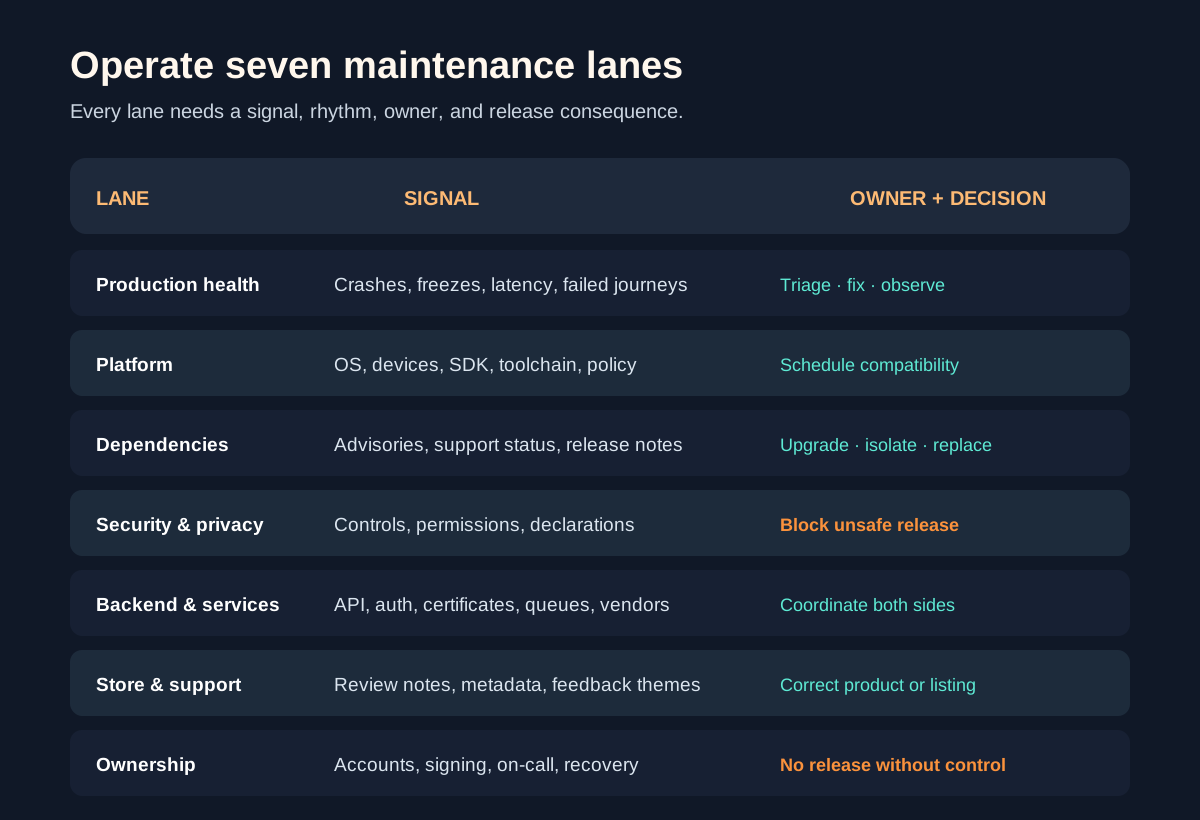
| Lane | Minimum evidence | Release consequence |
|---|---|---|
| Production health | Crash, freeze, performance, and failure trends | Fix, monitor, or accept explicitly |
| Platform | OS, device, SDK, and policy change register | Schedule compatibility work |
| Dependencies | Inventory, update notes, advisories, support status | Upgrade, isolate, or replace |
| Security & privacy | Control tests, permissions, data declarations | Block unsafe release |
| Backend & services | API, auth, certificate, queue, and vendor health | Coordinate both sides |
| Store & support | Review notes, metadata, ratings themes, support cases | Correct product or listing |
| Ownership | Accounts, signing, on-call, approvals, recovery | No release without control |
Connect production health to a response
Monitor the complete priority journey, not only whether the app process is running. Include authentication, API errors, transaction completion, notification delivery, background work, offline sync, and external service failures where they matter. Segment by app version, OS, device class, geography, or account type only when it helps explain and act on the problem.
Google’s Android vitals guidance identifies user-perceived crash and application-not-responding rates as core measures and lets teams inspect trends by version, OS, device, and other dimensions. Store data is valuable, but it does not replace your own backend, business-flow, and support visibility.
Every alert needs an owner, severity rule, diagnostic context, and next action. Alerts without response capacity become noise; dashboards without release decisions become decoration.
Maintain a platform and store change register
Track supported and target OS versions, device families, build toolchains, SDK requirements, privacy declarations, store policies, signing assets, certificates, entitlements, deep links, push credentials, review accounts, screenshots, support URLs, and listing metadata. Assign a review date and owner to each time-sensitive item.
Google Play requires new apps and updates to target a recent Android API level and can restrict submissions or discoverability when requirements are missed. Check the current target API policy rather than copying a date into a permanent runbook.
Apple’s App Review Guidelines call for on-device testing, functional URLs and backend services, complete metadata, and review access for account-based features. Re-check the live rules before every submission; store compliance is ongoing product work, not a one-time launch task.
Update dependencies without treating every update equally
Keep an inventory of direct dependencies, native modules, SDKs, build plugins, analytics and advertising libraries, payment or identity components, backend clients, and hosted services. For each change, read release notes and advisories, identify transitive impact, reproduce the build, and test the journeys that component can affect.
Prioritize known exposure, unsupported software, platform incompatibility, and dependencies on the critical path. Batch low-risk updates when that improves test efficiency, but avoid a giant upgrade that makes the source of a regression impossible to isolate.
Use a mobile-specific verification baseline proportionate to the app. The OWASP Mobile Application Security Verification Standard organizes controls across storage, cryptography, authentication, network, platform, code, resilience, and privacy. It is a useful control map, not a claim that a generic checklist certifies a particular app.
Make every release produce evidence
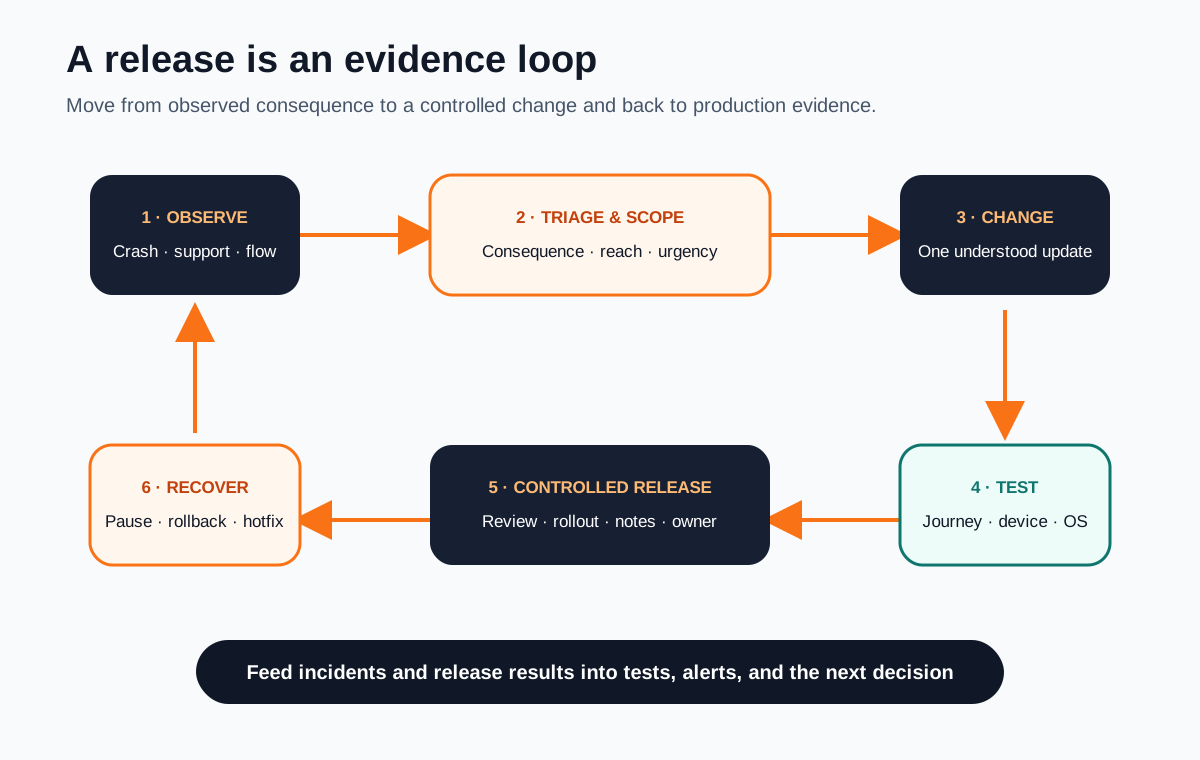
Define the changed behavior, affected systems, user consequence, data migration or compatibility need, device and OS coverage, regression scope, analytics impact, release notes, support message, reviewer access, rollout plan, owner, and recovery path. Test the complete outcome, including weak network, denied permissions, interrupted sessions, and old app versions talking to the current backend where relevant.
Use staged rollout or phased release when the store and product context allow it. Watch the signals tied to the change and pause expansion when evidence is unclear. A server-side feature flag can reduce exposure for some changes, but it does not replace a viable binary rollback, hotfix, or compatibility plan.
After release, record the result and feed new failure patterns into regression tests. Maintenance improves when each incident leaves better detection, documentation, testing, or system boundaries behind.
Prove control before a new team makes major changes
An incoming team needs repository access, a reproducible build, package and dependency inventory, environment and backend map, store accounts, signing control, credentials and renewal owners, analytics and crash access, test devices, release history, support context, known risks, and current product priorities.
Use the software project handover checklist for the broader transition, then make a small proof release: a safe dependency update, diagnostic improvement, or contained bug fix. The goal is to verify the actual path from code change to observed production outcome before combining takeover risk with a large feature.
If platform architecture itself is becoming the constraint, the native versus cross-platform guide helps separate a maintenance problem from a product architecture decision.
Start support with one maintenance ownership brief
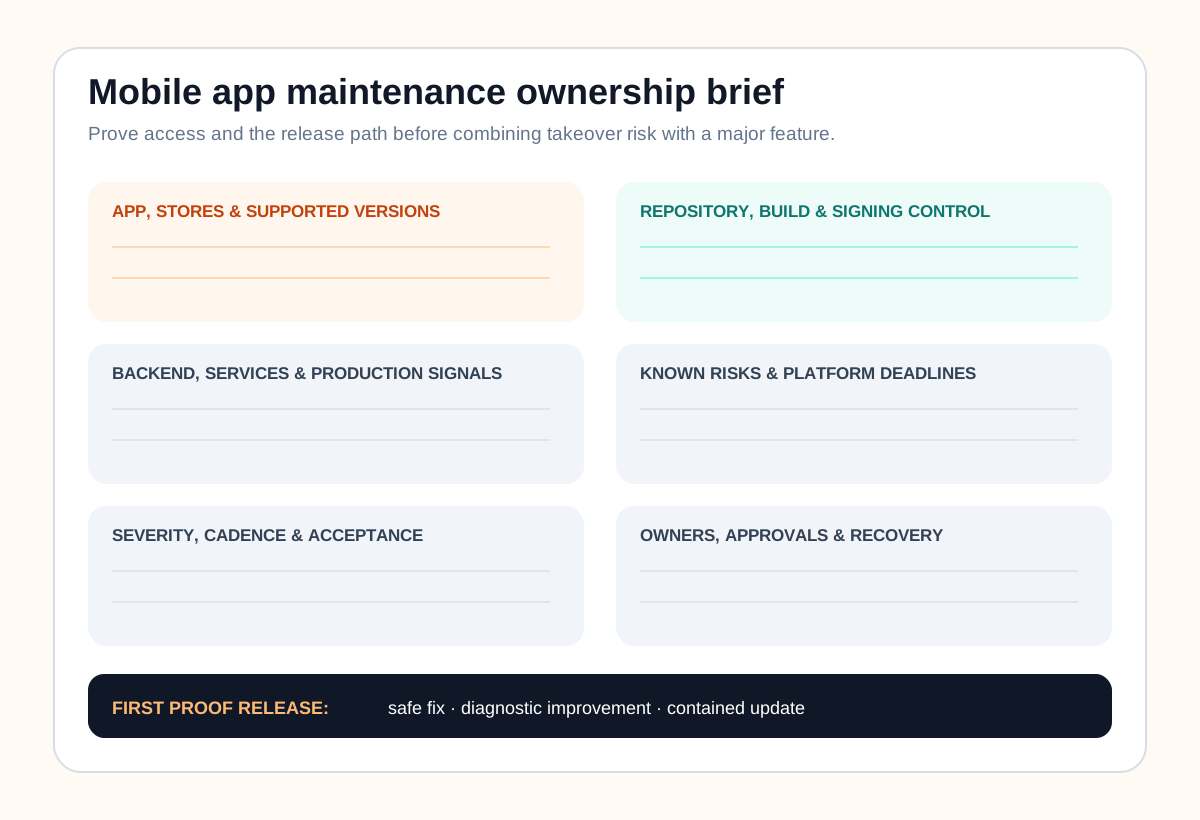
Record app and store identifiers, supported platforms and versions, repository and build path, backend and service map, production signals, known issues, upcoming deadlines, release rhythm, severity rules, access owners, approvers, response expectations, acceptance evidence, recovery path, and the first proof release. Link to controlled systems rather than copying secrets into the document.
A focused app maintenance and support engagement should match the app’s real consequence, release frequency, and operational gap. A low-change internal app and a transaction-heavy consumer product should not inherit the same ceremony or service level by default.
Mobile app maintenance FAQ
What does mobile app maintenance include?
It normally includes crash and performance triage, OS and device compatibility, dependency and SDK updates, security and privacy maintenance, backend and integration health, store policy and metadata work, support feedback, regression testing, release coordination, monitoring, and clear ownership of accounts, credentials, incidents, and future changes.
How often should a mobile app be maintained?
Production signals and urgent security or service failures need continuous ownership. Other work can follow a defined review and release rhythm based on app usage, platform deadlines, dependency risk, business seasonality, and team capacity. A fixed calendar should not delay a critical fix or force a low-value release.
What should be checked before every app update?
Check the complete priority journey, authentication and account recovery, permissions, purchases or payments where relevant, notifications and deep links, offline or weak-network behavior, supported devices and OS versions, backend compatibility, analytics and crash reporting, accessibility, privacy disclosures, store metadata, review access, rollout settings, and rollback or hotfix readiness.
Can a new team maintain an app it did not build?
Yes, if the takeover includes repository and build access, store and signing control, environment and backend documentation, dependency and service inventory, observability, known risks, test evidence, release history, support context, and a small proof release. Missing access or undocumented production behavior should become explicit discovery work before major feature changes.
How do I choose a mobile app maintenance partner?
Ask the partner to inspect the live operating boundary, explain how it prioritizes incidents and platform deadlines, demonstrate a repeatable build and release path, identify access and documentation gaps, propose service levels that match real risk, and define who owns monitoring, approvals, credentials, store communication, testing, and handover. Start with an assessment or small release when the app is unfamiliar.