
The short answer: define what “active tenant” means
A SaaS tenant provisioning requirement should specify the creation trigger, stable tenant identity, isolation boundary, initial administrator, entitlements, required integrations, safe retry behavior, activation checks, and recovery owner. A new row in a tenants table is not an active customer workspace.
Imagine a B2B product that receives a signed order on Friday. Sales expects the customer to log in Monday, but the workspace needs an identity configuration, plan entitlement, default settings, and perhaps a dedicated data store. If any step fails, support needs to see which steps completed and whether the customer can safely be invited. That is the job of a provisioning contract.
This article focuses on the system between a signup or sales handoff and a usable workspace. The SaaS user onboarding guide covers what people do after the workspace is ready; the tenancy architecture guide helps choose pooled or dedicated resource boundaries. Keep those decisions connected, but give provisioning its own acceptance test.
Choose the activation boundary before automating steps
Write down the first action a customer must be able to complete. For a collaboration product, that may be signing in as the initial administrator, inviting a colleague, and opening an empty project. For an integration product, it may require a working connection before the workspace is useful. “Provisioned” and “first value” are different milestones; specify which one your service promise requires.
Classify setup work into three groups. Blocking work must pass before access: tenant identity, resource boundary, administrator authorization, and the purchased entitlement. Deferred work can happen while the workspace is available, such as sending a welcome email or creating optional sample content. Manual approval work may be needed for unusual contracts or regulated data. An explicit status prevents a manual step from being mistaken for a silent technical failure.
AWS SaaS Lens describes tenant onboarding as an orchestrated, observable process, including registration, user and tenant management, billing integration, and resource provisioning. That is a useful architecture model, not a requirement to split a young product into many services. One well-defined workflow in a modular application can implement the same boundaries.
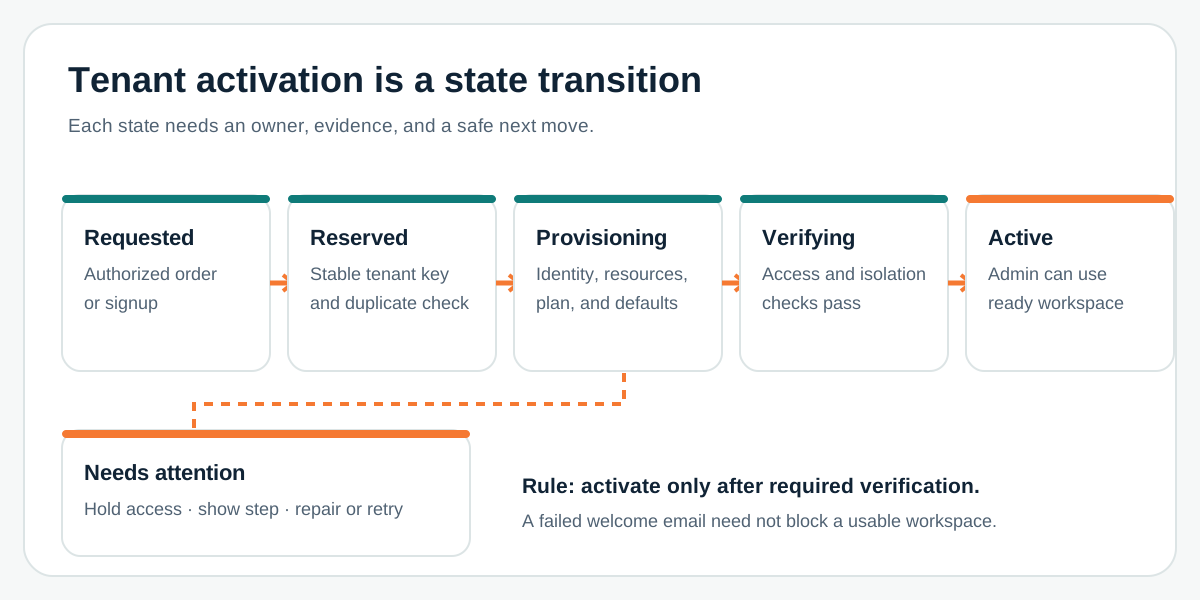
Use a state model such as requested, reserved, provisioning, verifying, active, and needs attention. Record who or what can move the tenant to the next state. Do not show a general “setup complete” message when access policies or entitlements have not passed verification. If the commercial process is manual, the same state model can guide an internal operator instead of a self-service signup.
Write the seven-part provisioning contract
- Trigger and authority. State whether an approved order, payment event, invited administrator, or internal operator can request a tenant. Define what evidence authorizes creation. Do not let an unverified webhook or a browser retry create extra workspaces.
- Stable identity. Assign an immutable tenant key. Decide how domain names, legal account names, and display names may change without changing the key. Specify duplicate detection and a safe idempotency key for repeated requests.
- Data and resource boundary. Name the database, storage, search, cache, job, and log contexts that carry tenant identity. For pooled resources, queries and background work need enforced tenant scope. For dedicated resources, record which template and configuration version was provisioned.
- Initial access. Choose the first administrator and invitation method. Define expired invitations, identity-provider mismatch, organization switching, and support access. A workspace should not become visible merely because a user account exists.
- Entitlements and defaults. Connect purchased plan or approved trial to feature limits, region, retention, and configuration. Record the source of truth and what happens when the billing or contract system is temporarily unavailable.
- External dependencies. List DNS, email, billing, identity, data seeding, and third-party integrations only where this product actually needs them. For each, state whether failure blocks activation, can be retried, or requires a human owner.
- Evidence and ownership. Record status, timestamps, step outcomes, sanitized error codes, correlation ID, and the operator who can repair a tenant. Avoid logging secrets or customer data as a shortcut to observability.
AWS treats tenant isolation as a foundational SaaS control. A valid login alone is not proof that one tenant cannot access another tenant's resources. The SaaS permissions checklist helps define the roles inside each workspace; provisioning must establish the workspace boundary they operate within.
Design a retry that cannot create a second customer
Provisioning spans systems that rarely commit as one transaction. A billing record may exist while resource creation times out. A retry should inspect the saved workflow state and continue an incomplete step where safe. Make a repeated request with the same business identity resolve to the existing tenant or an explicit review state; never silently create a duplicate because the caller did not receive a response.
For each step, decide between retry, compensation, and operator repair. Retry transient failures with bounded attempts and a visible queue. Compensate only when removing a resource will not erase a customer's valid work. Escalate ambiguous outcomes—such as a third-party API timing out after creating an account—to a human who can check before repeating the operation. Keep the tenant unavailable until required verification passes.
The API integration checklist covers idempotency, rate limits, and error ownership at each handoff. Here, apply those rules to the complete activation journey. An operator should be able to answer: what request started this setup, which tenant key was reserved, which steps passed, what is safe to retry, and what the customer currently sees?
Test the ready state and the forbidden state
A happy-path signup is the start of acceptance, not the end. Test two simultaneous requests for the same account, a replayed payment or order event, a failed identity step, delayed email, partial resource creation, a cancelled setup, and a return visit after failure. Verify that the same tenant key survives safe retries and that unresolved work is visible to the assigned operator.
Then create two test tenants and attempt direct access across their boundaries: API object IDs, files, search results, jobs, caches, and support actions. AWS SaaS Lens explicitly calls out onboarding and isolation tests. The exact cases depend on your architecture, but the proof should cover both successful activation and forbidden cross-tenant access. Give the first administrator the right entitlement, then change the plan and confirm the new limits propagate without creating a new workspace.
Measure the operational result without inventing a universal target. Useful measures include time from authorized request to verified activation, the proportion needing operator repair, duplicate-request rate, and the age of tenants stuck in each state. Set service targets from actual customer promises and observed failure modes, then revise the contract when a new setup variation appears.
A first-release brief you can take into scoping
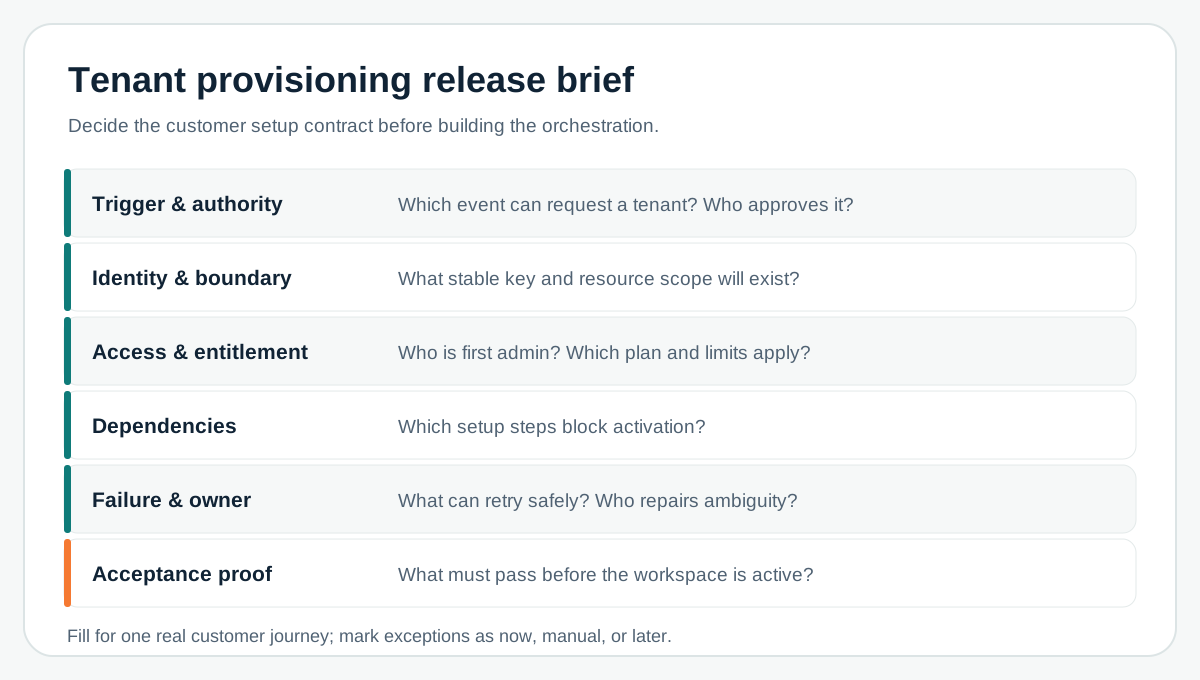
Fill the worksheet for one representative customer, then run a second case that challenges it: a dedicated-resource tenant, an enterprise identity setup, or a manual contract approval. Mark each extra branch as required now, safely manual, or later. The result is a bounded first release and a list of real estimate drivers—not a promise that every future customer can be fully automated at once.
If the workspace is created correctly but users still stall, take the next step with the first-value onboarding checklist. If isolation choice is still undecided, resolve that with the tenant architecture comparison before hard-coding a provisioning template.
A team scoping the full product can connect this contract to Leeonex's SaaS platform development service and bring the unresolved setup branches to an initial conversation.
Frequently asked questions
Is tenant provisioning the same as user onboarding?
No. Tenant provisioning creates and verifies the organization's workspace, identity boundary, resources, settings, and entitlements. User onboarding helps people reach their first useful action inside that ready workspace. The two journeys meet at activation, but need different owners and tests.
Must every SaaS tenant have its own database?
No. Pooled and dedicated resources can both work when the isolation boundary is defined, enforced, and tested. The right choice depends on customer commitments, workload, operations, and cost; provisioning must implement the selected model consistently.
What happens if tenant creation fails halfway through?
Keep the tenant unavailable, record the completed and failed steps, and retry safely or run a documented compensating action. Do not create a second workspace on a repeated request or mark a tenant active before access and resource checks pass.