
The short answer: design for first value, not first login
A SaaS onboarding flow should help one defined user reach one meaningful product outcome with the least responsible setup. Specify the account and workspace state, required data, permissions, guidance, saved progress, failure recovery, support path, and evidence that the outcome happened. Add a tour or checklist only when it helps that path.
Signup, onboarding completion, and activation are different events. Signup proves an account exists. Completion proves the user followed the designed steps. Activation should represent a product-specific result: a real report was published, a shared workflow completed, or a customer case reached a useful state. A polished tour can finish without any of those things being true.
Before this user journey begins, the organization needs a ready workspace. Use the tenant provisioning requirements checklist to specify that creation and activation handoff.
Outcome
One useful result for one user situation
Continuity
Progress survives exits, retries, and invites
Evidence
Events explain success, delay, and failure
Write an activation contract before designing screens
Search results commonly recommend shorter forms, welcome messages, product tours, checklists, templates, emails, and tooltips. These can be useful, but they are delivery mechanisms. Start with a compact contract that explains the value path and makes every requirement testable.
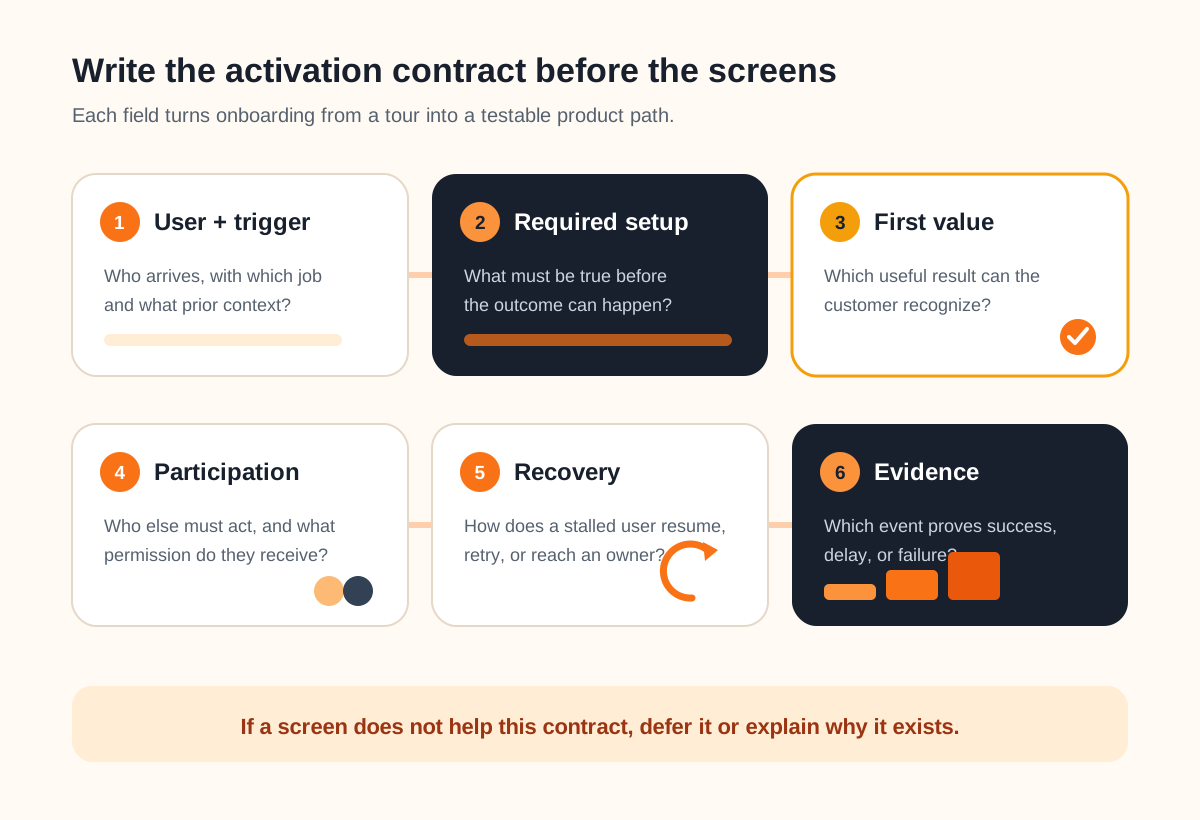
| Contract field | Question to answer | Example evidence |
|---|---|---|
| User and trigger | Who arrives, with what job and prior context? | Named role, source, promise, and starting state |
| Required setup | What must exist before value is possible? | Workspace, permission, connection, or first record |
| First value | What useful result can the user recognize? | A real outcome with a durable object or state |
| Participation | Does another person have to act? | Invite accepted or operator task completed |
| Recovery | What happens when setup stops or fails? | Saved progress, retry, alternate path, or owner |
| Evidence | Which event answers the product question? | Timestamped outcome plus relevant context |
Keep the first-value definition honest. “Viewed dashboard” may be useful for a reporting product only if the dashboard already contains trustworthy, relevant data. “Invited a teammate” is not value when the teammate never joins. The event should stand for an outcome the customer can recognize, not an interface gesture that is easy to count.
If the entire first release still lacks a clear user and job, step back to the MVP scope checklist before optimizing onboarding. It separates core value, trust, operability, and learning so the first-run experience is not asked to repair an unfocused product.
Map onboarding as states with a recovery path
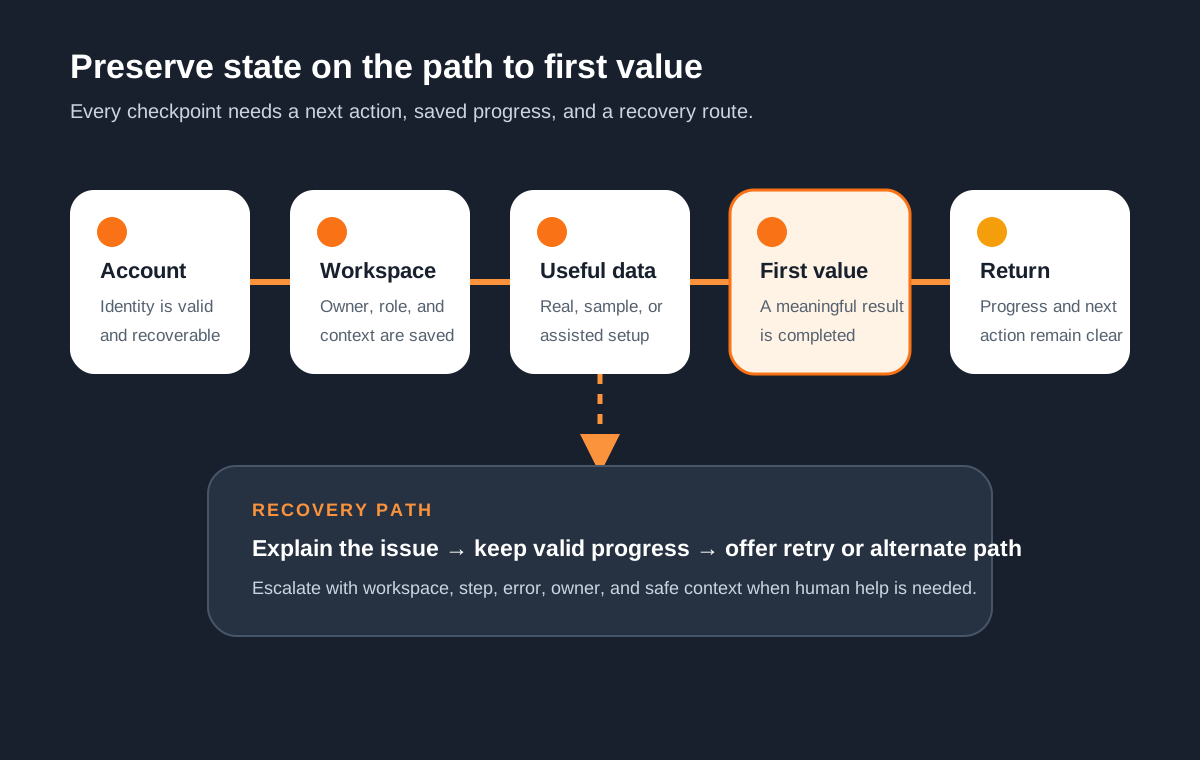
A sequence of screens describes the happy path but not the product state. Model what becomes true after every step: account verified, workspace created, role assigned, data available, first outcome completed, collaborator active, or return action scheduled. Then define who can resume, revise, skip, or undo it.
Choose real, sample, or assisted setup deliberately
- Real dataproves the product in the customer's context, but import, validation, permissions, and rollback may make it the slowest and riskiest route.
- Sample data teaches the model quickly. Label it clearly and provide a clean path to replace or remove it; interaction with a demo is not proof of customer value.
- Assisted setup lets a customer-success or operations owner handle complex mapping for an early cohort. The handoff, permissions, completion evidence, and support capacity still need requirements.
Returning users should see the current state and one useful next action. Preserve valid progress across browser exits, email verification, invitation acceptance, failed integrations, and delayed approvals. If a step must restart, explain what was kept and what must be repeated. Avoid a generic “something went wrong” state that sends the user back to the beginning.
When onboarding depends on existing customer data, the API integration requirements checklist helps define field ownership, duplicate safety, retries, reconciliation, and operator recovery separately from the user journey.
Treat identity, workspace, and team setup as product rules
Self-serve signup is not mandatory. An invitation-only pilot, sales-created account, organization-admin flow, or identity provider connection may fit the product better. Document who creates the account, who owns the workspace, whether one person can belong to several workspaces, and how ownership changes when the original admin leaves.
Do not improvise authentication requirements inside an onboarding mockup. The current NIST authenticator guidance covers password, authenticator, recovery, and lifecycle choices; the appropriate assurance depends on the service and risk. The W3C guidance on accessible authentication also explains why login should not depend on cognitive tests without an accessible alternative or assistance mechanism.
Specify the invitation lifecycle
For a team product, define inviter permissions, default role, invitation expiry, resend and revoke behavior, existing-account matching, domain restrictions, duplicate invitations, and the destination after acceptance. Decide whether the first outcome belongs to the account, the individual, or both. A workspace is not activated just because its administrator finished setup if the intended users cannot perform their job.
Use the SaaS permissions requirements checklist when onboarding introduces several roles or tenant boundaries. It goes deeper on action-level authorization, tenant-safe tests, admin access, and permission change evidence.
Measure the outcome, the path, and the unresolved cases
Define the question before naming analytics events. A useful measurement plan distinguishes account creation, onboarding start, setup milestones, first-value completion, teammate participation, return behavior, error, retry, assisted recovery, and abandonment. Include role, plan, path variant, and workspace context only when the team will use them and privacy rules allow them.
Google Analytics provides recommended events such as sign_up, tutorial_begin, and tutorial_complete in its official event reference. Those names can support consistent reporting, but the product still needs a separate event for its real first-value outcome. Validate that event against user behavior rather than declaring that it predicts retention without evidence.
Run acceptance cases, not only a funnel
- A new eligible user reaches value through the primary path.
- A returning user resumes from every saved checkpoint.
- An expired, revoked, and duplicate invitation behaves clearly.
- Invalid data and a failed integration preserve useful progress.
- Keyboard and assistive-technology use reaches the same outcome.
- A support owner can see and resolve a stalled case safely.
- Analytics records the outcome once with the intended context.
Start with a controlled cohort when account setup, imports, or customer-specific configuration remain uncertain. Human help is not evidence of failure; hidden help is. Record which steps need intervention, why, and whether the next release should simplify, automate, document, or deliberately retain them.
Use a one-page SaaS onboarding release brief
Complete the brief with product, design, engineering, customer success, security, and analytics owners. Attach real examples: a valid invitation, a difficult import, a stalled account, a support transcript, and the product object created by first value. Mark assumptions and exclusions rather than smoothing them into confident prose.
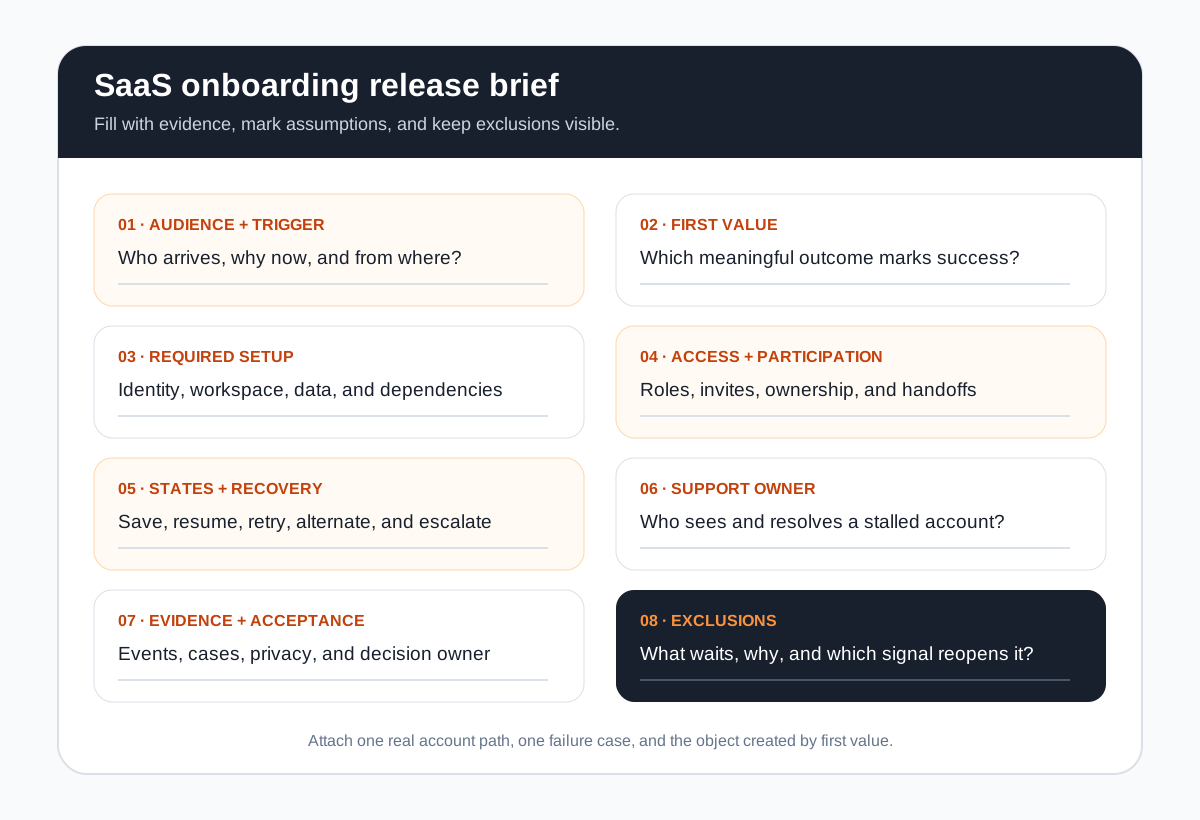
Estimation boundary
user + first value + setup states + participation + recovery + evidence + exclusions
This boundary gives a delivery team something more useful than “improve onboarding.” Leeonex's SaaS platform development can help shape or implement a role-aware first-value flow, while a focused scoping conversation may reveal that a manual onboarding change or analytics repair should come before a larger rebuild.
SaaS onboarding requirements FAQ
What should a SaaS onboarding flow include?
A SaaS onboarding flow should include only the identity, workspace, data, permissions, guidance, and support needed for one defined user to reach a meaningful first outcome. It also needs saved progress, clear next actions, failure and retry states, measurement of the outcome, and a route for users who need human help. Tours, checklists, templates, and sample data are optional mechanisms rather than universal requirements.
What is the difference between onboarding completion and activation?
Onboarding completion records that a user finished the designed steps. Activation records a product-specific outcome that demonstrates useful behavior, such as publishing a real report, completing a shared workflow, or resolving a real case. A user can complete a tour without reaching value, so teams should measure the business outcome separately from checklist or tutorial completion.
Should a SaaS product require users to invite a teammate during onboarding?
Only when collaboration is necessary for the first value outcome. If a solo user can evaluate the core benefit, forcing an invitation adds dependency and privacy concerns too early. For team products, define inviter and invitee roles, existing-account behavior, expired and revoked invitations, domain rules, permission defaults, and what value each participant should reach.
Should SaaS onboarding use sample data or require an import?
Use sample data to teach concepts quickly, but do not mistake interaction with sample content for evidence that the product works with a customer's reality. Require real data only when it is essential to the first outcome. If import is costly or risky, offer a template, a small manual setup, or assisted onboarding and define validation, duplicates, rollback, and deletion of test data.
How do you estimate a SaaS onboarding build?
Estimate a named path and its branches: authentication, workspace creation, role selection, invitations, data setup or import, first-value action, saved progress, notifications, analytics, accessibility, support handoff, and failure recovery. The number of user roles, integrations, migration formats, permission states, experiments, and exception paths usually changes the effort more than the number of welcome screens.