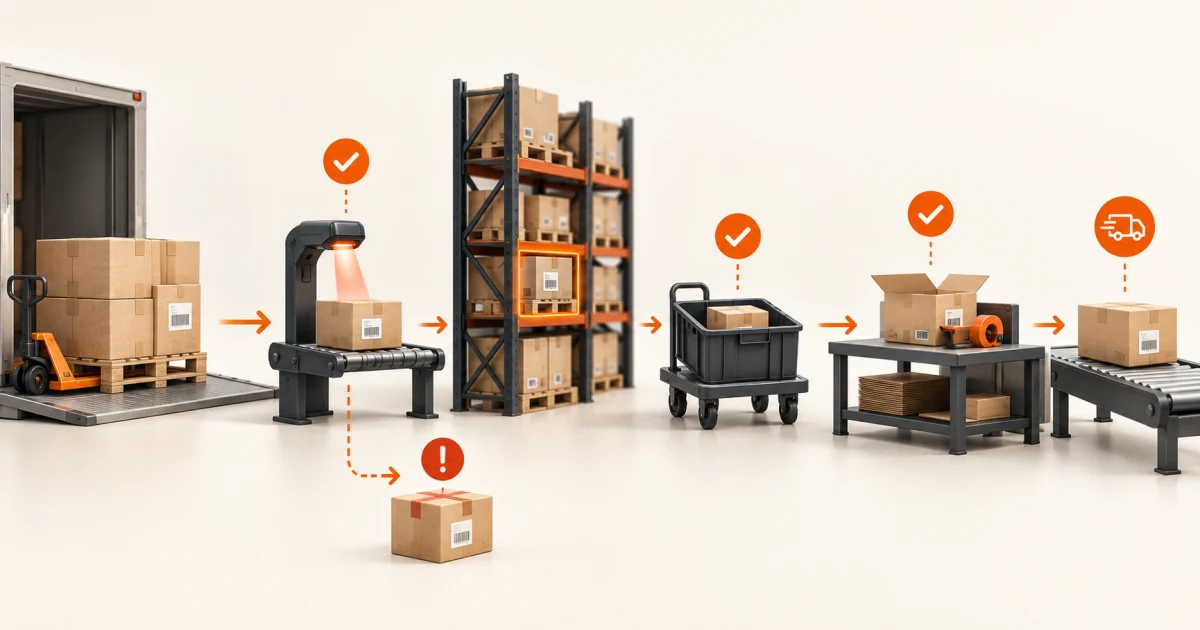
Define warehouse truth before comparing WMS features
A useful warehouse management system requirements checklist defines how physical units are identified, where they may be stored, which inventory states affect availability, how work is directed and confirmed, and how the operation recovers when the physical world disagrees with the system.
Cover inbound appointments and receipts, handling units, putaway, locations, inventory status, allocation, replenishment, picking, packing, staging, loading, shipping, transfers, returns, cycle counts, mobile devices, labels, integrations, permissions, history, reporting, migration, and exceptions. Then make each finalist run the same difficult shift using your items, locations, devices, rules, and connected systems.
Write an inventory state contract for one difficult unit
Choose a representative unit that exposes the operation: a mixed pallet, serial-controlled device, short-dated lot, damaged inbound carton, split case, or customer order that must ship in two parcels. Record the item and variant, quantity and unit of measure, lot or serial, handling unit, warehouse and location, condition, inventory status, ownership, source document, reservation or allocation, and current work.
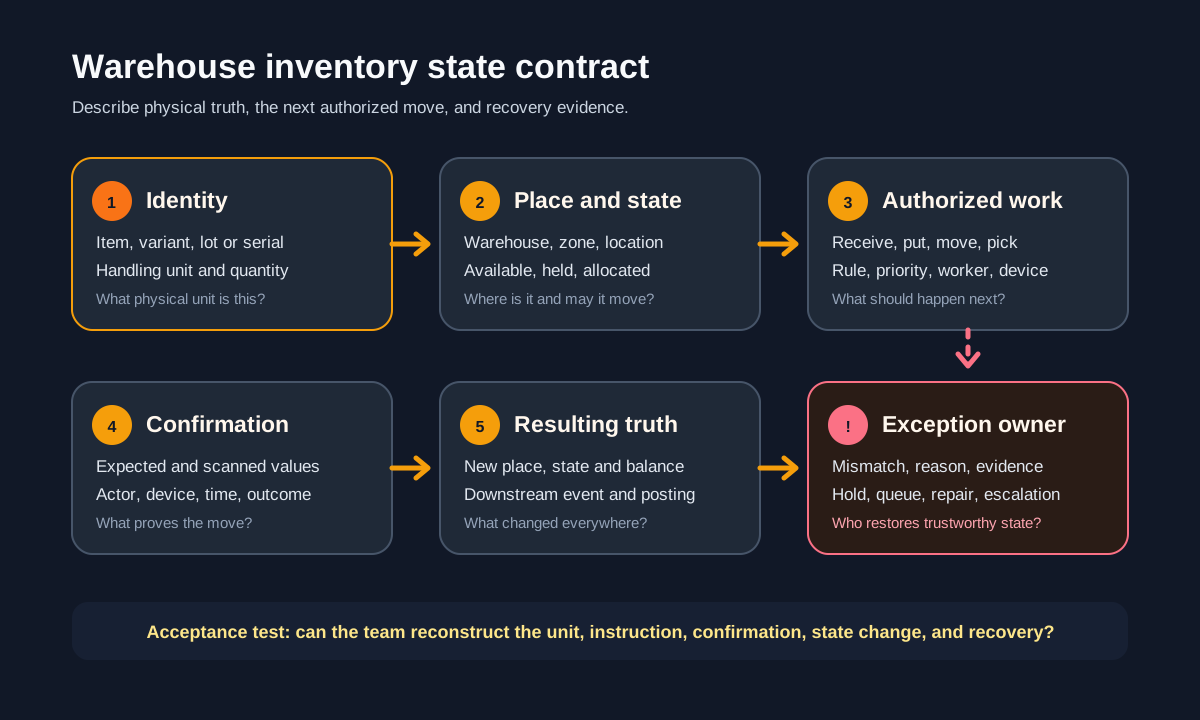
Treat inventory changes as events, not silent field edits. The GS1 EPCIS 2.0.1 standard describes event dimensions as what, when, where, why, and how. A WMS does not have to implement EPCIS, but that model is a useful completeness test: can the system explain the object, time, place, business context, condition, and evidence behind a change?
Separate physical truth from business permission. A pallet may be in location A-01 but quarantined, reserved, or awaiting inspection. A picker may have lifted it while the move is not yet confirmed. A parcel may be packed but not accepted by the carrier. One generic status cannot safely represent location, condition, availability, and work progress.
Cover the requirement lanes that run a complete shift
Facility and identity
Sites, warehouses, zones, location profiles, capacity, docks, staging, item and variant, units of measure, lot, serial, expiry, handling units, labels, barcodes, and ownership.
Inbound and storage
Appointments, purchase and transfer orders, ASNs, unload, receipt, overage and shortage, damage, quality, quarantine, cross-dock, putaway, consolidation, overflow, and replenishment.
Outbound execution
Demand, reservation, allocation, waves or releases, pick strategies, substitutions, shortages, packing, cartons, staging, loading, labels, manifests, dispatch, and split shipments.
Inventory control
Status, holds, movements, adjustments, cycle counts, blind counts, recounts, approvals, transfers, returns, recalls, ageing, traceability, and reconciliation.
People and equipment
Roles, skills, menus, work queues, priorities, ergonomics, shared devices, scanners, printers, batteries, offline behavior, automation, safety stops, and shift handover.
Systems and operations
ERP, orders, procurement, carriers, EDI and APIs, automation control, monitoring, audit history, dashboards, exports, migration, configuration, support, retention, and disaster recovery.
Use the checklist to define workflows and evidence, not to reward the longest feature list. “Supports picking” is too vague. Name whether the first release needs discrete, batch, cluster, zone, wave, cart, case, pallet, or another strategy; what triggers work; which identity must be confirmed; and how a short pick, wrong location, damaged unit, or abandoned task is recovered.
Make inbound, putaway, and location rules testable
Define the expected source: purchase order, inbound shipment, transfer, production completion, return, or unplanned receipt. Capture supplier or origin, appointment, vehicle or load, advance notice, packing structure, item, quantity, unit, lot, serial, expiry, condition, documents, photos, temperature or other required evidence. State how duplicates, unknown goods, overages, shortages, damaged units, missing labels, and partial receipts are held and owned.
Receipt and putaway may be separate work. Microsoft’s current warehouse mobile configuration documentation distinguishes flows that receive and create putaway work from flows where the same worker receives and puts away. That design choice changes evidence, labor, staging, and recovery, so it belongs in requirements rather than hidden configuration.
Putaway rules should consider location type, item and unit, capacity, dimensions, weight, hazard or compatibility, temperature, lot and expiry policy, consolidation, fixed or empty locations, velocity, security, accessibility, and incoming work. Define the fallback when no location qualifies. Microsoft’s work-template and location-directive guidance shows why the instruction and the location rule are separate: one defines the work, while the other determines where pick or put actions occur.
Connect allocation, replenishment, picking, and dispatch
Assign authority for demand, reservation, allocation, and release. The WMS should know which order lines are eligible for work, but the order system or ERP may still own customer promise, credit, cancellation, and financial posting. Define cut-off times, priorities, holds, substitutions, lot or expiry rules, full-versus-partial shipment, consolidation, and what happens when inventory disappears after allocation.
Replenishment must arrive before the pick face becomes the problem. Specify minimums, demand-driven triggers, source and destination selection, units, work priority, concurrent reservations, blocked paths, short source locations, and who may override. Connect the replenishment task to the demand it protects so an operator can explain why it was created.
For picking, packing, staging, and loading, define the required confirmations at each transition. Decide when a tote, carton, pallet, shipment, load, or trailer identity is created; how items aggregate or split; when labels print; when carrier acceptance becomes known; and which event makes inventory no longer available. A label created is not the same as a parcel shipped, just as a pick confirmation is not a completed order.
Design for warehouse work, devices, and failure
Map the worker’s real environment: gloves, lighting, noise, distance, one-handed use, scan range, shared devices, battery change, printer access, cold or outdoor conditions, and intermittent connectivity. Keep the next required action obvious. Confirm only the identities and quantities that reduce meaningful risk; excessive prompts encourage automatic dismissal and workarounds.
Microsoft documents product, location, quantity, counting, quarantine, and status-change confirmations in its warehouse mobile flows. Use those categories as examples, not a universal answer. Your requirements should say which confirmation proves a specific risk was controlled and which actor may bypass or correct it.
Define loss of connectivity before selecting a mobile stack. Name which work may continue, what data is cached, how stale instructions are detected, how scans are ordered and made idempotent, which actions require an online check, and how conflicts return to a visible queue. The offline-first mobile requirements checklist provides a deeper action-contract model for warehouse apps that must continue through unreliable networks.
Assign authority across WMS, ERP, devices, and partners
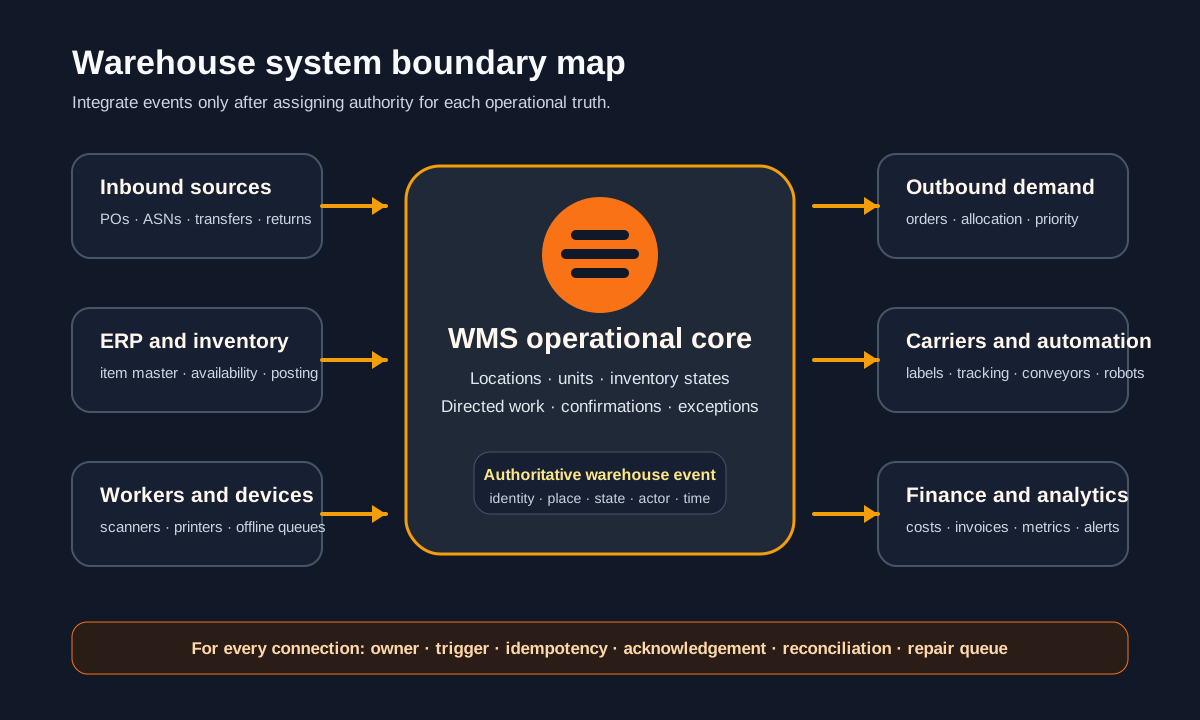
For every integration, identify the source of truth, trigger, payload identity, correlation key, acknowledgement, retry, ordering, idempotency rule, timeout, reconciliation report, and repair owner. A shipment should not dispatch twice because an acknowledgement was lost, and inventory should not remain available because a downstream post failed silently.
Keep adjacent scopes explicit. The inventory management requirements guide focuses on stock truth across business locations and channels; the order management guide covers customer demand and fulfillment coordination; and the returns guide follows reverse outcomes. A WMS coordinates the physical work inside its warehouse boundary while exchanging controlled state with those systems.
Choose among product configuration, extensions, and a build
Configure a packaged WMS
Best when standard inbound, storage, replenishment, outbound, count, traceability, and device flows fit. Verify configuration ownership, upgrades, integrations, data export, support, and the cost of each site, user, device, or automation connection.
Extend around a stable core
Best when inventory and warehouse execution fit but a focused supplier flow, scanner experience, dashboard, automation adapter, label service, or exception workspace does not. Keep state authority in the core and make the extension recoverable.
Build a custom warehouse core
Reasonable only when the operating model is genuinely differentiating and packaged constraints are material. Budget for rules, devices, security, integrations, observability, migration, testing, support, and continuous operational change—not only screens.
Repair the process first
Prefer this when locations, labels, item masters, units, ownership, exception policy, or physical discipline are undefined. Software can enforce a good operating contract; it cannot create one from contradictory practices.
Leeonex can help scope a focused custom web application, mobile workflow, integration, or operational dashboard around a defined warehouse problem. A discovery result may also be that configuration or process repair is the better first step.
Use a difficult-shift worksheet before approval
Build the pilot around one complete flow, then add failures that cross responsibilities. Record the expected state and evidence after each event. At minimum, include:
- The warehouse, zones, locations, capacity constraints, item, units, lot or serial, handling units, and opening inventory.
- An inbound order or notice with a duplicate message, shortage, damaged unit, and full preferred putaway location.
- A replenishment need, a partially unavailable source, and an urgent outbound order competing for the same units.
- A wrong scan, offline device, interrupted task, short pick, split pack, failed label, and late carrier acknowledgement.
- A cycle count difference, approval or hold, correction, downstream reconciliation, dashboard update, and shift handover.
For every step, capture the actor, input, rule, instruction, confirmation, event, resulting physical and system state, failure response, owner, and proof. The pilot passes only when the operation can explain and safely recover the difficult path, not merely complete the happy path quickly.
Warehouse management software FAQ
What should a WMS requirements checklist include?
Include warehouse and location models, item and handling-unit identity, inbound appointments and receipts, quality or quarantine, putaway, inventory status, reservation and allocation, replenishment, picking, packing, staging, loading, shipping, transfers, returns, cycle counts, adjustments, mobile and scanner behavior, labels, roles, integrations, audit history, reporting, offline or outage behavior, migration, administration, and acceptance scenarios.
What is the difference between WMS and inventory software?
Inventory software mainly records what stock exists and its business availability. A WMS also directs physical work inside a warehouse: receiving, putaway, moves, replenishment, picking, packing, staging, loading, counting, and exception recovery. The products can overlap, so buyers should assign one system authority for each state and transaction instead of relying on labels alone.
Should a warehouse buy, extend, or build software?
Buy when a mature product supports the operating model and integrations with tolerable configuration. Extend when the core inventory and warehouse engine fits but a focused mobile flow, partner portal, dashboard, or connector is missing. Build a custom core only when the workflow is genuinely differentiating and the organization can own rules, testing, support, security, devices, and continuous operational change.
How should warehouse software be tested before rollout?
Rehearse complete shifts, not isolated screens. Include short and damaged receipts, duplicate messages, full putaway locations, replenishment shortages, partial picks, wrong scans, label or carrier failures, offline devices, split shipments, count differences, lost units, and integration outages. Verify physical location, system state, inventory availability, work ownership, evidence, downstream posting, and the recovery path after each event.