Define how maintenance work becomes trustworthy
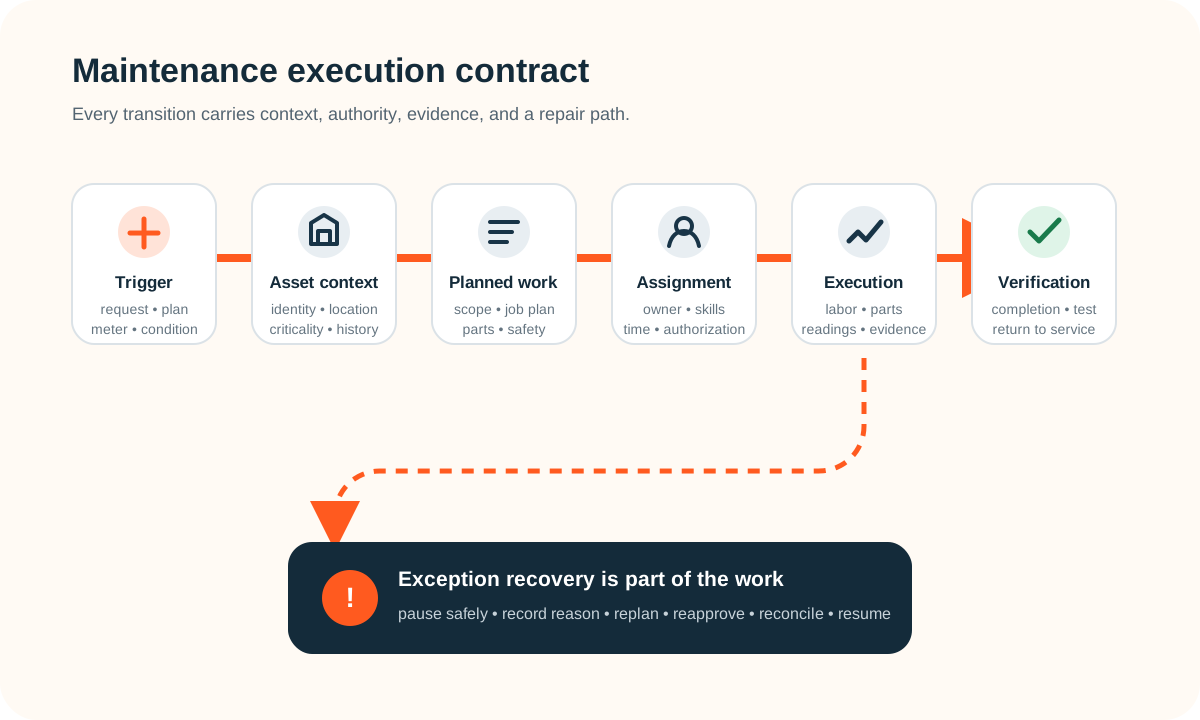
A useful CMMS requirements checklist defines the complete maintenance transaction: what triggered work, which asset and location it affects, the approved plan, who may do it, the safety and material constraints, what actually happened, who verified completion, and how an exception is repaired. Start there—not with a list of screens or reports.
Include asset identity, requests, work-order states, preventive and meter-based triggers, planning, scheduling, technician mobile work, labor and parts actuals, permissions, evidence, integrations, migration, reporting, administration, and failure recovery. Then test the same difficult maintenance scenarios against buying, configuring, extending, or building.
Write a maintenance execution contract before a feature list
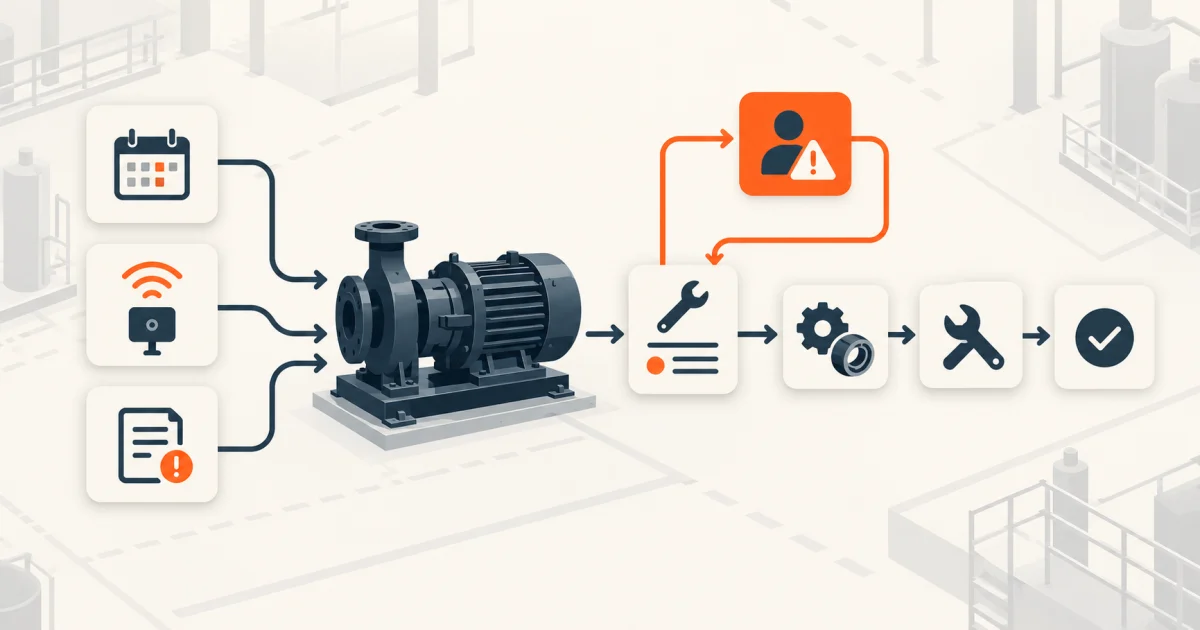
Choose one consequential maintenance flow and follow it end to end. A trigger might be an operator request, a preventive schedule, a meter threshold, an inspection defect, or a sensor condition. The system must join that trigger to the right asset, plan the work, establish authority and prerequisites, capture actual execution, verify the result, and update history.
Mature products expose why these distinctions matter. IBM's current Maximo documentation describes preventive work generated from elapsed time, meter use, or both, and allows the next due date to depend on the prior target start or completion date. See IBM's guidance on creating preventive maintenance records. Those are different operating policies. Your requirements must name which one is correct, including early completion, missed readings, seasonal windows, deferment, and reset behavior.
Add the unhappy path beside every transition. What happens when the asset is unavailable, a permit expires, a part is missing, the technician finds a second defect, a job is partly completed, the reading is implausible, or verification fails? A CMMS that records only successful closure will make the riskiest work disappear into notes and side conversations.
Cover the requirement lanes that change daily maintenance
Asset and location model
Stable IDs, hierarchy, parent-child relationships, criticality, meters, specifications, ownership, warranty, status, moves, replacements, and retirement.
Demand and prioritization
Request channels, requester feedback, duplicate detection, classification, impact, urgency, triage, service targets, and conversion into controlled work.
Planning and scheduling
Job plans, tasks, skills, permits, tools, parts, duration, dependencies, crews, shifts, calendars, shutdowns, backlog, and dispatch rules.
Maintenance strategies
Corrective, preventive, inspection, condition-based, meter-based, seasonal, campaign, route, and follow-up work—with explicit generation and suppression rules.
Execution and closeout
Acknowledgement, start, pause, reason codes, readings, observations, labor, materials, attachments, additional defects, completion, verification, reopen, and return to service.
Governance and support
Roles, segregation, change history, master-data stewardship, configuration release, integration monitoring, retention, export, support queues, and audit review.
Keep asset tracking and maintenance control related but distinct. The asset tracking software requirements guide covers serialized identity, events, custody, and reconciliation. A CMMS adds the planned and actual work contract. Do not duplicate two weak asset masters; agree which system owns identity and which one owns maintenance history.
Define work states, prerequisites, and closure rules
Avoid one generic status dropdown. Describe permissible transitions such as requested, screened, planned, waiting for approval, waiting for parts, scheduled, dispatched, in progress, paused, technically complete, verified, closed, canceled, and reopened. Name who may make each transition, required fields, notifications, timestamps, downstream events, and reversals.
Separate planned work from actual work. The job plan may specify expected steps, parts, labor, readings, tolerances, documents, and safety information; the completed record should retain what technicians actually used, observed, changed, skipped, or added. IBM's work-order documentation notes that preventive work can inherit job-plan and safety-plan information while recording labor, materials, services, tools, meters, and downtime. See its overview of work orders and maintenance progress. Use that as evidence that these are real data relationships—not as a template every team must copy.
Safety-critical control needs accountable specialists. For example, the US OSHA control-of-hazardous-energy standard assigns specific procedures, training, and periodic inspection duties; a checkbox cannot replace them. Requirements may record the approved procedure, current revision, authorization, permit, acknowledgement, isolation evidence, and exception, while the governing safety process remains authoritative. Review OSHA 29 CFR 1910.147 with the responsible safety and legal teams where applicable.
Design for the technician's actual environment
Specify supported devices, authentication, shared-device rules, gloves or dirty-hand constraints, camera and scanner use, attachment limits, readable drawings, accessibility, location capture where justified, battery and data limits, and response time for the real worksite. Decide what is cached, encrypted, editable, and visible offline.
Offline is a state model, not a download button. Define how the app reserves work, shows sync state, timestamps actions, handles stale master data, prevents duplicate completion, detects conflicts, preserves failed uploads, and lets a supervisor reconcile two legitimate edits. The offline-first mobile requirements checklist provides a deeper action-contract and sync model.
Completion evidence should be proportional. Require readings, failure codes, parts, labor, notes, photographs, signatures, or verifier approval only when each changes a maintenance decision or obligation. Test authenticity, timestamp and actor, file handling, retention, redaction, and export. More mandatory fields do not automatically create better evidence; they may create invented values and adoption workarounds.
Assign sources of truth across the maintenance boundary
Map asset and location records, request channels, operational sensors, identity, purchasing, parts inventory, finance, technician mobile, documents, analytics, and external service providers. For each boundary name the owning system, stable ID, direction, event, timing, authorization, retry, idempotency, reconciliation, retention, and support owner.
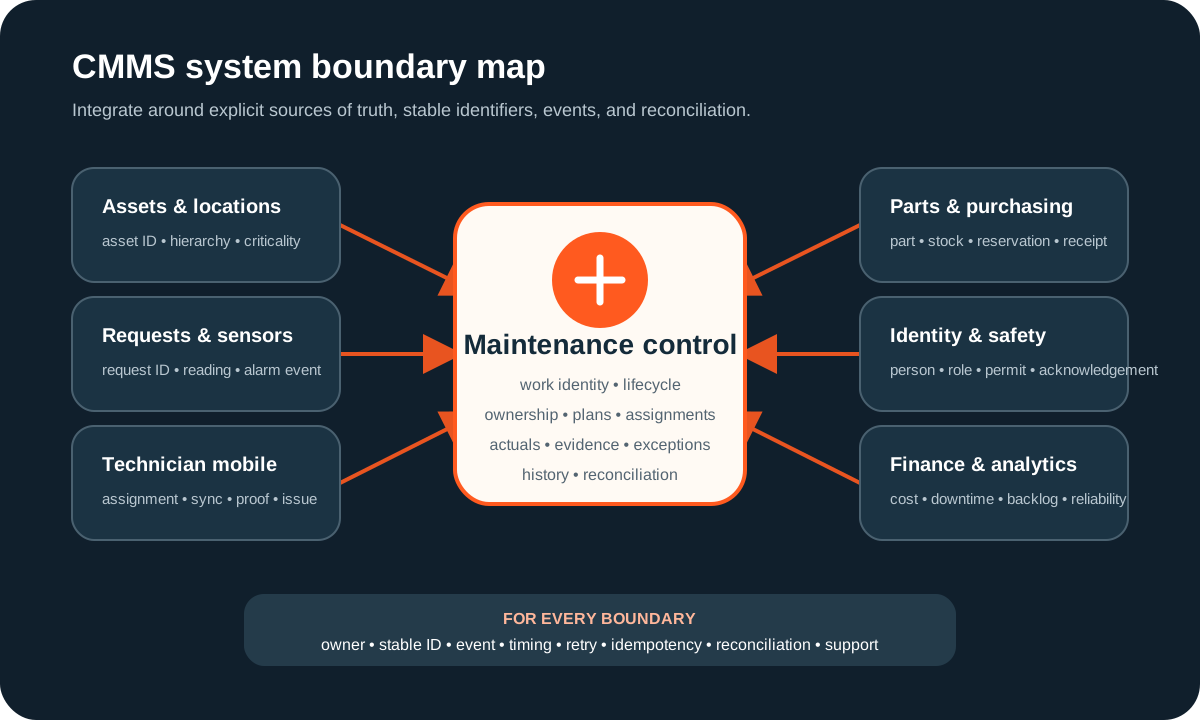
Decide how parts reservations, issues, returns, substitutions, receipts, and counts reconcile with the inventory authority. The inventory management software requirements checklist gives a reusable movement-led model. In the CMMS, retain enough context to explain the work without pretending to be the warehouse ledger or general ledger.
Reporting follows definitions. Name the population, status rules, time window, exclusions, timezone, late-arriving data, owner, and drill-through for backlog, schedule compliance, preventive completion, downtime, repeat defects, parts usage, and cost. Avoid copying benchmark targets without local context; first make each measure reproducible from source work records.
When maintenance windows and production capacity must share one planning view, use the production scheduling software requirements checklist to define the schedule decision, constraint ownership, release, and execution feedback without turning the CMMS into the production scheduler.
Choose buy, extend, or build from the operating gap
Buy and configure
A mature product fits the asset model, work lifecycle, scheduling, mobile execution, parts controls, permissions, and integrations.
Extend
The core CMMS is sound, but one portal, field interaction, approval, report, migration tool, or integration is missing.
Build
Maintenance is inseparable from a distinctive product, device, service promise, or operating model that packaged workarounds repeatedly distort.
Demonstrate the same representative jobs in every option. Use a preventive job that becomes overdue, an urgent breakdown, an unavailable part, a technician working offline, a second defect, a failed integration, and a reopened completion. Score evidence quality, repairability, master-data fit, administrator effort, lifecycle cost, export, and user burden—not presentation polish.
Leeonex can help with API and integration services, cross-platform mobile development, or custom web application development when a focused workflow should complement or replace a poor-fit tool. The smallest useful first release may be one controlled maintenance flow, not an entire enterprise suite. The maintenance-request SaaS MVP concept study shows how to narrow request intake, triage, assignment, completion evidence, verification, and reopen handling into one testable product loop.
Use a one-flow CMMS pilot worksheet
- Outcome: name the maintenance decision or execution failure the pilot must improve.
- Assets: select representative critical, ordinary, moved, offline, and retired records.
- Triggers: include a request, schedule, meter or condition event, and a false or duplicate signal.
- Work contract: define states, owners, prerequisites, plan, actuals, completion, verification, reopen, and cancellation.
- Field reality: specify devices, connectivity, cached data, attachments, conflict rules, and support path.
- Boundaries: assign authority for assets, identity, parts, purchases, cost, documents, sensors, and reporting.
- Exceptions: test blocked access, missing material, changed priority, unsafe condition, failed sync, and rejected completion.
- Acceptance: retain evidence that the full flow, permissions, history, integrations, export, and recovery behaved as agreed.
A pilot is complete when a named maintenance owner trusts the record and can repair failures without private spreadsheets or vendor intervention. That evidence is more useful than checking that every menu item exists.
CMMS requirements FAQ
What should a CMMS requirements checklist include?
Include asset and location identity, maintenance requests, work-order states, job plans, preventive and meter-based triggers, planning and scheduling, technician mobile work, labor and parts actuals, safety controls, vendors, downtime, permissions, audit evidence, integrations, migration, reporting, exception recovery, administration, and acceptance scenarios.
What is the difference between a CMMS and asset tracking software?
Asset tracking establishes what an asset is, where it is, and how custody or status changed. A CMMS uses asset and location context to plan, authorize, execute, verify, and analyze maintenance work. A team may integrate the two, but a location scan alone does not prove that maintenance was completed correctly.
Should a company buy or build CMMS software?
Buy and configure a mature CMMS when its asset model, work-order lifecycle, scheduling, mobile experience, parts controls, and integrations fit. Extend one when the core is sound but a focused field workflow, portal, report, or integration is missing. Consider custom development when maintenance is inseparable from a distinctive product or operating model and packaged workarounds repeatedly break execution or adoption.
How should CMMS software be tested before rollout?
Run representative corrective, preventive, inspection, meter-triggered, emergency, deferred, and failed-sync scenarios. Prove permissions, safety acknowledgements, assignments, offline work, labor and parts actuals, schedule recalculation, integration retries, reconciliation, history, reporting, export, and exception repair with named owners and retained evidence.