
The short answer: define control, not digital storage
Document management system requirements should define how an important document is identified, captured, classified, changed, reviewed, approved, found, shared, retained, exported, and disposed of—and who may make each decision. Storage is only one capability. The real product is a trustworthy lifecycle.
Start with one consequential document journey, such as a contract, policy, drawing, procedure, customer file, supplier certificate, or regulated record. Follow it from receipt or creation to working versions, approval, controlled use, replacement, retention, and final disposition. Add a hard case: a duplicate upload, wrong classification, expired approval, external collaborator, legal hold, unavailable scanner, or conflicting signed copy.
This guide is about governing documents. If the main problem is extracting fields, classifying incoming files, or routing low-confidence results to review, use the separate AI document processing requirements checklist. Extraction can feed a document system; it does not decide which version is authoritative.
Model the document lifecycle before the screen list
Write named states and transitions for each document type. A practical path might include received, classified, draft, in review, changes requested, approved, effective, superseded, on hold, eligible for disposition, and disposed. Not every type needs every state, but every consequential transition needs an actor, rule, timestamp, evidence, result, and reversal or repair path.
The US National Archives' current Universal Electronic Records Management Requirements organize electronic-record needs around capture, maintenance and use, disposal, transfer, metadata, and reporting. Your organization may not follow US federal records rules, but the lifecycle structure is a useful reminder: upload and search are not the end of the system.
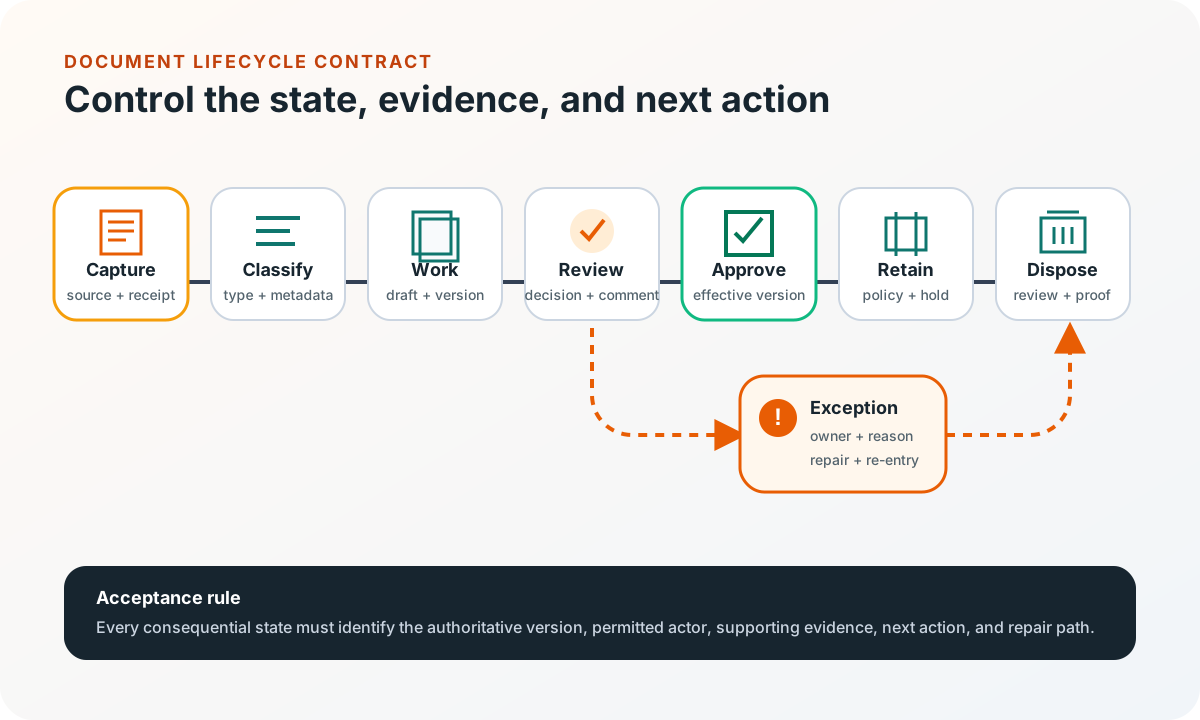
Keep document status, review status, record status, and access status separate when they answer different questions. An approved procedure may be effective, locked as a record, and restricted to one site. Collapsing those facts into “final” creates ambiguous automation and unsafe bulk actions.
Define eight requirement lanes with acceptance evidence
Use representative files, folder structures, spreadsheets, email handoffs, approval records, access requests, search failures, retention schedules, and migration inventories as evidence. Turn each concern into observable behavior.
| Lane | Decision to specify | Acceptance evidence |
|---|---|---|
| Identity and type | Stable ID, document types, relationships, duplicates, source | One business document resolves to one governed identity |
| Capture and validation | Channels, formats, limits, scanning, malware checks, failures | Unsafe or incomplete files cannot silently enter use |
| Metadata and classification | Required fields, vocabularies, inheritance, corrections, confidence | A document can be filed and found without filename guesswork |
| Version and collaboration | Drafts, check-in, merge, compare, restore, effective version | Users can identify and recover the intended version |
| Workflow and evidence | Reviewers, sequence, due dates, comments, signature, delegation | Every decision has actor, time, input, outcome, and next state |
| Access and sharing | Roles, groups, external parties, download, watermark, expiry | Representative users see only permitted content and actions |
| Retention and disposition | Trigger, hold, schedule, review, transfer, destruction proof | Policy survives edits, moves, exports, and account changes |
| Integration and operations | APIs, search, audit, migration, export, monitoring, admin | Failures are visible, replayable, reconcilable, and owned |
Add non-functional requirements where they change the decision: expected file sizes and volume, search freshness, preview time, restore objectives, supported devices, accessibility, data residency, availability, backup, observability, and support responsibility. Do not copy a generic “enterprise scale” line; use a representative workload and a measurable result.
Make capture safe, attributable, and repairable
Define upload, drag-and-drop, scanner, watched mailbox, mobile camera, bulk import, and API capture only where the business needs them. For each channel record the source, actor, received time, original filename, detected type, size, checksum, classification status, and processing result. Preserve the original when policy requires it; keep derived previews, OCR text, thumbnails, and redacted copies linked as derivatives.
File handling is a security boundary. The OWASP File Upload Cheat Sheet recommends allowlisting necessary extensions, validating file type rather than trusting the request header, generating safe storage names, limiting size, authorizing uploaders, and storing files away from the application server where appropriate. Specify quarantine, scanning, rejection, operator review, and user feedback instead of treating upload as one happy path.
Migration is capture at scale. Inventory sources and owners, map types and metadata, identify duplicates and corrupt files, define checksums, preserve required dates and provenance, reconcile counts and bytes, sample content, and retain a signed exception ledger. A successful copy command is not migration acceptance.
Test discovery with real questions and access boundaries
Search requirements should name the questions people ask: latest approved safety procedure for site A; signed agreement for customer B; certificates expiring next month; drawings superseded by revision C; or documents awaiting a specific reviewer. Define full text, metadata filters, facets, saved views, synonyms, OCR coverage, ranking, result freshness, and how users understand why something matched.
Search must be security-trimmed. Test near-identical users from different teams, tenants, sites, projects, or external organizations. Validate search results, previews, direct URLs, exports, shared links, notifications, cached files, and APIs—not only the document-list screen. Define what remains visible when a person changes role or leaves.
Measure findability with a task set, not a vague relevance goal. Give representative users known-item searches, category searches, partial facts, stale terminology, and deliberate no-result cases. Record whether they found the correct current document, how long it took, and which misleading results need a metadata, content, permission, or ranking repair.
Keep one document identity across system boundaries
Map business applications, identity, scanning and email, electronic signature, OCR or AI processing, search, archive, backup, analytics, and external portals. Decide which system owns the binary, document ID, business relationship, workflow state, signer evidence, retention policy, and user identity. Prefer stable document references over unmanaged file copies.
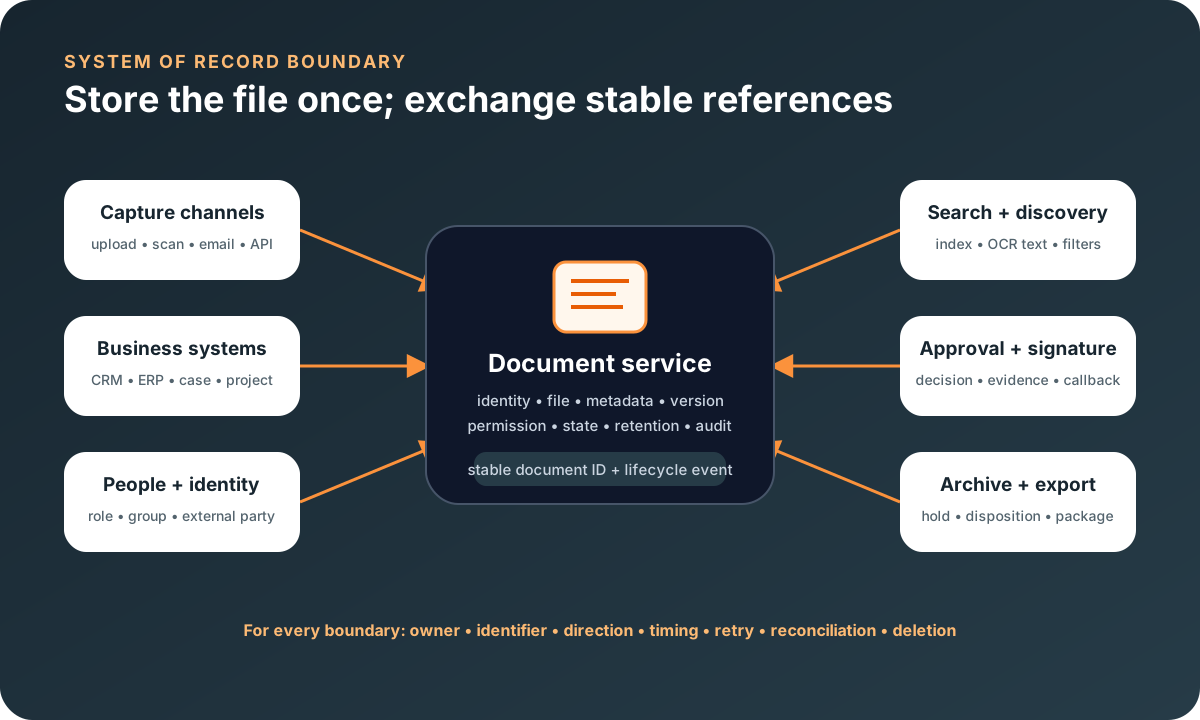
For each integration define identifiers, direction, events, timing, authorization, retries, idempotency, deletion, reconciliation, and support ownership. If a signature provider callback fails or a customer record merges, the document should not become orphaned or silently revert to draft.
Treat complete export as a product capability. Include original files, required derivatives, metadata, relationships, versions, permissions where portable, workflow history, holds, checksums, and a manifest that can be validated. The customer data export requirements guide offers a reusable coverage and acceptance model.
Choose buy, extend, or build from the lifecycle gap
Buy and configure
Standard libraries, metadata, versioning, search, permissions, retention, and supported integrations fit.
Extend
The repository and governance model fit, but one focused workflow, portal, capture channel, or integration is missing.
Build
The document lifecycle is inseparable from a distinct product, domain model, user journey, or operating process.
Compare options with the same document types, user roles, versions, metadata, review steps, retention rules, integrations, migration sample, and exception scenarios. A polished search demo is weak evidence if the platform cannot represent your effective-version rule or export a complete, verifiable record.
Use a mature repository when it genuinely fits. Use API and integration services to connect an appropriate platform, or custom web application development when the governed document experience is a core part of the product rather than a generic back office library.
If the document set is primarily agreements and the missing control spans requests, clauses, redlines, approval authority, signatures, obligations, amendments, notices, and renewals, use the contract management software requirements checklist to define that lifecycle without turning the document repository into an accidental CLM.
If documents are only one part of a wider evidence loop across nonconformance, complaints, audits, investigation, corrective action, controlled change, training, and effectiveness review, use the quality management software requirements checklist to define the QMS boundary without making the repository own every quality process.
Use a one-lifecycle pilot worksheet
- Document set: choose two or three representative types, including large, old, sensitive, externally supplied, and unusual files.
- Identity: define the stable ID, type, business relationship, duplicate rule, source, and authoritative-copy rule.
- States: list capture, draft, review, approval, effective use, supersession, hold, retention, export, and disposition.
- Authority: name who may view, edit, review, approve, share, restore, hold, export, and dispose—and who may not.
- Discovery: write ten real search questions and the correct current result for each role.
- Boundaries: assign ownership for identity, business records, signatures, extracted data, storage, search, retention, and audit.
- Exceptions: test malicious or corrupt files, duplicates, conflicts, failed callbacks, missing metadata, changed roles, holds, and partial migration.
- Acceptance: prove lifecycle transitions, permissions, search, restore, reconciliation, complete export, and exception repair with retained evidence.
A first release may cover one document type and one approval path. That is enough if it makes the current version clear, protects access, preserves evidence, and survives realistic failure. Add more types and automation only after the control model earns trust.
Document management system requirements FAQ
What should document management system requirements include?
Include document identity and types, metadata, capture channels, file validation, version rules, review and approval states, permissions, external sharing, search, retention and holds, audit evidence, migration, integrations, export, administration, exception handling, and acceptance scenarios. Define the lifecycle and authority model before listing screens.
What is the difference between document management and document processing?
Document management controls the file, metadata, versions, access, workflow state, retention, discovery, and disposal across its lifecycle. Document processing extracts or validates information and may trigger work from a document. Processing can feed a document system, but OCR or AI extraction alone does not establish the authoritative version or records policy.
Should a business buy or build document management software?
Buy and configure a mature platform when its metadata, permissions, versioning, search, retention, and integration model fit the work. Extend one when the core repository is sound but a focused workflow, portal, or system connection is missing. Consider custom software when the document lifecycle is inseparable from a distinct product or operational process and packaged workarounds repeatedly break control or usability.
How should a document management system be tested before rollout?
Use representative documents, sizes, formats, metadata, roles, external parties, versions, approvals, holds, integrations, and failure cases. Prove upload safety, search quality, access boundaries, version recovery, exception repair, migration reconciliation, complete export, audit evidence, and disposition controls with named owners and expected results.